

Why Squarespace Site Owners Use MemberSpace
Squarespace is fantastic for building websites.
It’s intuitive, it looks great out of the box, and it makes it easy to publish pages quickly. That’s why so many creators and small businesses start there.
However, many business owners find the native selling and membership features to be a bit limited and inflexible.
Maybe you want to:
- Sell a course on its own and include it inside a membership
- Offer multiple pricing options
- Bundle a few products together
- Run a membership with recurring billing
- Avoid duplicating the same content over and over
Squarespace’s native selling and membership features can handle very basic setups. But once you want flexibility, they start to feel restrictive.
That’s where MemberSpace fits in.
MemberSpace plugs directly into your existing Squarespace site. You keep designing pages in Squarespace like you always have, and MemberSpace handles payments, access to content, and memberships behind the scenes.
Squarespace Commerce vs MemberSpace
One common misconception is that you have to choose between Squarespace or a separate membership platform.
You don’t.
MemberSpace works alongside Squarespace.
You build your storefront using regular Squarespace pages. MemberSpace adds the functionality Squarespace doesn’t offer by default — things like flexible pricing, memberships, and advanced access control.
Here’s a high‑level comparison:
| Feature | Squarespace Member Sites | MemberSpace |
|---|---|---|
| Sell products across tiers | ❌ | ✅ |
| 1-click payments | ❌ | ✅ |
| 1-click Google signup | ❌ | ✅ |
| Free trials & plans | ❌ | ✅ |
| Member pricing changes | ❌ | ✅ |
| Drip out pages & content | ❌ | ✅ |
| Charge signup fees | ❌ | ✅ |
| Choose billing dates | ❌ | ✅ |
| Automatic plan upsells | ❌ | ✅ |
| Plan expirations | ❌ | ✅ |
| Failed payment popups | ❌ | ✅ |
| Cancellation alternatives | ❌ | ✅ |
| Abandon signup reminders | ❌ | ✅ |
| Affiliate program | ❌ | ✅ |
| Member Directory | ❌ | ✅ |
| Integrate Zapier | ❌ | ✅ |
The important thing to understand is this:
MemberSpace doesn’t change how your Squarespace site looks or how you build pages.
It simply gives you better tools to sell what you’re already creating.
How to Create an Ecommerce Shop on Squarespace (Step by Step)
Below is the same process shown in the video tutorial, broken down into simple steps.
Step 1: Install MemberSpace on Your Squarespace Site
Installing MemberSpace takes just a minute.
You’ll copy a small snippet of code from your MemberSpace account and paste it into Squarespace:
- Copy your MemberSpace install code
- Go to Squarespace → Website → Pages → Custom Code → Code Injection
- Paste the code
- Save
Once it’s installed, you’ll see a small “Members” button on your site. That’s your confirmation that everything’s working.
Your customers will use that button to log in and access what they’ve purchased.
Step 2: Create a Simple Storefront on Your Website
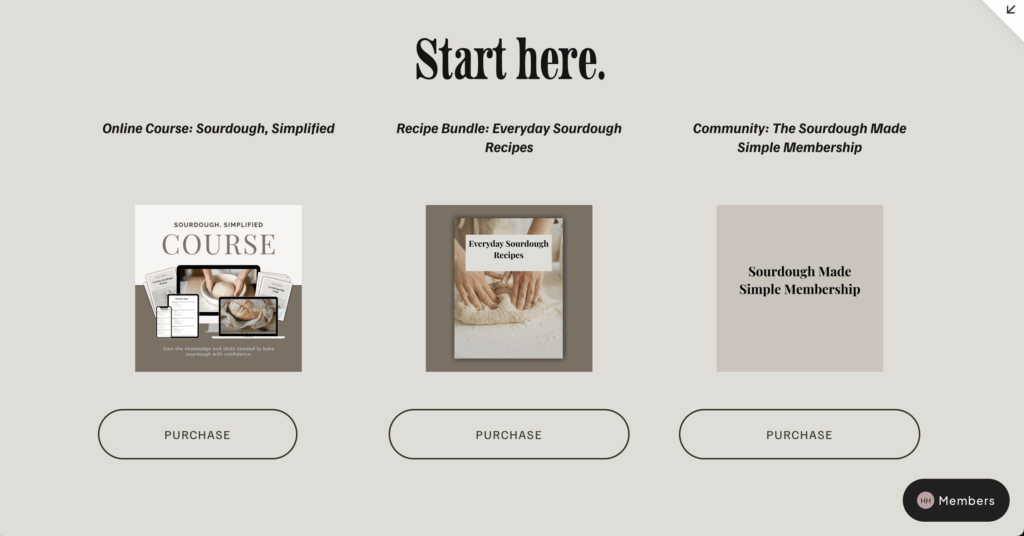
Next, you’ll create a storefront using regular Squarespace blocks.
In the example from the video, the storefront is a simple grid that includes:
- Product titles
- Product images
- Call‑to‑action buttons
At this stage, the buttons don’t need to link anywhere yet. You’re just setting up the layout.
This approach gives you a lot of freedom. You’re not locked into a specific shop template or product page structure.
Step 3: Upload Your Digital Products to MemberSpace
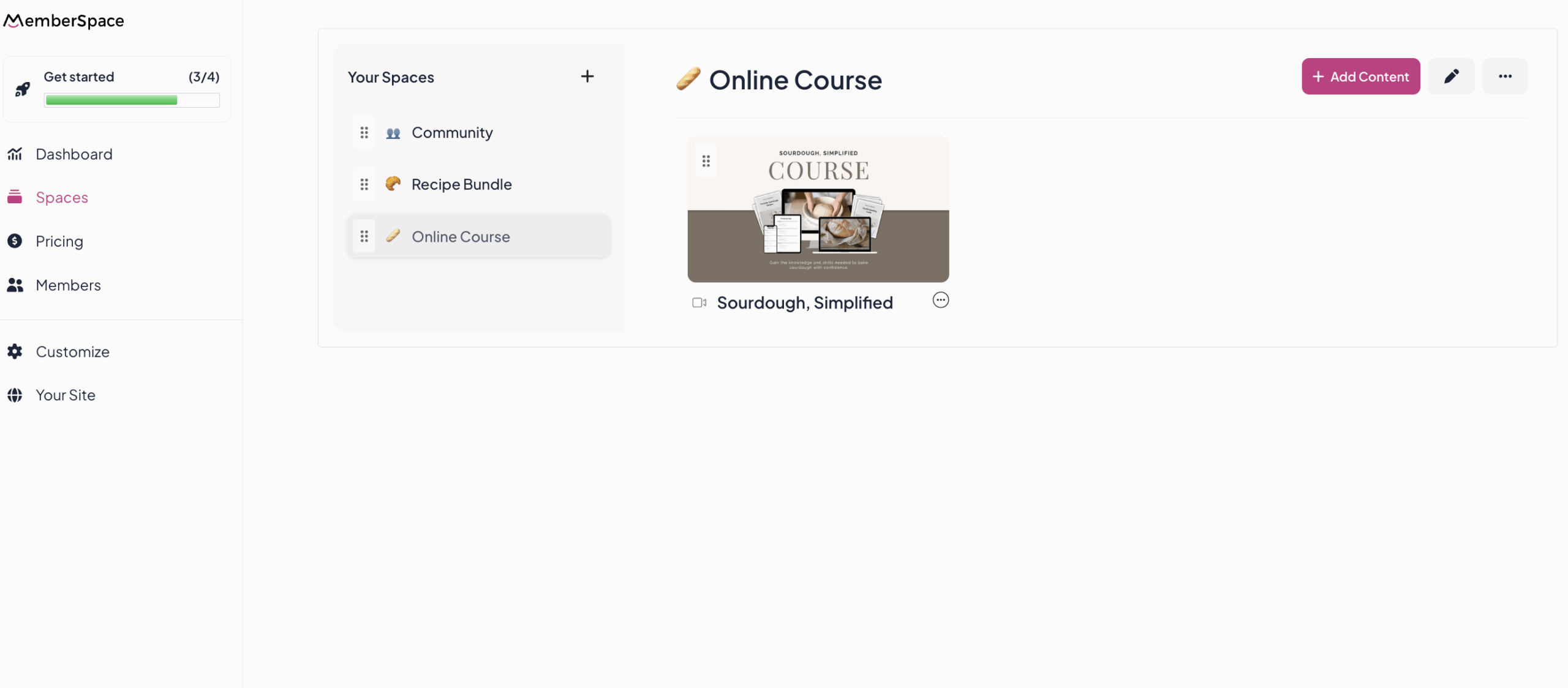
Now it’s time to add your products inside MemberSpace.
Each product lives inside what MemberSpace calls a Space.
In the tutorial example, that includes:
- An online course (video content)
- A recipe bundle (PDF download)
- A membership community (private group link)
Each Space can include videos, files, links, and cover images. And as your business grows, you can keep adding more — without reworking what you’ve already built.
Step 4: Set Up Your Pricing Plans
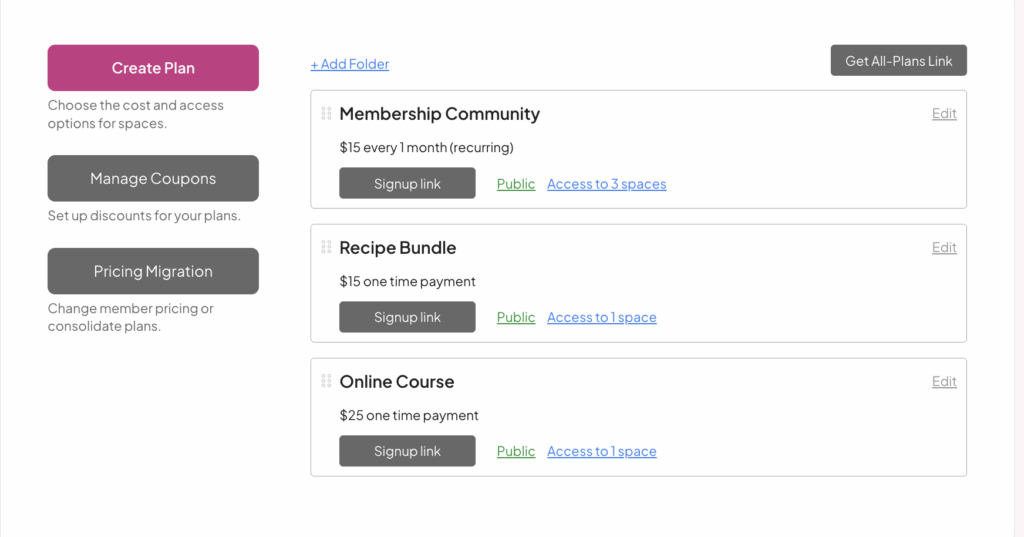
After that, you’ll connect Stripe and create pricing plans.
For example:
- A one‑time payment for a course
- A one‑time payment for a digital bundle
- A recurring monthly membership
With MemberSpace, the same product can be included in multiple pricing plans without duplicating content.
So you can sell a course on its own and include it inside a membership — using the exact same content.
With Squarespace’s native tools, that usually means recreating the product from scratch for each plan.
Step 5: Add Plan Links to Your Storefront Buttons
The last step is simply connecting everything.
- Copy the signup links from your pricing plans
- Add those links to the buttons on your Squarespace storefront
Once that’s done, your shop is live!
When someone clicks a button, they’re taken to a secure signup page, complete their payment, and immediately get access to what they purchased.
Frequently Asked Questions
Can Squarespace be used for ecommerce?
Yes. Squarespace supports ecommerce, especially for simple product sales. Many site owners use tools like MemberSpace to extend those capabilities for digital products and memberships.
How much does Squarespace ecommerce cost?
Squarespace ecommerce features are included in Business and Commerce plans. Pricing depends on the plan you choose and the features you need.
Is selling on Squarespace worth it?
It can be — especially if you already enjoy building your site on Squarespace. Pairing it with MemberSpace helps remove many of the limitations that show up as your business grows.
What is the disadvantage of Squarespace ecommerce?
The biggest limitation is flexibility. Native tools make it harder to reuse content, create tiered pricing, or scale without workarounds.
Can you sell digital products on Squarespace?
Yes. You can sell digital products directly on Squarespace, or use MemberSpace to manage access, bundles, and memberships more easily.
Can Squarespace handle memberships?
Squarespace offers basic membership features. Many creators switch to MemberSpace when they want more control, better billing options, and fewer limitations.
Final Thoughts
If you like Squarespace but feel boxed in by its selling tools, you’re not alone.
MemberSpace gives you a way to keep the website you already have — while giving you more freedom in how you sell.
It’s simple to set up, works alongside Squarespace, and makes selling digital products feel a lot less frustrating.