


Start with a Clean Website Structure
Most photographers only need:
- A Home page
- A Gallery or Portfolio page
- A Packages or Services page
Your gallery shows off your work, and your packages page does the heavy lifting when it comes to bookings.
Add a Packages Section With Call‑to‑Action Buttons
On your packages page, list your photography sessions (mini sessions, full sessions, newborn sessions, etc.).
Each package should include:
- A short description
- The price
- A clear button like “Book Now” or “Reserve Your Session”
These buttons will eventually connect to MemberSpace so clients can sign up and pay.

Install MemberSpace on Your Squarespace Site
Installing MemberSpace is quick and only requires adding a small snippet of code to your Squarespace site.
Once installed, MemberSpace adds a login button to your site where clients can access their private galleries later. From there, MemberSpace handles accounts, payments, and content access — all while staying seamlessly connected to Squarespace.
Step 2: Add Client Galleries to MemberSpace
Once your website is set up, MemberSpace becomes the place where you manage and deliver client galleries.
Each client gets their own private space inside MemberSpace.
Create a Space for Each Client
For every photoshoot, you’ll create a new Space and name it after the session or client. Inside that space, you can add folders like:
- A sneak peek gallery
- A full gallery
This keeps everything organized and easy to manage.

Keep Galleries Private
When adding galleries, make sure to toggle off the “visible to members” option.
This ensures that:
- Clients can only see their own photos
- Galleries stay private and secure
- Access is controlled by direct links
This is one of the ways MemberSpace gives photographers more control and flexibility when delivering client work.
Step 3: Set Up Your Photography Pricing Plans
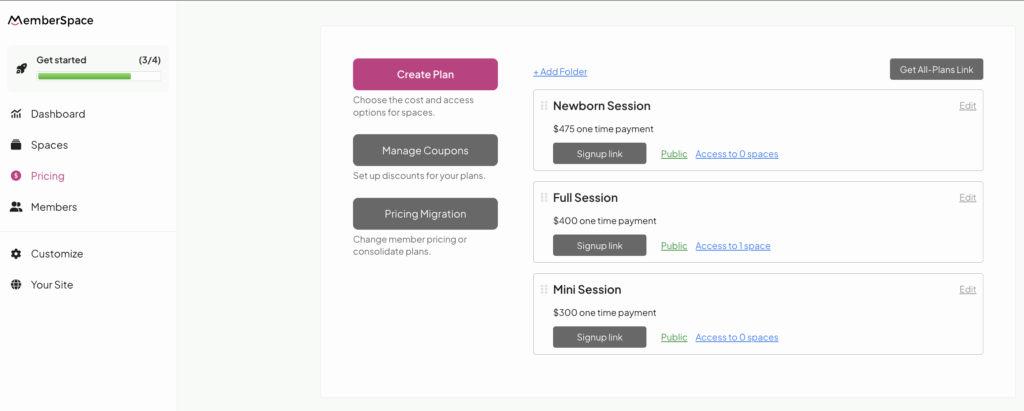
Next, you’ll create pricing plans in MemberSpace that match your photography packages.
For example:
- Mini Session – one‑time payment
- Full Session – one‑time payment
- Newborn Session – one‑time payment
Each plan connects payment, account creation, and content access into one smooth flow. You can always add payment plans or additional options later — MemberSpace is built to grow with your business.
Step 4: Connect Your Pricing Plans to Your Squarespace Site
Now it’s time to connect everything.
Each pricing plan in MemberSpace comes with a unique sign‑up link. You’ll add these links to the call‑to‑action buttons in your Squarespace packages section.
From the client’s perspective, the process is simple:
- They choose a package on your website
- Click the button
- Create an account and pay
After that, most photographers reach out by email or text to schedule the session details. This keeps the booking process flexible while still handling payments and accounts automatically.
Step 5: Send Galleries to Your Clients
When a gallery is ready, delivering it takes just a few seconds.
Inside MemberSpace, you’ll copy the direct link to the client’s gallery and send it via email or text. This link is what your client will use to access their private photos.
As long as they’re logged into their account, they’ll be able to:
- View their images
- Download files
- Access sneak peeks or full galleries
You can even link out to Google Drive or Dropbox if that’s part of your workflow — MemberSpace gives you the flexibility to deliver content in the way that works best for you.
Frequently Asked Questions
Is Squarespace good for photographers?
Yes. Squarespace for photographers is a popular choice because it’s easy to use and visually focused. When paired with MemberSpace, it becomes a full client management solution.
Do clients need to create an account?
Yes, and that’s actually a benefit. Accounts keep galleries private and allow clients to return and access their photos anytime.
Can I use this for any type of photography?
Absolutely. This setup works for family photographers, wedding photographers, newborn photographers, and more.
Final Thoughts
If you’ve been wondering how to create a photography website on Squarespace that does more than just showcase your work, combining Squarespace with MemberSpace is a powerful solution.
Squarespace gives you a beautiful website.
MemberSpace adds the flexibility and features you need to run your photography business your way.
From booking and payments to private gallery delivery, everything stays on your site — simple, professional, and easy to manage.
If you’re a photographer looking for a streamlined workflow that grows with you, Squarespace and MemberSpace are a great place to start.