

What Can You Sell with Webflow + MemberSpace?
By combining Webflow and MemberSpace, you can sell:
-
- Online courses and workshops
-
- Digital downloads (ebooks, templates, resources)
-
- Gated content and premium libraries
-
- Subscriptions and recurring memberships
-
- Client portals or internal content hubs
All while keeping everything fully branded and hosted on your Webflow site.
Why Add MemberSpace to Webflow?
Webflow allows you to accept payments and deliver digital products, but it no longer includes native membership functionality. That means features like recurring subscriptions, free trials, content gating, and multiple pricing tiers require an external solution.
MemberSpace is built specifically for this.
With MemberSpace, you get:
-
- Flexible pricing models (one‑time, recurring, or payment plans)
-
- Protected access to pages, CMS collections, or files
-
- Free trials, coupons, and multiple pricing tiers
-
- A branded member dashboard embedded into your site
-
- Scalability as your business or community grows
Instead of rebuilding your site or relying on complex workarounds, MemberSpace adds a layer of more powerful flexibility to Webflow’s design‑first approach.
Step 1: Create Your MemberSpace Account
Start by creating your account at MemberSpace.
During setup:
-
- Choose “Use my existing website”
-
- Select Webflow as your platform
-
- Enter your website URL and business name
If you’re an agency or manage multiple Webflow sites, the Agency Plan allows you to manage all clients from one dashboard, with optional white‑labeling.
Step 2: Connect MemberSpace to Your Webflow Site
MemberSpace provides a small code snippet that you add to your Webflow site — no plugins, no backend development required.
Once installed:
-
- A Member login button appears on your site
-
- Customers can log in anytime to access their content
-
- Access is automatically granted after purchase
Members are taken to a clean, branded dashboard where all of their purchased products and memberships live in one place.
Step 3: Upload Your Digital Products
In MemberSpace, content is organized into Spaces — private areas only accessible to members with the right permissions.
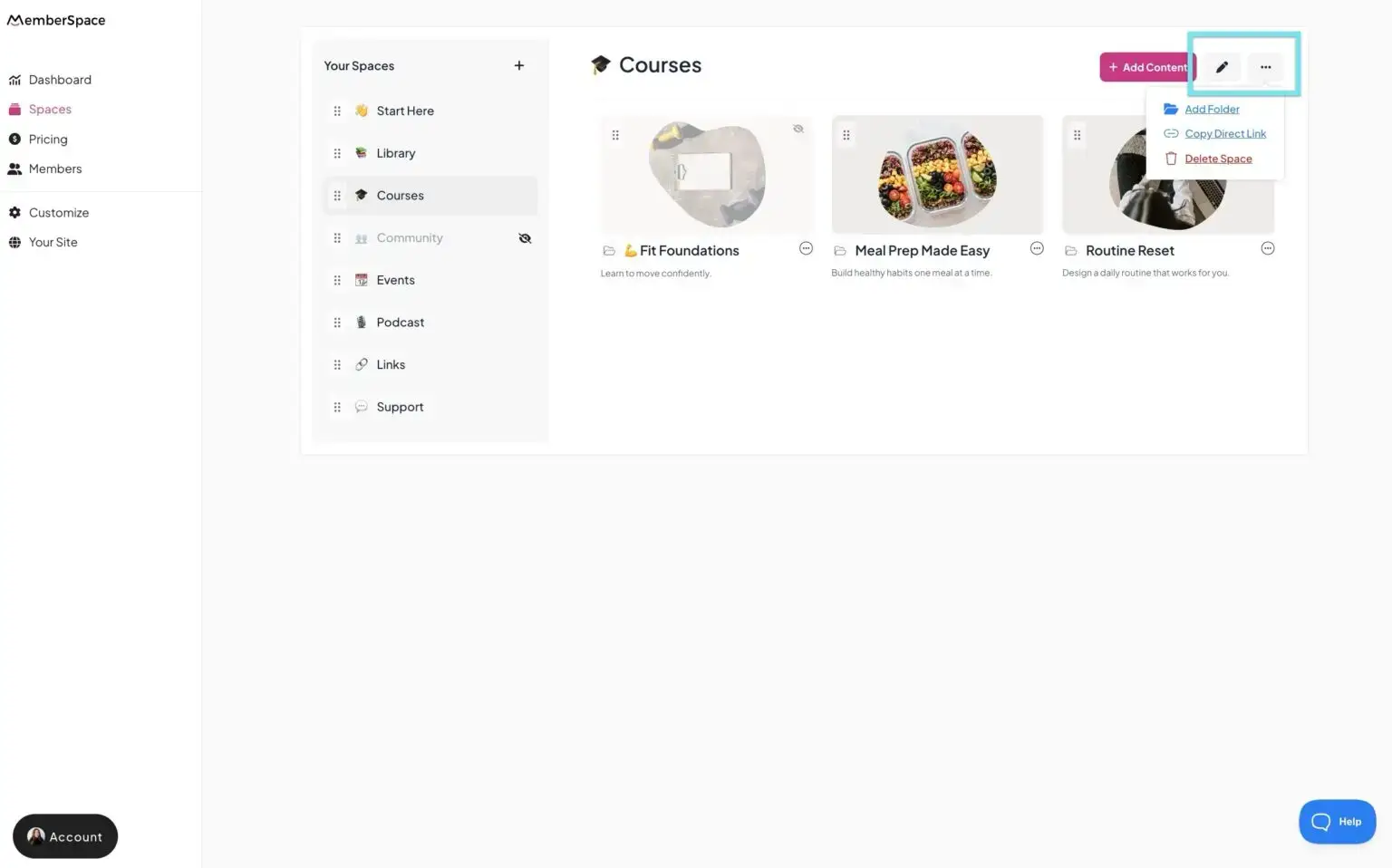
Each Space can include things like:
-
- Videos
- Images
- Gated website pages
- PDFs and downloadable files
- Links
- Lessons, resources, or collections of content
You can use Spaces to sell:
- A single digital product
- A complete course
- Bundled resources
- Ongoing access to a content library
Your content stays protected behind secure login — no public links or manual access management.
Step 4: Set Up Pricing, Payments & Access Rules
MemberSpace integrates directly with Stripe, giving you full control over how customers pay and what they can access.
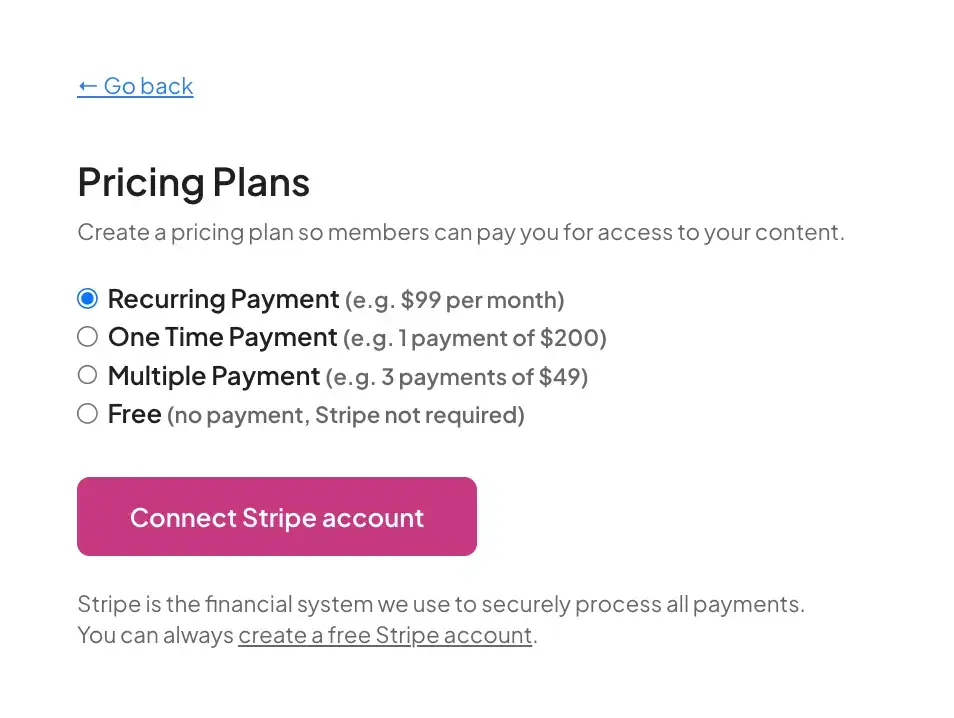
You can offer:
- One‑time purchases for downloads or standalone products
- Recurring subscriptions for memberships
- Payment plans for higher‑ticket offerings
- Free trials and discount codes for launches or promotions
This makes it easy to start small — then grow into a more advanced membership or subscription model later.
Step 5: Customize the Customer Experience
Because MemberSpace lives on top of your Webflow site, your member experience stays fully on‑brand.
You can customize:
- Fonts, colors, and buttons
- Login and signup flows
- Member dashboard layout
From checkout to content access, everything feels like one seamless experience — not a third‑party tool bolted onto your site.
That’s how you deliver content your community, your way.
Step 6: Launch and Start Selling
Once your products are live, MemberSpace gives you direct links to your signup and member areas.
You can add them to:
-
- Webflow buttons and CTAs
-
- CMS‑driven pages
-
- Email campaigns
-
- Onboarding flows or client dashboards
From there, MemberSpace automatically handles:
-
- Payments
-
- Account creation
-
- Access control
-
- Ongoing membership management
No manual work required.
FAQ: Selling Digital Products on Webflow with MemberSpace
Can I sell digital products with Webflow alone?
Yes — for simple transactions. But if you want subscriptions, memberships, gated content, or recurring access, you’ll need a dedicated membership solution like MemberSpace.
What types of products work best with MemberSpace?
Courses, templates, premium content, resource libraries, communities, and client portals.
Can I offer multiple pricing tiers or plans?
Absolutely. You can control access levels and pricing without duplicating content.
Is this a good solution for agencies?
Yes. Agencies use MemberSpace to add memberships and paid content to Webflow client sites — without custom development.
How do members access their content?
They log in through your site and access everything from a private, branded dashboard.
Final Thoughts
Webflow gives you the freedom to design anything. MemberSpace gives you the tools to monetize it.
Together, they let you sell digital products, subscriptions, and memberships with confidence — combining Webflow’s design flexibility with MemberSpace’s powerful access control and payments.
Whether you’re launching your first course, building a paid content library, or creating a scalable membership business, MemberSpace helps you unlock more powerful flexibility — all while keeping your site, your brand, and your audience exactly where they belong.
Your website. Your content. Your community, your way.