

Set Up Spaces in MemberSpace
In MemberSpace, exclusive content is organized into Spaces. Think of each space as a protected content area for your fans.
For example, you might create:
- A “Fan Club” space
- A “Behind the Scenes” space
- An “Exclusive Music” space
Inside each space, you can upload files, embed audio or video, and organize content however you’d like.
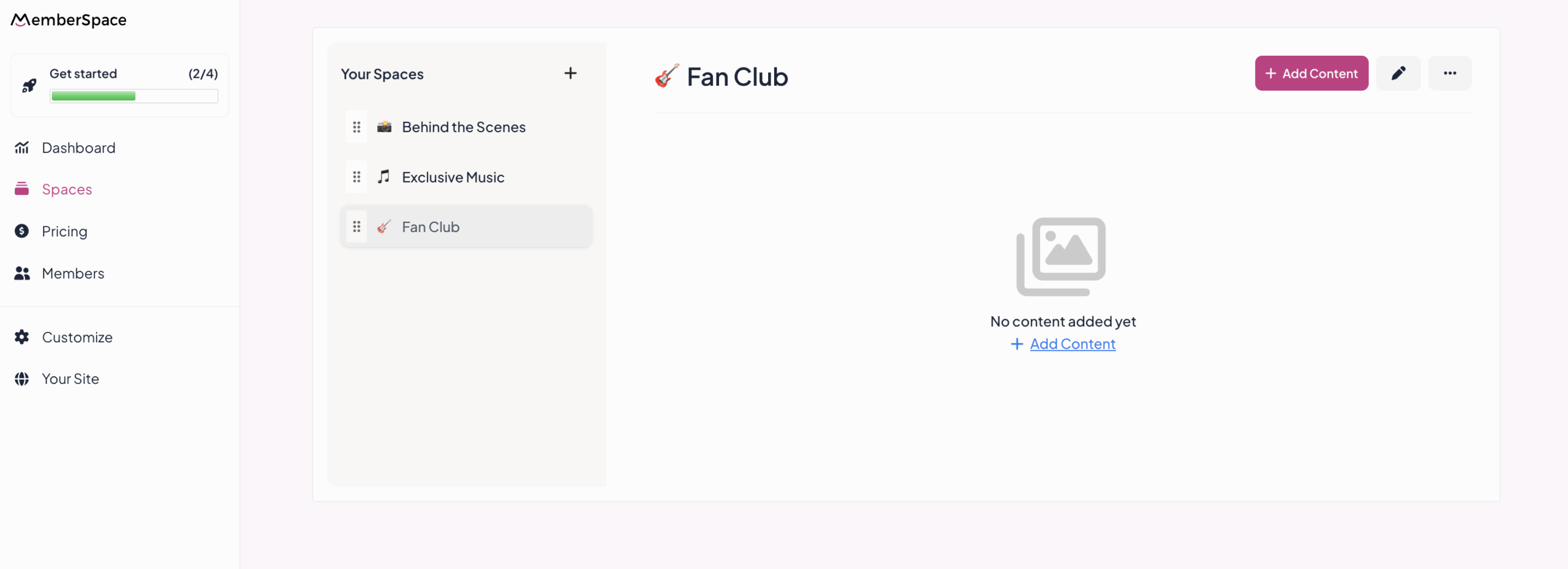
MemberSpace handles protecting this content so only the right fans can access it — giving you full control over what’s public and what’s exclusive.
Step 3: Create Pricing Plans to Sell Access to Your Content
Once your exclusive content is uploaded to MemberSpace, the next step is creating pricing plans that sell access to it.
Pricing plans are how fans actually pay to unlock your protected content.
Common Pricing Plan Options for Musicians
Recurring Memberships
- Monthly or yearly fan memberships
- Ongoing access to exclusive content
- Great for building predictable income
One‑Time Purchases
- Access to a specific album or release
- Special video content or live sessions
- Ideal for limited or standalone content
- Basic fans vs. super fans
- Different levels of access depending on support
With MemberSpace, you can assign one or multiple spaces to each pricing plan, giving musicians powerful flexibility to experiment and adjust over time.
Step 4: Add Your Pricing Plans to Your Squarespace Site
Now it’s time to connect everything to your Squarespace website.
MemberSpace provides a checkout or sign‑up link for each pricing plan. You’ll add these links to buttons on your Squarespace pages, such as:
- “Join the Fan Club”
- “Unlock Exclusive Music”
- “Support My Work”
From the fan’s perspective, the process is simple:
- Click a button on your website
- Create an account
- Pay and get instant access
Everything happens on your Squarespace site, keeping the experience seamless and professional.
Step 5: Share and Update Content for Your Fans
Once fans have access, you can continue adding new content inside MemberSpace anytime.
This allows musicians to:
- Drop new songs or demos
- Share updates directly with supporters
- Reward loyal fans with exclusive releases
You’re not locked into a one‑time launch — you can grow and evolve your content as your music does.
Best Squarespace Templates for Musicians
Choosing the right Squarespace template makes a big difference for musicians.
Some of the best Squarespace templates for musicians include:
- Hawley – Designed specifically for musicians and bands, with built‑in audio and tour sections
- Native – Clean and modern, great for solo artists
- Rally – Bold visuals and strong branding for artists with a distinct style
- Wells – Minimal and content‑focused, perfect for highlighting music and video
The key is choosing a template that puts your music front and center while leaving room for MemberSpace‑powered fan access and monetization.
Frequently Asked Questions
Is Squarespace good for musicians?
Yes. Squarespace for musicians is an excellent choice because it’s easy to manage and visually polished. When paired with MemberSpace, it becomes a flexible platform for monetizing music and fan relationships.
Do fans need to create an account?
Yes. Accounts allow fans to securely access exclusive content and return anytime without losing access.
Can I offer both memberships and one‑time purchases?
Absolutely. MemberSpace supports multiple pricing models, giving musicians freedom to monetize in different ways.
Final Thoughts
If you’ve been wondering how to create a Squarespace website for musicians that does more than promote your music, combining Squarespace with MemberSpace opens up powerful possibilities.
Squarespace gives you a beautiful home for your music.
MemberSpace gives you the features and flexibility to monetize it — your way.
Whether you’re building a fan club, selling exclusive content, or offering early access to releases, this setup helps musicians turn their website into a sustainable part of their career, not just a promotional tool.