
Step 1: Create Your Ebook in Canva
Let’s start with the ebook itself.
If this is your first (or fifth) digital product, the biggest advice is to keep it focused. Short, clear ebooks are easier to create, easier to sell, and easier for your audience to actually use.
Choose a Clear Topic
Some ebook ideas that work especially well:
- How‑to guides
- Short educational ebooks
- Step‑by‑step frameworks
- Resource or reference guides
Before opening Canva, outline or write the content first. This keeps the design process moving and prevents overthinking the layout.
Design the Ebook in Canva
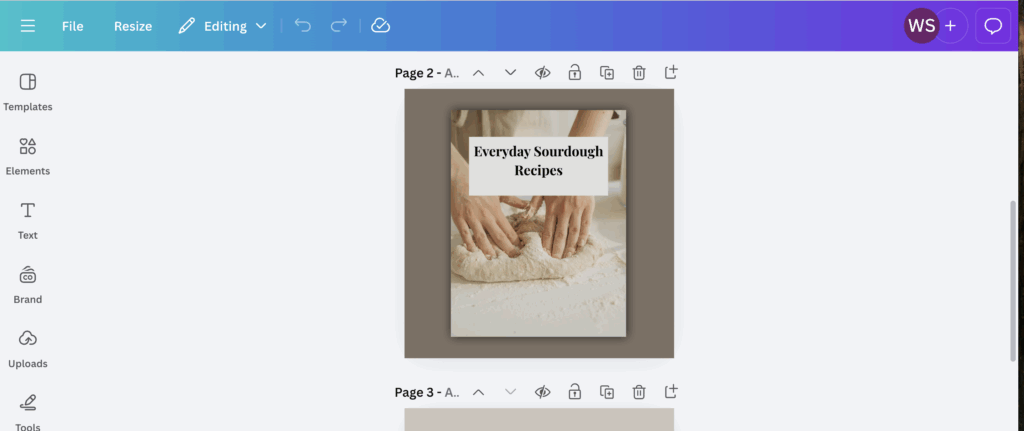
Once your content is ready:
- Pick an ebook or document template in Canva
- Customize fonts, colors, and spacing
- Add headings or visuals where helpful
Canva is very forgiving here — I am certainly no designer, but it makes it super easy to create something polished without being a pro.
When you’re done, download your ebook as a PDF, which is the most common format for selling digital ebooks.
Optional: Use a Premium Ebook Template from Etsy
If you have a very specific look in mind — or want something more design‑forward — you can also use premium Canva ebook templates from Etsy.
Many designers sell:
- Professionally designed ebook templates
- More advanced layouts and typography
- Branded, polished styles that feel high‑end
These templates still work inside Canva, so you don’t need new software — you just open the template, drop in your content, and customize it.
This is completely optional, but it can be a great shortcut if design isn’t your strength or you want a more premium feel.
Step 2: Set Up MemberSpace on Your Website
Once your ebook is ready, you’ll need a way to sell it and deliver it automatically. That’s where MemberSpace comes in.
Instead of using a third‑party marketplace, MemberSpace lets you sell ebooks directly from your own website.
Create and Install MemberSpace
To get started:
- Create a MemberSpace account
- Enter your website details (like your site URL and business name)
- Choose the option to use an existing website
MemberSpace will give you a small code snippet to install on your site. You’ll add this using your website’s code or code injection settings.
Once installed, a Members button appears on your site, where customers can log in to access what they’ve purchased.
Step 3: Upload Your Ebook to MemberSpace
In MemberSpace, ebooks and other digital products live inside Spaces.
A Space is simply a protected area that only paying customers can access.
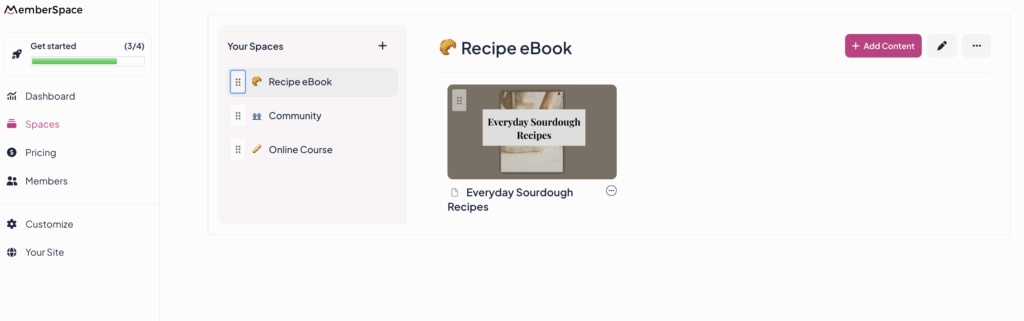
Add Your Ebook
To upload your ebook:
- Create a new Space (you can name it after the ebook)
- Upload the PDF file
- Add a title and optional cover image
- Enable downloads so customers can save the file
If you plan to add more ebooks or resources later, you can reuse this space or create additional ones as your product library grows.
Step 4: Create a Pricing Plan for Your Ebook
Next, decide how you want to sell your ebook.
For most ebooks, a one‑time payment is the easiest option, but you can also include it as a part of a recurring subscription payment, multiple payment, or offer it for free.
Set Up the Pricing Plan
Inside MemberSpace:
- Create a new pricing plan
- Choose a one‑time charge
- Set your price
- Connect the plan to the Space where your ebook lives
MemberSpace automatically creates a checkout and signup link for you.
Step 5: Add the Purchase Link to Your Website
Now it’s time to make your ebook available for purchase.
Take the checkout link from MemberSpace and add it to a button on your website. Common button text includes:
- “Buy the Ebook”
- “Get the Guide”
- “Download Now”
You can place this button on a sales page, your homepage, or a resources page.
From there, everything runs automatically:
- Customers click the button
- Create an account
- Pay
- Instantly access or download the ebook
Frequently Asked Questions
Do I need design experience to create a Canva ebook?
No. Canva templates are designed for non‑designers. You can keep things very simple and still create something professional.
Can I use this ebook inside a membership instead of selling it separately?
Yes. You can include the ebook as a member‑only resource, a bonus, or part of a content library. The setup is the same — you just connect the Space to a membership plan instead of a one‑time purchase.
What file format should I use for my ebook?
PDF is the most common and works best for selling and downloading.
Can I sell more than one ebook with MemberSpace?
Absolutely. You can add multiple ebooks to one Space or create separate Spaces and pricing plans for each product.
Do customers have to create an account?
Yes. Accounts are required so MemberSpace can securely deliver the ebook and allow customers to access it again later.
Final Thoughts
If you already run a membership or sell digital products, creating a Canva ebook is one of the simplest ways to add value and generate additional revenue.
Canva makes the creation process approachable.
MemberSpace handles selling, access, and delivery.
Together, they give you a clean, flexible setup that fits naturally into your existing business — without adding unnecessary complexity.
If you’ve been thinking about turning your expertise into an ebook, this is an easy place to start.