

Haiden Hibbert
If you’re trying to create different signup forms for each membership plan on Squarespace, you’ve probably realized, you can’t.
Squarespace only gives you one checkout form for your entire site, and free memberships don’t go through checkout at all—so you can’t customize those either.
That means:
- Every paid plan uses the same form
- Free members can’t be asked anything beyond basic info
- You can’t tailor signup based on what someone is actually joining
And there’s no built-in way around it. In this post, we’ll walk through a simple solution to setting up plan-specific signup forms on Squarespace.
Get more membership features on Squarespace!
The easiest way to accept membership payments or one-time charges for digital products like podcasts, online courses, communities, content libraries, and more — all from your own website!
Get started for free! 5 minutes to set up.
The Only Way to Customize Membership Signup Forms on Squarespace
If you want to fix this, you need to extend Squarespace’s functionality.
MemberSpace is a plugin that connects to your Squarespace site and lets you create custom signup forms for each membership plan.
Instead of one generic form, you can:
- Add custom signup fields
- Assign them to specific plans
- Control what each member sees during signup
This works for both free and paid memberships, so you’re no longer limited by Squarespace’s checkout system.
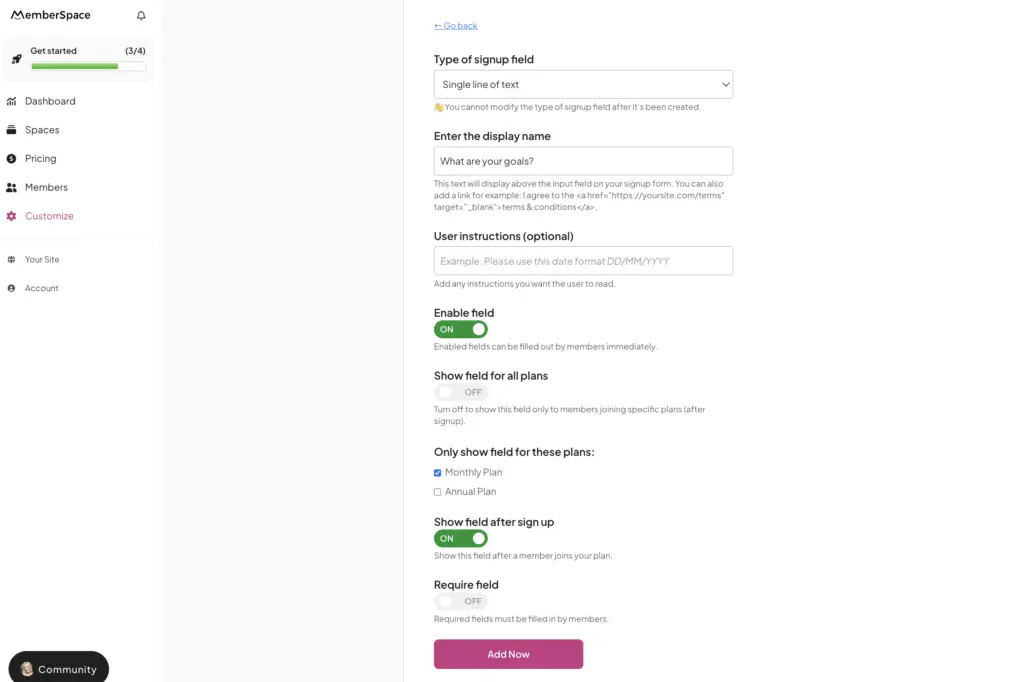
How MemberSpace Custom Signup Fields Work
With MemberSpace, you’re not stuck with one fixed form—you’re building flexible signup flows.
By default, MemberSpace collects:
-
- First name
- Last name
From there, you can add anything else you need.
To customize your signup fields:
-
- Go to Customize → Signup Fields
- Click Add Signup Field
- Choose your field type (text, dropdown, etc.)
- Select which plans the field should appear on
That last step is what Squarespace is missing.
You can decide exactly:
-
- Which questions show up
- Which plans they apply to
- What each member sees during signup
Example: Custom Signup Forms for Free and Paid Membership Plans
Let’s say you run a membership site with three membership tiers:
Free Plan
- Name
Paid Membership
-
- Name
- Experience level
Coaching Program
-
- Name
- Goals
- Website
- Business stage
Each member only sees what’s relevant to their plan.
No unnecessary questions. No missing information.
Why Custom Signup Forms Matter for Membership Sites
When your signup flow matches your offer:
- Forms feel faster and easier to complete
- You collect better, more useful data
- Onboarding becomes smoother
Which leads to:
-
- Higher conversion rates
- Better member segmentation
- Less manual follow-up
Instead of working around limitations, you’re building a signup experience that actually fits your business.
The Bottom Line
Squarespace doesn’t support:
-
- Plan-specific signup forms
- Custom fields for free memberships
- Flexible signup experiences
If you want to:
-
- Customize signup for each membership plan
- Collect better information (especially from free members)
- Improve conversions and onboarding
MemberSpace fills that gap—without requiring you to rebuild your site.
FAQs About Custom Signup Forms on Squarespace
Can I create different signup forms for each membership plan on Squarespace?
No. Squarespace only allows one checkout form, so all plans use the same form.
Can I customize signup forms for free memberships on Squarespace?
No. Free memberships don’t go through checkout, so there’s no way to collect additional information during signup.
How do I create custom signup forms for different plans?
You’ll need a tool like MemberSpace, which allows you to add custom signup fields and assign them to specific membership plans.
Can MemberSpace customize signup forms for both free and paid plans?
Yes. MemberSpace lets you control signup fields for all plans, including free memberships.
Why should I customize my membership signup forms?
Because it helps you:
- Improve conversion rates
- Collect better data
- Create a smoother onboarding experience
Does MemberSpace work with Squarespace?
Yes. MemberSpace integrates directly with Squarespace and adds advanced membership features like flexible signup forms.
Get more membership features on Squarespace!
The easiest way to accept membership payments or one-time charges for digital products like podcasts, online courses, communities, content libraries, and more — all from your own website!
Get started for free! 5 minutes to set up.
