

Haiden Hibbert
If you’re moving your membership from another platform to Squarespace, there’s one question that always comes up: Can I just import my existing members?
Short answer: no—at least not with Squarespace alone.
And this is something we see trip people up all the time.
They’re halfway through migrating, everything looks good, and then they realize… there’s no way to upload their members.
No CSV import. No bulk upload. Nothing. Which means you’re stuck asking everyone to sign up again, which is obviously not ideal. In this post, we’ll walk through a simple solution that allows you to build your membership site on Squarespace and migrate your existing members.
Import members to Squarespace!
The easiest way to import your existing members or subscribers to your Squarespace membership site.
Get started for free! 5 minutes to set up.
Can You Import Members into Squarespace?
Squarespace’s native Member Sites feature is pretty limited when it comes to migrations.
There’s no built-in way to:
- Import existing members
- Upload subscribers in bulk
- Move users over from another platform
So if you’re relying on Squarespace alone, your only option is manual signup.
And if you already have a paying audience, that’s going to be a pain for you and them.
How to Import Members to Squarespace
There is a simple solution, though! Using a plugin MemberSpace. MemberSpace connects directly to your Squarespace site and handles the membership side of things—including imports.
So instead of rebuilding your membership from scratch, you can actually bring your members with you.
It fills in a lot of the feature gaps that Member Sites has. I wrote an entire blog about those feature gaps that you can read here: MemberSpace vs Member Sites: Which Membership Solution Fits Your Needs?.
What the Migration Process Looks Like
Migrating from another platform to MemberSpace is simple. Here’s a quick overview of the process:
The nice part about this is you’re not stuck figuring it out on your own—MemberSpace handles most of it for you.
Here’s how it typically works:
First, you reach out to their support team to start the import. From there, they’ll send you a simple spreadsheet to fill out.
In that sheet, you’ll add:
- Your members’ names
- Their email addresses
- The plan you want each person assigned to
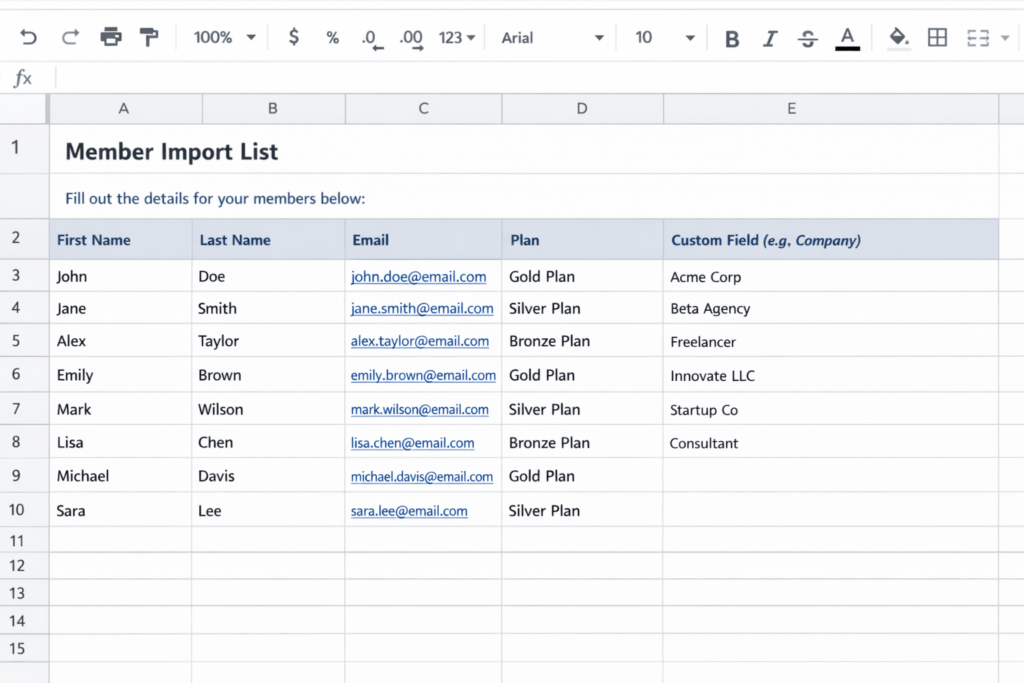
You can import as many members as you want, and if you have different pricing tiers, you can assign different people to different plans.
If you’re collecting any custom signup info (like company name, role, etc.), you can include that too.
Once everything’s filled out, you send the sheet back—and they take care of the actual import for you.
After that, your members will each get an invite email prompting them to join your site. They’ll create a password, log in, and instantly get access to their plan.
You can even customize that invite email so it matches your brand and feels more personal.
And if your members are already on a billing cycle, there are ways to keep that consistent during the transition, so everything doesn’t reset or feel disruptive.
If you want all the details, check out our help doc here.
What Your Members Will Experience
This part matters more than people think.
Instead of forcing your members to go through your entire signup flow again, they just:
- Get an email
- Click to join
- Create a password
It feels simple on their end—which is exactly what you want during a migration.
What About Existing Payments?
If your members are already paying you, you don’t want to mess that up during the switch. The good news is—you have options.
You can:
- Keep billing aligned with what they’re already on
- Or start fresh with new plans
Most people just choose whatever makes the transition cleanest for their setup.
Squarespace Member Sites Limitations
If you’re considering Squarespace Member Sites, importing members is just one limitation that you might encounter. While the membership features are sufficient enough to launch a very basic membership, we often see business owners run into the need for more flexibility and features.
Here are common feature gaps on Member Sites:
- No free trials
- Limited pricing flexibility
- No manual member approvals
- Less control over how memberships work
That’s why a lot of people end up pairing Squarespace with MemberSpace.
You get the best of both:
- Squarespace for your website
- MemberSpace for your membership features
FAQs About Importing Members to Squarespace
Can I import members into Squarespace?
No. Squarespace Member Sites doesn’t support member imports.
What’s the easiest way to migrate members to Squarespace?
Use a tool like MemberSpace. It lets you import your existing members instead of starting over.
Will my members need to sign up again?
Not fully. They’ll accept an invite, create a password, and log in—much easier than signing up from scratch.
Can I move paying members over too?
Yes. There are ways to transition paying members without disrupting everything.
What happens if I don’t import my members?
You’ll need to ask everyone to sign up again manually—which usually leads to drop-off.
Why do people use MemberSpace with Squarespace?
Because Squarespace is great for building sites, but its membership features are limited. MemberSpace fills those gaps.
Final Thoughts
If you’re switching to Squarespace, importing your members is probably one of the first problems you’re trying to solve.
And yeah—Squarespace doesn’t support it.
But that doesn’t mean you’re stuck.
Using MemberSpace, you can:
- Bring your members with you
- Avoid starting from scratch
- Keep your migration smooth and organized
And honestly, that’s the difference between a messy transition… and a clean one.
Import members to Squarespace!
The easiest way to import your existing members or subscribers to your Squarespace membership site.
Get started for free! 5 minutes to set up.
