

Haiden Hibbert
If you’re running a membership site on Squarespace, you might want to manually approve new members before they get access — especially if you want to control who joins or vet applications. But here’s the thing: Squarespace’s native member areas don’t let you do this.
Squarespace’s built-in member areas are pretty limited when it comes to membership management. Once someone signs up, they get instant access — no manual approval, no waiting, no way to review new members first.
That’s a problem for creators or businesses who want to:
- Screen applicants before granting access
- Keep tight control over who joins
- Avoid spam or low-quality signups
Lots of people have noticed this restriction — like in this Reddit thread where users discuss how limited Squarespace’s native Member Sites can be.
Launch a flexible Squarespace membership site!
The easiest way to accept membership payments or one-time charges for digital products like podcasts, online courses, communities, content libraries, and more — all from your own website!
Get started for free! 5 minutes to set up.
How MemberSpace Fixes This with Manual Member Approval
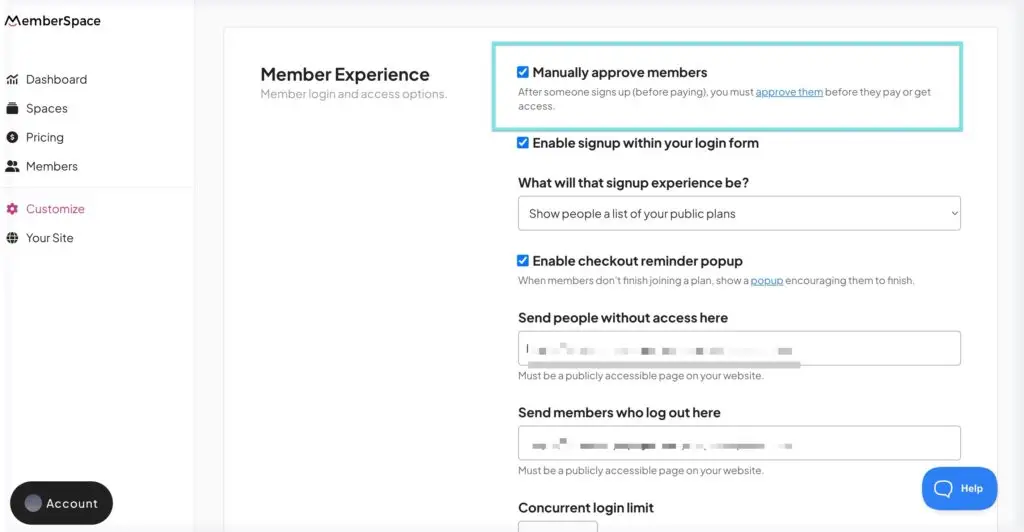
MemberSpace steps in to solve this problem. It lets you manually approve members so you decide who gets in — no automatic access on signup. Once you’ve signed up and installed MemberSpace on your Squarespace website, here’s how easy it is to set up:
- Log in to your MemberSpace dashboard.
- Go to Customize > General Options.
- Check the box for Manually approve members at the top of the page.
- Click Save Changes.
Now, when someone signs up for your membership plans, they’ll see a message letting them know their account is pending approval. You get notified, review their info, and approve or deny access yourself.
Why This Matters
Manual approval gives you control and peace of mind. You can:
- Protect your community from unwanted members
- Make sure only serious or qualified people join
- Create a more exclusive, higher-value membership experience
FAQ: Manual Member Approval on Squarespace with MemberSpace
Q: Can I manually approve members using Squarespace’s native member sites?
A: No, Squarespace’s built-in member areas don’t support manual approval. Members get instant access once they sign up.
Q: How does MemberSpace’s manual approval feature work?
A: When you enable manual approval in MemberSpace, new signups are marked as “pending.” You review and approve each member before they gain access.
Q: Can I use manual approval with multiple membership tiers?
A: Yes! MemberSpace lets you set up manual approval for any number of membership tiers. Learn more about Squarespace membership tiers here.
Q: Will members know their account is pending approval?
A: Yes. When manual approval is enabled, new members see a message explaining their account is awaiting your review.
Q: Does manual approval slow down the signup process?
A: It adds a review step, but this helps ensure quality and control over your community. You decide when to approve members.
Q: Can I manage manual approvals easily from the MemberSpace dashboard?
A: Absolutely. MemberSpace gives you a simple interface to review, approve, or deny membership requests.
Q: How does this fit with Squarespace member sites?
A: Since Squarespace’s native member sites don’t offer manual approval, MemberSpace fills that gap and adds more flexible membership management options. Learn more about Squarespace member sites.
Final Thoughts
If you’ve been frustrated by Squarespace’s lack of manual approval options, MemberSpace is a smart workaround that’s easy to use and powerful. It adds the flexibility you need without making your site complicated.
Want to learn more about setting up MemberSpace on Squarespace? Check out our step-by-step guide.
Launch a flexible Squarespace membership site!
The easiest way to accept membership payments or one-time charges for digital products like podcasts, online courses, communities, content libraries, and more — all from your own website!
Get started for free! 5 minutes to set up.