
Haiden Hibbert
If you’re using Duda to build your website and want to share your podcast privately — maybe to a paying audience or a select group of fans — you might have noticed that Duda’s built-in tools aren’t quite enough. Sure, you can upload audio files, but organizing, protecting, and monetizing your podcast episodes? That’s a different story.
That’s where MemberSpace comes in. It’s a simple way to turn your Duda site into a membership platform for your podcast. You can upload your episodes, organize them neatly, and control who gets access — all in one place.
Here’s how you can get started.
Launch a private podcast on Duda!
The easiest way to accept membership payments or one-time charges for digital products like podcasts, online courses, communities, content libraries, and more — all from your own website!
Get started for free! 5 minutes to set up.
Step 1: Get MemberSpace Set Up on Your Duda Site
First things first: create a MemberSpace account for free.
Then, you’ll add a small piece of code to your Duda website’s header. Don’t worry — it’s just a quick copy-and-paste job. Once that’s done, MemberSpace will be connected to your site and ready to upload your podcast content.
Step 2: Upload and Organize Your Podcast Episodes
Instead of juggling multiple platforms, you can upload your audio files directly to MemberSpace. This keeps everything in one place and makes managing your episodes much easier.
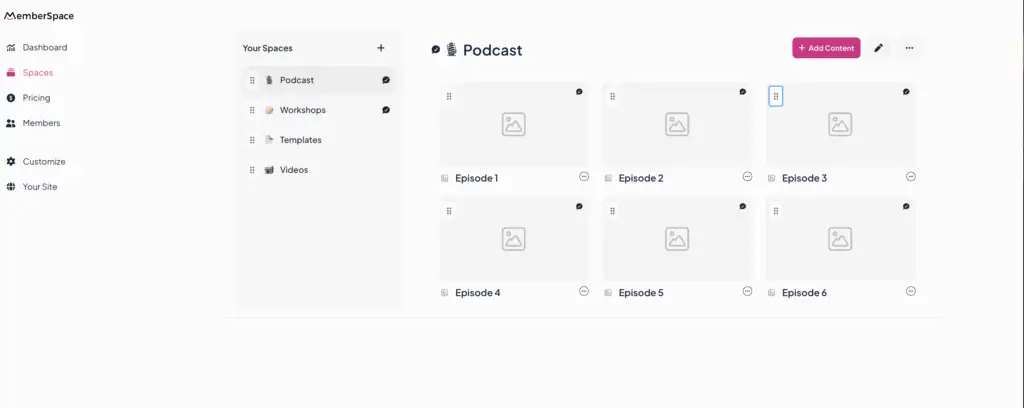
MemberSpace lets you create “Spaces” — think of these as folders or categories — to organize your episodes however you like. You could group them by season, topic, or month. You can even nest folders inside spaces for extra organization.
This way, your members can easily browse through your content without getting overwhelmed.
Step 3: Set Up Your Pricing Plans
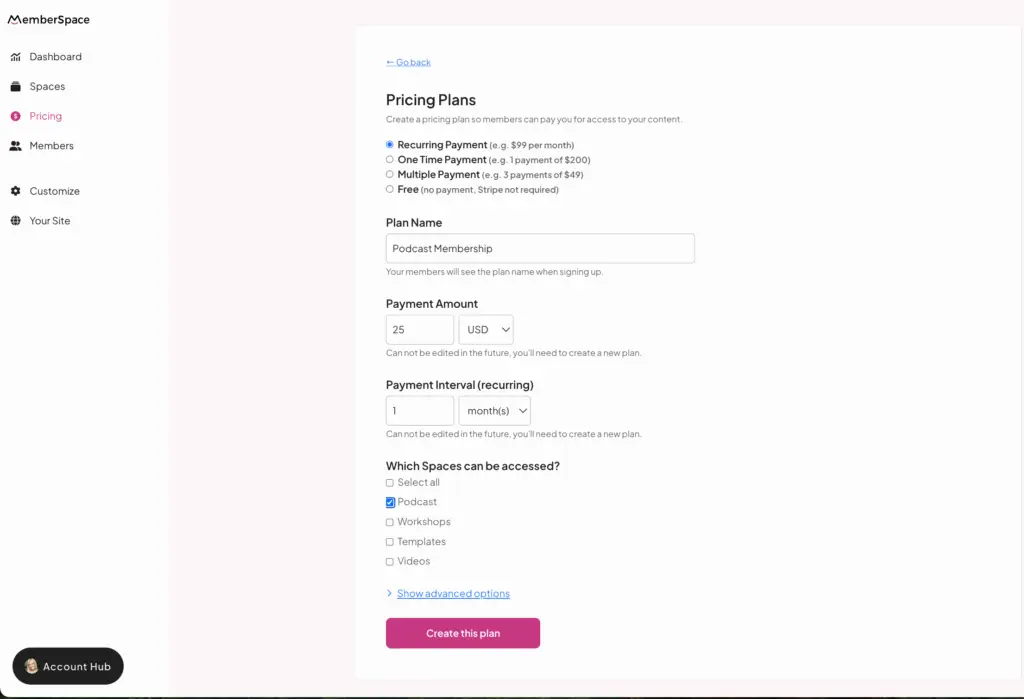
Now for the fun part: deciding how you want to share your podcast.
With MemberSpace, you can:
- Offer free access to some or all episodes
- Charge a monthly subscription
- Sell one-time access to specific episodes or collections
- Create multiple membership levels — for example, a basic tier for podcast access and a premium tier with extra perks like coaching or bonus content
- Offer free trials or discounts to attract new members
This flexibility means you can tailor your membership offerings to fit your audience and goals.
Once you set up your plan, you’ll get a signup link that you can share wherever you’d like. This link opens the signup/checkout forms for your listeners to subscribe to your podcast and instantly get access to all your episodes.
Why MemberSpace Works So Well with Duda
MemberSpace brings together everything you need to run a private podcast membership:
- Upload and host your episodes directly — no need for extra hosting services
- Organize your content with spaces and folders so your members can find what they want
- Protect your episodes behind membership plans that you control
- Offer different pricing options, free trials, and discounts
- Automatically notify members when new episodes are available
- Integrate smoothly with your Duda website without complicated setup
Tips for Growing Your Podcast Membership
Building a membership community takes time, but there are some things that can help:
- Keep a consistent publishing schedule so your members know when to expect new episodes
- Plan your content ahead of time to stay organized
- Use clear calls-to-action encouraging listeners to join your membership or community
- Engage your members with bonus content, live Q&As, or behind-the-scenes updates
Frequently Asked Questions
Can I embed podcasts from other platforms on my Duda site?
Yes! You can embed podcasts from Spotify, Apple Podcasts, SoundCloud, and more using Duda’s HTML widget. But these embeds are public and don’t let you restrict access.
Can I offer both free and paid podcast episodes?
Definitely. MemberSpace supports multiple membership tiers, so you can mix free content with exclusive, paid episodes.
Is MemberSpace secure for protecting my podcast?
Yes. MemberSpace uses secure gating to make sure only members with access can listen.
Do I need to be tech-savvy to use MemberSpace with Duda?
Not at all. The setup is straightforward and the MemberSpace team offers support if you need help.
Can I sell other products alongside my podcast?
Yes! You can sell courses, ebooks, coaching, and more — all through MemberSpace on your Duda site.
Final Thoughts
If you want to share your podcast privately or create a paid membership on your Duda website, MemberSpace makes it simple and manageable. You get full control over your content, how it’s organized, and who can access it — all without juggling multiple tools.
Ready to get started? Head over to MemberSpace and start building your podcast membership today.
Launch a private podcast on Duda!
The easiest way to accept membership payments or one-time charges for digital products like podcasts, online courses, communities, content libraries, and more — all from your own website!
Get started for free! 5 minutes to set up.