

Haiden Hibbert
ou’ve invested time and effort into building your Squarespace site, but if you’re looking to create a true private community with forums and flexible membership tiers, you’ve probably hit some walls. Squarespace’s native membership features are pretty basic and don’t support community forums or the kind of tiered access that most growing communities need.
That’s why in this article, we’ll walk you through the best tools and step-by-step process to build a scalable, members-only community on Squarespace — complete with membership tiers, private spaces, and more — so you can grow your audience and revenue without frustration.
Launch a private community on Squarespace!
The easiest way to accept membership payments or one-time charges for digital products like podcasts, online courses, communities, content libraries, and more — all from your own website!
Get started for free! 5 minutes to set up.
Can you create a private community with Squarespace Member Sites?
Squarespace’s Member Sites makes it easy to get started with memberships — you can restrict pages and offer paid access. But when your community starts to grow, you’ll quickly notice the limits:
- No way to create different membership tiers with unique perks
- No member dashboards or centralized places for members to find all their content
- No built-in forums or discussion boards where members can interact
- Limited payment and subscription management features
If you want to build a community that grows and offers real value, you need more than just basic page locks.
Using MemberSpace to Build a Community on Squarespace
MemberSpace works alongside Squarespace to give you the features you need — without complicating your site or requiring coding skills. Here’s what it adds:
- Multiple membership tiers: Create as many levels as you want, each with its own pricing and perks.
- Private “Spaces”: Think of these as members-only rooms where you can share exclusive content, directories, or links to private chat groups.
- Integration with chat platforms: Connect your community to Slack, WhatsApp, Facebook Groups, and more for real-time conversations.
- Member dashboards: Give your members a central place to access everything they’re entitled to.
- Flexible payment options: Manage subscriptions, one-time payments, and free trials easily.
This means you can offer a polished, professional membership experience that scales as your community grows.
How to Set up MemberSpace on Squarespace
Getting started is easier than you might think. Here’s a simple process to launch your private community:
- Install MemberSpace: Add MemberSpace to your Squarespace site to unlock advanced membership features.
- Create your “Spaces”: Organize your community into private areas where members can find resources, links, and exclusive content. You can also link your private Slack, WhatsApp, or Facebook groups to your Members’ dashboard.
- Set membership tiers: Offer different levels — free, basic, premium — each with unique access and benefits.
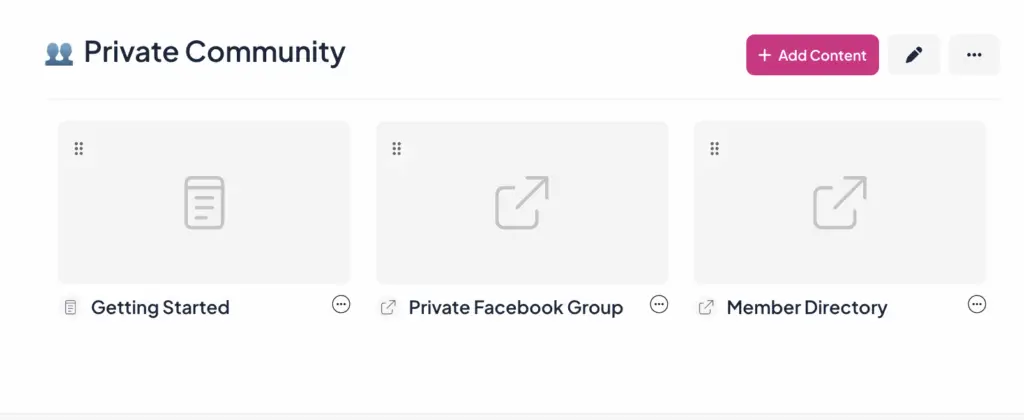
 Community Tip: If you’re looking to add a private forum to your Squarespace site, we recommend using a private Facebook Group, Slack channel, or something similar and adding the link to your MemberSpace! We are planning to add a community feature in the near future that will allow you to have forum-style conversations directly on your website, so stay tuned for that!
What You Can Offer Your Members
A strong community offers more than just locked pages — it creates value and connection. Here are some ideas for what you can include:
- Exclusive access to private chat groups or forums
- Members-only webinars, workshops, or coaching calls
- Downloadable resources like ebooks, templates, or guides
- Private directories or member lists
- Regular newsletters with insider updates and tips
By mixing different types of content and interaction, you keep your community engaged and coming back.
Promoting Your New Community
Building your community is only half the battle — you need to get the word out and grow. Here are some strategies that work well:
- Leverage your existing audience: Use your email list, social media, YouTube, or podcast to announce your community and highlight its benefits.
- Collaborate with influencers: Partner with people in your niche to reach new potential members.
- Create free, valuable content: Blog posts, videos, or webinars that showcase your expertise and entice people to join.
- Offer limited-time promotions: Discounts or bonuses for early members create urgency.
- Optimize for search engines: Use SEO tactics to help people find your community organically.
- Engage in related forums and groups: Participate authentically and share your community as a resource.
Remember, promoting isn’t a one-time thing — consistent effort keeps your community growing.
Adding a Forum to Squarespace with Circle
Squarespace doesn’t have a built-in forum feature, but you can integrate platforms like Circle to add a branded forum experience right on your site. When combined with MemberSpace, you get a powerful setup:
- Build your community landing pages on Squarespace
- Lock pages with MemberSpace to control access
- Set pricing plans for memberships
- Integrate Circle to host your community forum
This combo gives your members a seamless experience without leaving your website.
Community Building Tips
You’ve already worked to build a following that finds value in what you offer, so how do you turn them into paying customers? Simple. You engage them by offering various features and perks (like exclusive content or access to private forums), creating a sense of exclusivity and value.
Just look at how the digital agency Boss Project used MemberSpace and Squarespace to turn a layoff into a 7-figure, work-from-home business. If you aren’t sure where to start, take a look at how Abagail generates income through her coaching services and all-inclusive memberships.
Here are a few additional ideas on what you can offer with MemberSpace to build and grow your community:
- Offer a community newsletter: Keep your members informed and engaged with regular updates, exclusive content, and valuable insights.

2. Host a private podcast: Share exclusive, audio-only content with your community that they can listen to at their convenience.
3. Host live events: Facilitate engaging live experiences, including networking sessions, group coaching, zoom calls, and mastermind classes, to bring your community together in real-time.
4. Offer membership tiers: With MemberSpace’s membership levels feature, you can create different tiers of access and benefits for your community members based on their subscription level.

5. Private forums: Create private discussion boards for your members to connect and engage with one another in a safe space. This fosters a sense of community and encourages members to share their knowledge and experiences and can be a great feature to add to book club memberships, online courses, or health and wellness websites.

6. Set up social media groups: Extend the reach of your community by creating social media groups where members can interact and engage with each other outside of your website.
7. Exclusive content: Offer your community access to exclusive resources such as e-books, templates, and other digital content libraries that can add value to their membership.

Remember, creating an engaged community is what’s going to help your customers continue to find value in your Squarespace forum, community, or group and therefore continue to pay for it.
FAQ about Private Squarespace Communities
How do I create a private Squarespace community?
To create a private membership website on Squarespace using MemberSpace, follow these steps.
- Pick a community platform: think Facebook groups, private Instagram accounts, or LinkedIn groups
- Integrate MemberSpace with your private community platform
- Create a paid subscription
- Add the signup link to your website
How do I add a forum to my Squarespace site?
Squarespace forums offer a great way to foster community engagement and discussion within your website. To add a forum to your Squarespace site using Circle and MemberSpace, follow these steps:
- Build your Squarespace community landing page(s)
- Lock your page(s) with MemberSpace
- Set a price for it
- Integrate with Circle
How much should I charge for access to my community?
When deciding how much to charge, a good starting point is to offer different tiers of access to cater to the different levels of engagement and value that your members might want. Here’s a quick snapshot of what other entrepreneurs are offering taken from MemberSpace’s recent State of Membership report:
- One-time payments averaged $375.67, with a median price of $99.
- Recurring payments averaged $226.05, with a median price of $49.
What benefits should I offer my community?
MemberSpace allows you to offer a variety of benefits to enhance your community and provide value to your members. Here are some ideas:
- Restrict access to premium content such as videos, articles, eBooks, and downloads
- Organize members-only events, webinars, and workshops to foster learning and interaction within your community
- Offer special discounts or deals on products, services, or any other offerings
- Create spaces where members can network, collaborate, and share information
- Give members early or exclusive access to new features, products, or content
- Offer priority support or additional consultation services to certain membership tiers
- Allow members to create profiles and be part of member directories
- MemberSpace allows you to set flexible billing cycles such as monthly, annually, or one-time payments
These features enable you to tailor the membership experience to meet the needs and preferences of your community.
What is the difference between Squarespace Member Sites and MemberSpace?
Squarespace Member Sites and MemberSpace are both effective for managing memberships, but they differ in key ways. To learn more, check out our article about Member Sites vs MemberSpace.
Squarespace Member Sites is a built-in feature of Squarespace, offering seamless integration for creating exclusive sections accessible only to registered members. It includes password-protected pages, gated content, and exclusive products or services, but has limited customization compared to dedicated platforms.
MemberSpace makes it easy to convert any Squarespace website into a membership site by allowing you to add a paywall to any part of your website. With MemberSpace, you can protect your content library, online courses, community newsletter, videos, paid podcasts, and more.
Ultimately, the choice between Squarespace Member Sites and MemberSpace boils down to your needs: easy integration with Squarespace Member Sites or the extensive features and flexibility of MemberSpace.
Does Squarespace have a community feature?
Squarespace does not have a native community feature, but you can use third-party tools like Circle and MemberSpace.
Final Thoughts
Creating a paid, members-only community with your Squarespace website allows you to monetize your influence and gives your biggest supporters a closer connection with you. By integrating MemberSpace with an existing platform your audience is on, you make community access easier to manage.
Start small then expand your offerings over time – private podcast episodes, member Q&As, courses, masterminds, and more. If you need any help getting set up, feel free to reach out to our support team or check out our guides on MemberSpace University.
Launch a private community on Squarespace!
The easiest way to accept membership payments or one-time charges for digital products like podcasts, online courses, communities, content libraries, and more — all from your own website!
Get started for free! 5 minutes to set up.