
Haiden Hibbert
You’ve built your Squarespace website to grow your business, but now you want to sell access to an event—whether it’s a virtual workshop or an in-person class. The question is, how do you set up events on Squarespace without a ton of extra work?
The answer: keep it simple. With Squarespace and MemberSpace, you can create a streamlined way to sell tickets, share details, and focus on delivering a great experience. This guide will walk you through the process step by step.
Sell events on Squarespace!
The easiest way to accept event registration payments or one-time charges for digital products like podcasts, online courses, communities, content libraries, and more — all from your own website!
Get started for free! 5 minutes to set up.
Step 1: Install MemberSpace on Your Squarespace Website
Installing MemberSpace on your Squarespace site takes just 30 seconds. Once installed, it integrates directly with your existing website, allowing you to easily sell event tickets and control access to members-only events.
Step 2: Add Your Event to MemberSpace
You can sell access to any type of virtual or in-person event. Think workshops, webinars, conferences, retreats, classes, and more! All you need to do is create a new “Space” — this is where you’ll share the details of your event.
For example, you might title your Space “Workshops,” and within that space, you’ll add all of your workshop-related content — links to your Zoom or Google Meet event, event details, workbooks or other supplemental materials, anything you want to provide your event attendees. If it’s an in-person event, just add the details of your event!
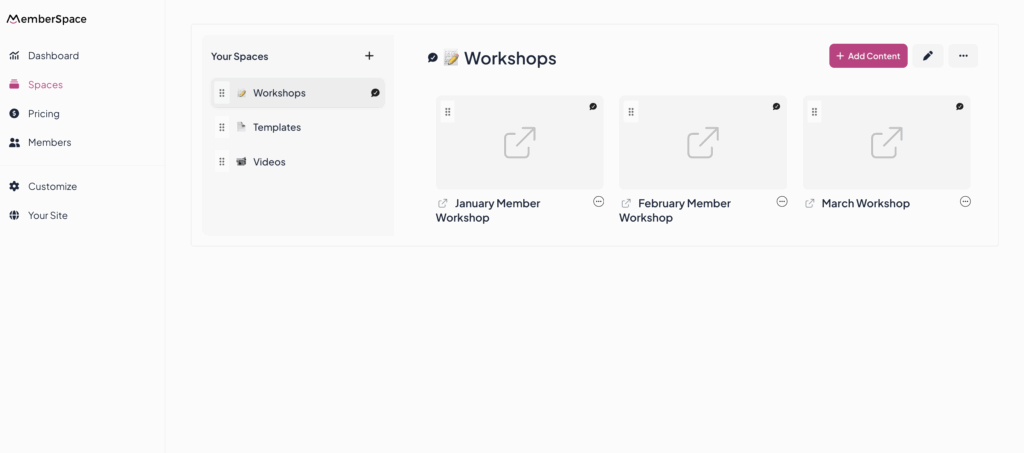
Here are some examples of what this might look like:
- If you have a prerecorded workshop, embed your video file.
- If you have an upcoming live stream, webinar, or class, add a link to wherever you are hosting it (Zoom, Google Meet, etc.).
- If it’s an in-person retreat, add a post with all the details of the event.
- You can easily add all your event archives as well, so people can access event recordings in an organized library.
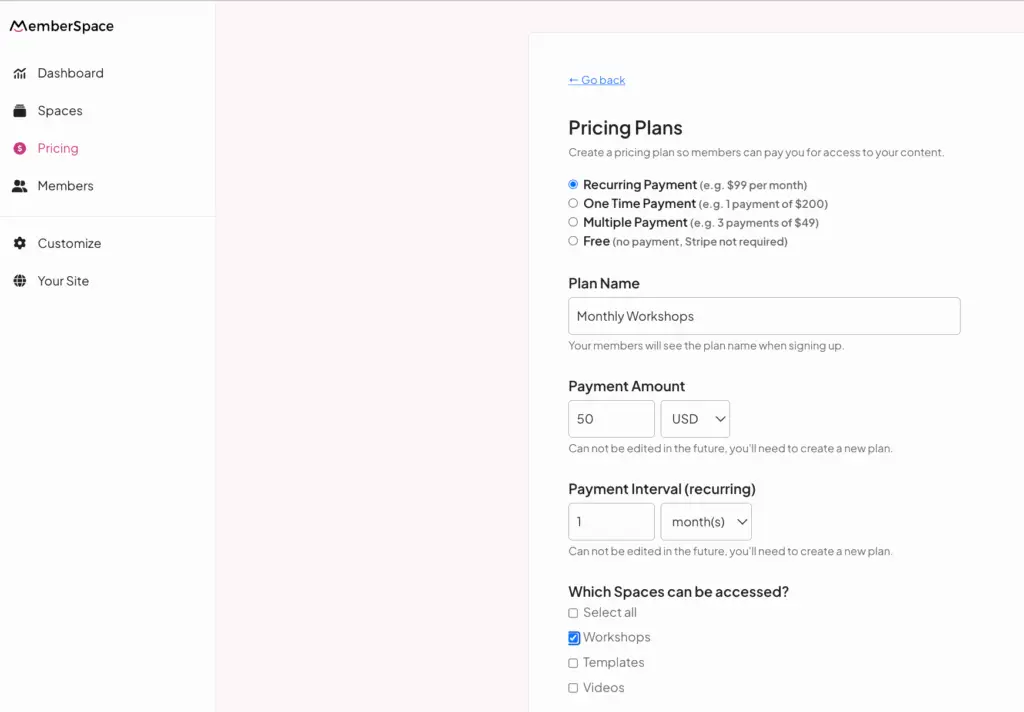
Step 3: Set a Price for Your Event
Next, you’ll create a pricing plan for your event. Maybe it’s a one-time fee for a single workshop, a recurring subscription if you have members who get access to ongoing events, a payment plan if you’re selling access to an expensive event like a retreat or conference, or maybe it’s even free! You pick the details — it’s completely flexible. When someone signs up for the plan you create, they’ll get access to your event Space.
Step 4: Build Your Public Event Page to Promote Your Event
Once you’ve set up your event on MemberSpace, you’ll get a direct link to the registration and checkout form that you can add to your Squarespace website. We recommend building a public event landing page and adding that link there.
When someone clicks the link, they’ll be prompted to fill out a signup and payment form, granting them access to your private event details.
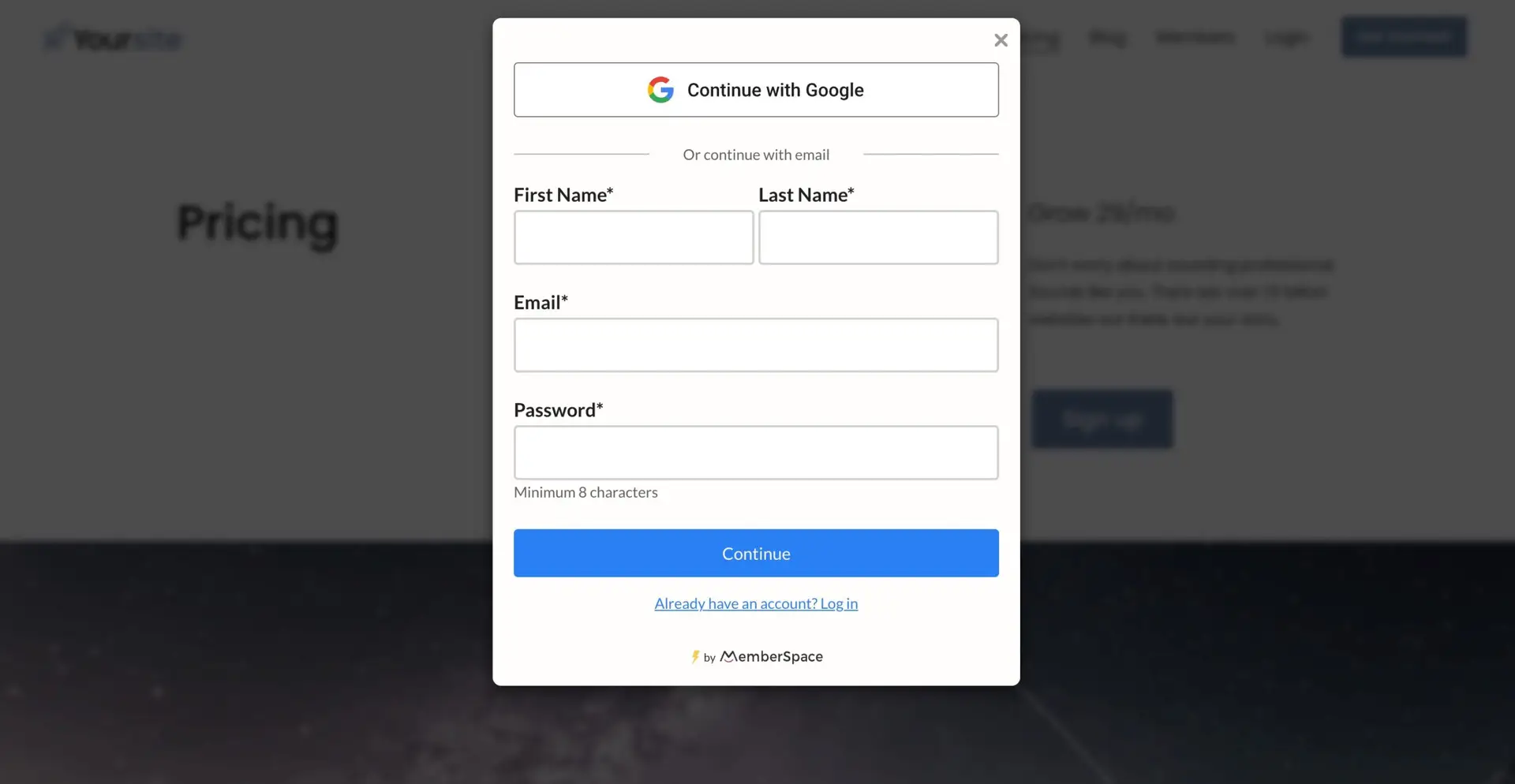
You can even customize your signup form to match your branding and collect attendee details like dietary preferences (hello, retreat planning!) or webinar questions.
Now onto the landing page! Think of it as your pitch. It’s the first thing potential attendees see, so make it count! This is where you’ll answer the big questions:
- What’s in it for them? Focus on the transformation or outcome your event delivers. Will they leave inspired, skilled, or with fresh ideas?
- The must-know details: Include the date, time, location (for in-person events), or platform (for virtual ones).
- The price tag: Are there multiple ticket options, like general admission and VIP? List them here.
- How to sign up: Add a bold button with a clear call-to-action, like “Save My Spot” or “Register Now.”
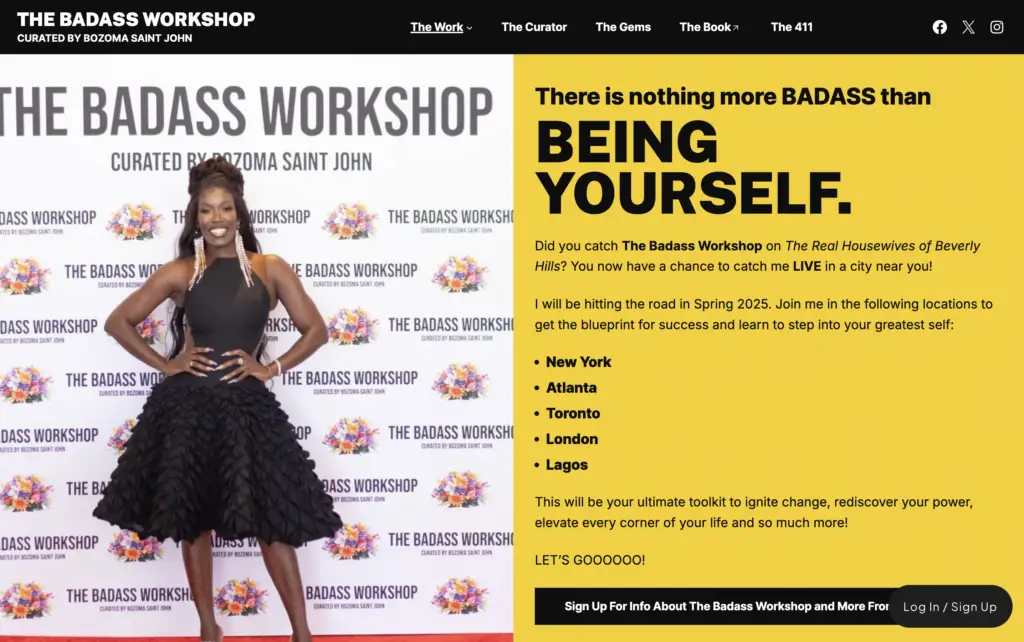
Quick Tip: Offering different ticket options? Use MemberSpace to create multiple pricing tiers. You could have a VIP ticket that includes perks like a private Q&A session, access to an online course, or exclusive breakout groups.

Step 5: Maximize Your Event’s Potential
When you’re selling event access, the right tools can make all the difference. MemberSpace doesn’t just help you sell tickets on Squarespace—it gives you more features to maximize your event’s impact and make the entire process smoother for you and your attendees.
Here’s how you can make the most of your event with MemberSpace:
- Abandoned signup reminders: Recover lost sales by automatically following up with people via email who started signing up but didn’t finish.
- Custom email notifications: Welcome attendees, share event details, or build excitement with countdowns. You can even use these emails to upsell VIP options or future events.
- Flexible ticket options: Create multiple pricing tiers like general admission, VIP packages, or early bird specials to appeal to different audiences.
- Upsell opportunities: Use your event page to promote your other digital products, like a related course, exclusive content, or your next event.
- Streamlined payments: Let attendees pay with one click using Google or Apple Pay—no need for them to dig out their wallet.
Many business owners find Squarespace’s native selling features to be limited, but MemberSpace lets you fully customize your event experience. Whether you’re sharing event details on a locked page, through an email, or even in a private online group, you have the flexibility to set things up your way.
FAQ About Selling Tickets for Squarespace Events
Q: What types of events can I sell tickets for using Squarespace and MemberSpace?
A: You can sell tickets for virtually any type of event — including virtual workshops, live webinars, online classes, in-person retreats, conferences, etc. MemberSpace lets you customize each event space with the specific details and content your attendees need, whether that’s video links, downloadable materials, or location info.
Q: Can I sell tickets for both virtual and in-person Squarespace events?
A: Yes! MemberSpace supports both virtual and in-person events seamlessly. For virtual events, you can add links to Zoom, Google Meet, or any streaming platform. For in-person events, you can share venue details, schedules, and any other important info directly in your event space.
Q: How flexible is pricing for Squarespace events?
A: Pricing is fully customizable. You can set a one-time fee for a single event, offer subscriptions for ongoing access to multiple events, create payment plans for high-ticket offerings like retreats, or even offer free events. MemberSpace supports multiple ticket tiers (general admission, VIP, early bird) to maximize your event’s reach.
Q: Can I collect additional information from attendees during signup?
A: Absolutely. You can customize your MemberSpace signup forms to collect attendee details like dietary restrictions, special requests, webinar questions, or anything else important for your event planning. This makes managing your Squarespace events easier and more personalized.
Q: Is it possible to offer recordings or event archives for past Squarespace events?
A: Yes! MemberSpace lets you organize and share event recordings or archives within your Spaces, so attendees can access past content anytime. This is a great way to add value and create ongoing revenue from your events.
Q: How do attendees pay for tickets to Squarespace events?
A: MemberSpace supports multiple payment options including credit cards, Google Pay, and Apple Pay, making checkout fast and easy for your attendees. You can also set up recurring payments if you offer subscriptions.
Q: What happens if someone starts signing up but doesn’t complete the purchase?
A: MemberSpace automatically sends abandoned signup reminders via email to help recover lost sales — a handy feature to boost your event’s ticket sales.
Q: Can I promote other products or events on my Squarespace event page?
A: Yes! You can use your event page to upsell related courses, VIP experiences, or future events, helping you increase revenue and build a loyal audience.
Final Thoughts
Hosting events is an amazing way to connect with your audience, share your expertise, and grow your business. Whether it’s a virtual workshop, a webinar, or an in-person retreat, having a clear process for selling tickets and managing access makes everything so much easier.
With Squarespace and MemberSpace, you have the flexibility to customize your setup to fit your event’s needs. From handling payments to sharing details securely, you’re in control of the experience from start to finish. This means less stress for you and a polished, seamless experience for your attendees. Let us know if you have any questions, and good luck!
Sell events on Squarespace!
The easiest way to accept event registration payments or one-time charges for digital products like podcasts, online courses, communities, content libraries, and more — all from your own website!
Get started for free! 5 minutes to set up.