
Haiden Hibbert
Squarespace excels at design and page‑building, which is why so many fitness creators start there. The friction usually shows up later, when a business needs free trials, multiple membership tiers, flexible pricing, and a custom workout library members can easily navigate. These aren’t edge cases—they’re everyday realities for fitness memberships.
The simplest solution isn’t starting over, but layering MemberSpace on top of Squarespace. Squarespace stays your front door, while MemberSpace handles access, billing, and the member experience underneath, giving fitness businesses the flexibility they need without sacrificing their site or brand.
Start a Fitness Membership Site!
The easiest way to accept membership payments or one-time charges for digital products like online courses, communities, content libraries, and more — all from your own website!
Get started for free! 5 minutes to set up.
Prep work: what to set up before you add MemberSpace
Before installing anything, it helps to get clear on a few basics. Not everything—just what affects access.
Most fitness creators start with:
-
- A public sales page on Squarespace
- A clear idea of what the membership includes (workouts, programs, coaching, community)
- Pricing model – will it be a monthly subscription or something else?
If your business leans more toward coaching, this guide on building a coaching membership site on Squarespace walks through that setup in more detail. For creators blending content with services, this post on starting a service‑based business on Squarespace covers similar groundwork.
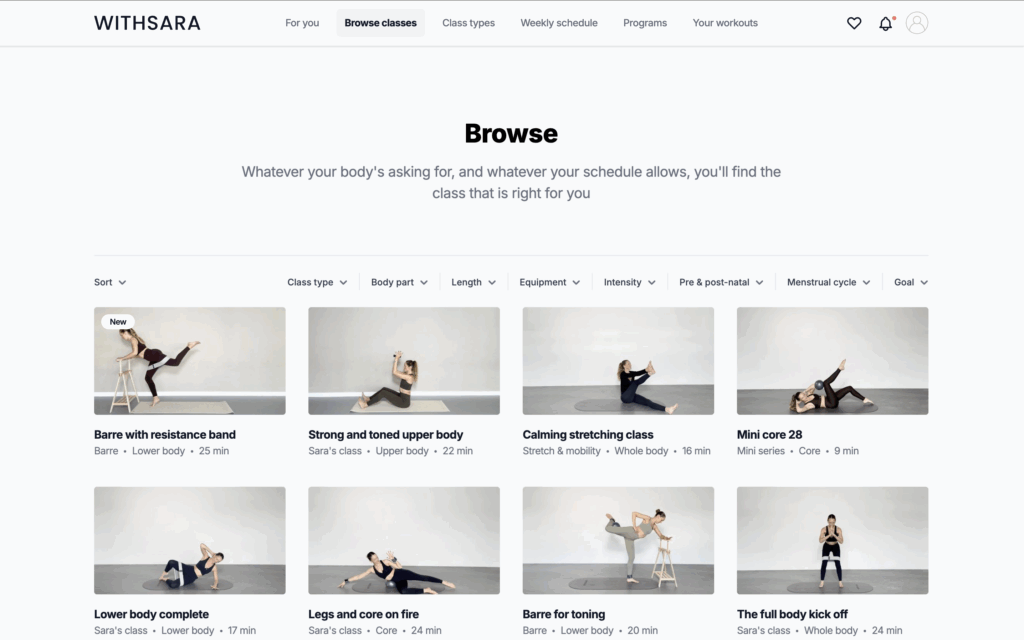
If you need some inspiration, check out this fitness membership, Withsara that’s built with Squarespace and MemberSpace.
Step 1: Install MemberSpace on Squarespace
Installing MemberSpace on a Squarespace site takes just 30 seconds.
You copy a small snippet of code and paste it into your site. That’s it!
If you’ve ever added analytics or a scheduling tool to Squarespace, this step will feel familiar.
Step 2: Add members‑only fitness content
With MemberSpace, you upload your content files directly into your account and organize them however you want. You’re not forced into a preset layout or a single content type. You decide how members move through your content, and MemberSpace controls access behind the scenes.
You can upload and protect:
- Workout videos
- Training programs and PDFs
- Audio content
- Links to live classes, coaching calls, private communities, etc.
- Existing Squarespace pages
All content lives inside Spaces, which you can organize further with folders and nested folders.
For example:
- A Space for On‑Demand Workouts, organized by goal or equipment
- A Space for Programs, like a 6‑week strength series
- A Space for Coaching & Live Sessions, with call links and replays
This structure makes it easy for members to find what they need—without support emails or manual work.
Step 3: Set up membership pricing and trials
Pricing is where fitness businesses most clearly feel the limits of Squarespace—and the flexibility of MemberSpace.
You can create:
- Free memberships or trials
- One‑time payments
- Monthly or annual subscriptions
- Multi‑payment plans
Free trials and multiple membership tiers are especially important for fitness businesses, where people want to try before committing.
For programs that require tighter control—like limited enrollment—you can also manually approve members on Squarespace using MemberSpace.
Step 4: Customize member checkout and login
A common concern is whether adding a membership tool will feel disconnected from the rest of the site.
MemberSpace allows you to customize checkout and login forms so they match your Squarespace design. Fonts, colors, etc. stay consistent.
You can also enable Apple Pay, Google Pay, and Google sign‑on, so joining is fast and familiar.
Step 5: Grow and retain your fitness community
Selling access is only the first step. Retention is where sustainable fitness businesses are built.
MemberSpace includes tools that support this without adding more manual work:
- Abandoned cart reminders
- Cancellation alternatives like pausing or downgrading
- Easy plan changes for members
For creators who want to expand beyond content, this post on building a Squarespace community shows how memberships can support deeper engagement.
Final thoughts
Squarespace remains the foundation of your website. It’s where your brand lives and where new people land.
MemberSpace runs the membership layer underneath.
Together, they give fitness creators a way to build a business that can evolve—new programs, new pricing, new ways to engage—without starting over each year.
That flexibility is what turns a good‑looking site into a sustainable fitness business.
Start a Fitness Membership Site!
The easiest way to accept membership payments or one-time charges for digital products like online courses, communities, content libraries, and more — all from your own website!
Get started for free! 5 minutes to set up.


