Haiden Hibbert
Duda makes building a beautiful website simple, but when it comes to selling courses or memberships, you’ll need a different solution — since Duda doesn’t have built-in course features. Sure, there are plenty of third-party tools out there, but most of them don’t let you host your course directly on your Duda site. That means sending your customers off to another platform, which isn’t ideal.
MemberSpace changes that. It lets you sell your course right on your website, and your customers get access to everything through their own dashboard — all without ever leaving your site or needing to change your Duda design.
Launch an online course on your Duda website!
The easiest way to accept membership payments or one-time charges for digital products like online courses, communities, content libraries, and more — all from your own website!
Get started for free! 5 minutes to set up.
Why MemberSpace Is the Best Choice for Selling Courses on Duda
Duda makes it easy for creators and business owners to build beautiful websites without coding. But it doesn’t have built-in tools to sell courses or memberships.
MemberSpace fills that gap by integrating right into your Duda site, letting you:
- Sell unlimited courses, membership site access, and digital products like ebooks or video libraries.
- Upload as much content as you want, with no limits.
- Offer flexible pricing: one-time payments, subscriptions, payment plans, or free trials.
- Protect your content so only paying members get access.
- Provide a seamless member experience on your own site.
- Grow your audience without restrictions or hidden fees.
Together, they give you a simple, powerful way to sell and protect your digital content — all without complicated tech or extra platforms.
How to Get Started: Building Your Online Course on Duda with MemberSpace
Step 1: Sign Up for MemberSpace
Head to MemberSpace and create your account for free. No need to upgrade your Duda plan or change anything on your existing site.
Step 2: Install MemberSpace on Your Duda Website
This is the only technical step, but it’s really simple:
- Log in to your Duda dashboard.
- Go to Site Settings > Site HTML.
- Paste your MemberSpace installation code into the Footer HTML box.
- Save and publish your site.
A small MemberSpace button will now appear on your site pages — this is where your customers will sign up, log in, and access their courses.
Step 3: Build Your Course Inside MemberSpace
Instead of building your course on Duda, you create a Space in MemberSpace — a private, members-only area for your content.

You can organize it however you want:
- Modules and lessons.
- Upload PDFs, images, audio files.
- Embed videos from YouTube, Vimeo, or Wistia.
- Add posts or bonus content inside MemberSpace.
Your Duda site design stays exactly how you want it — the course lives securely inside MemberSpace.
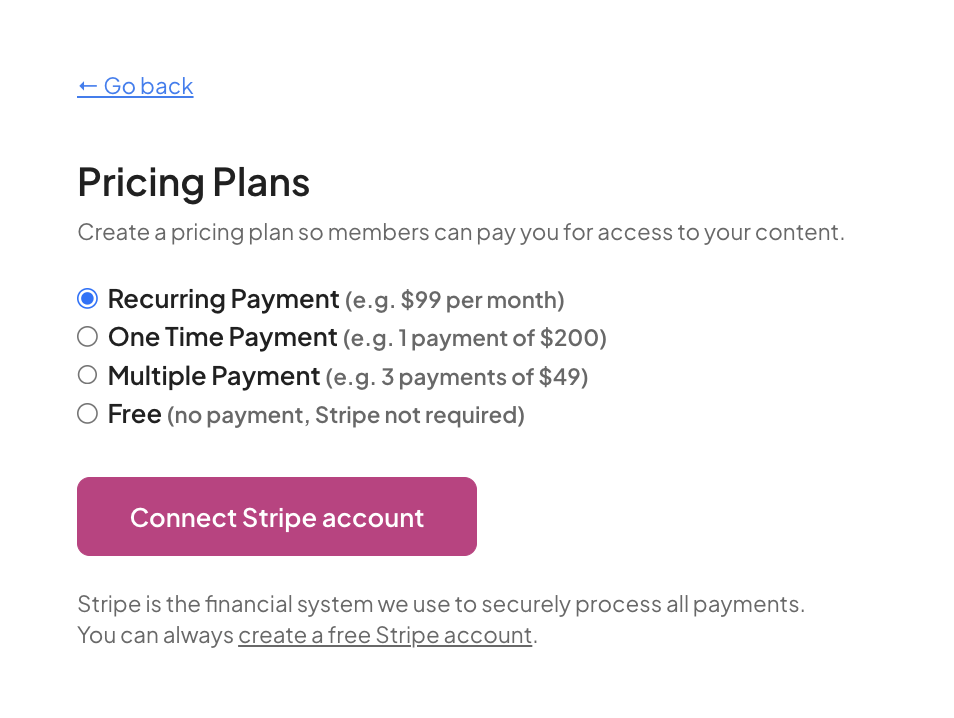
Step 4: Set Your Pricing and Payment Options
MemberSpace connects with Stripe, so you can easily set up payments:
- One-time purchases for standalone courses.
- Recurring subscriptions for memberships.
- Payment plans to make higher-priced courses more accessible.
- Free access for lead magnets or bonuses.
You have full control and can change pricing anytime.
Step 5: Launch Your Course!
Once you’ve uploaded your online course content and created a pricing plan, you’re ready to launch! Add a link to your course on call-to-action buttons throughout your website, or paste it in your social media bios. The link will open up your signup/checkout form so people can easily purchase your product.
Tips to Make Your Duda + MemberSpace Course a Success
- Use Duda’s drag-and-drop tools to create beautiful sales pages that speak directly to your ideal students.
- Keep your course content clear and organized — simple wins every time.
- Offer a free mini-course or sample lesson to build trust.
- Use MemberSpace’s drip content feature to release lessons over time and keep students engaged.
- Promote your course regularly — even after launch — to build momentum.
Frequently Asked Questions
Can I really host everything on my Duda site?
Yes! MemberSpace protects your content and handles memberships without needing a separate platform.
Do I need technical skills?
Nope. Installing MemberSpace is as simple as copy-pasting code in your Duda site settings.
Can I drip content over time?
Absolutely. You can schedule lessons to unlock gradually.
What payment methods can I accept?
Stripe integration means you can accept credit cards, Apple Pay, Google Pay, and more.
Can I sell multiple courses or bundles?
Yes! MemberSpace lets you create multiple Spaces for different products or membership tiers.
Final Thoughts
If you want a simple way to sell online courses and digital products on your Duda website, MemberSpace is the perfect partner.
It’s easy to set up, flexible to grow with your business, and built for creators and business owners who want to focus on what matters — their content and their customers.
Ready to get started? Sign up for MemberSpace and start selling on your Duda site today!
Launch an online course on your Duda website!
The easiest way to accept membership payments or one-time charges for digital products like online courses, communities, content libraries, and more — all from your own website!
Get started for free! 5 minutes to set up.