
2. Create a Paid Content Library
If you’ve been blogging for a while, you may already have content people would pay for.
A paid content library is simply a collection of premium resources behind a paywall.
This could include:
- Advanced tutorials
- Deep-dive guides
- Downloadable resources
- Members-only articles
- Video walkthroughs
Your public blog remains free, while the more in-depth material lives inside the paid library.
A good signal this might work for you is when readers start asking things like:
“Do you have all of this in one place?”
That’s often the perfect moment to package your expertise into a members-only library.
3. Launch a Membership
Memberships are one of the most reliable ways to generate recurring income from a blog.
Instead of selling a one-time product, you offer ongoing value in exchange for a monthly or annual subscription.
A membership might include:
- Weekly premium blog posts
- Exclusive tutorials
- A private resource vault
- Monthly workshops
- A members-only community
Your blog brings readers in. The membership gives them a reason to stay.
Many WordPress site owners use tools like MemberSpace to create memberships by locking specific pages or sections of their site and choosing who gets access.
4. Turn Blog Content Into an Online Course
If you’ve written multiple posts about the same topic, you may already have the foundation for a course.
A paid course usually takes your existing knowledge and organizes it into a clear, step-by-step learning path.
A course might include:
- Video lessons
- Structured modules
- Worksheets or exercises
- Progress tracking
- Community discussion
5. Offer Coaching or Consulting
If your blog teaches a specific skill or framework, coaching can be a natural next step.
Your blog answers general questions. Coaching helps people apply those ideas to their own situations.
This works especially well for:
- Business coaches
- Designers
- Health professionals
- Marketing consultants
- Educators
- Creators with niche expertise
MemberSpace allows you to give coaching clients access to private resources, recordings, or action plans inside a protected section of their website.
6. Run Paid Workshops or Bootcamps
Live experiences are another powerful way to monetize a WordPress blog.
Examples include:
- One-time paid workshops
- Multi-week bootcamps
- Skill-building intensives
- Guest expert sessions
- Certification programs
Your blog content helps readers understand your approach. Then the workshop gives them the opportunity to learn directly from you in real time.
Many business owners also record these sessions and add the replays to a paid content library or membership afterward.
7. Create Free and Paid Content Tiers
Not everything on your blog needs to be locked behind a paywall.
Many successful WordPress sites use a hybrid model:
- Free content for discovery
- Paid content for depth
For example:
- Free blog tutorials
- Paid advanced guides
- Members-only downloads
- Premium case studies
This allows readers to decide how far they want to go.
8. Grow an Email List (Then Monetize Later)
Sometimes the smartest monetization strategy is not monetizing right away.
Instead, focus on building an email list.
Your blog can invite readers to:
- Download a free guide
- Join a newsletter
- Get bonus resources
- Receive exclusive updates
Once someone is on your email list, monetization becomes far easier — because you’re no longer starting from zero every time you publish something new.
Your email list becomes one of the most valuable assets your website can build.
How to Monetize a WordPress Website With MemberSpace
If you want a simple way to sell memberships, courses, or digital products directly from your WordPress website, MemberSpace makes it easy to add members-only content directly to your site.
Here’s a simple overview of how it works.
1. Install MemberSpace on Your WordPress Site
First, install the MemberSpace plugin.
Once installed, you’ll be able to:
- Sell access to any content or digital product
- Protect pages or posts
- Create member logins
- Accept one-time, recurring, multiple payments
- Set up free trials and plans
- Control exactly who can access your content
2. Add Your Members-Only Content
Next, decide what content will be exclusive to members.
This could include:
- Premium blog posts
- Resource libraries
- Online courses
- Workshops or recordings
- Templates or downloads
Inside MemberSpace, this exclusive content is organized into Spaces. You can also create folders and nested folders if you need to further categorize your content!
For inspiration, check out MemberSpace customer, Katie Wilmshurst and how she has her fitness membership site set up on WordPress:

3. Create Pricing Plans
Then choose how you want to charge for access.
You can create:
- Monthly subscriptions
- Annual memberships
- One-time purchases
- Free plans
- Installments
- Tiered pricing plans
When someone signs up, MemberSpace automatically:
- Processes the payment
- Creates their account
- Grants access to the correct content
Everything runs automatically in the background.
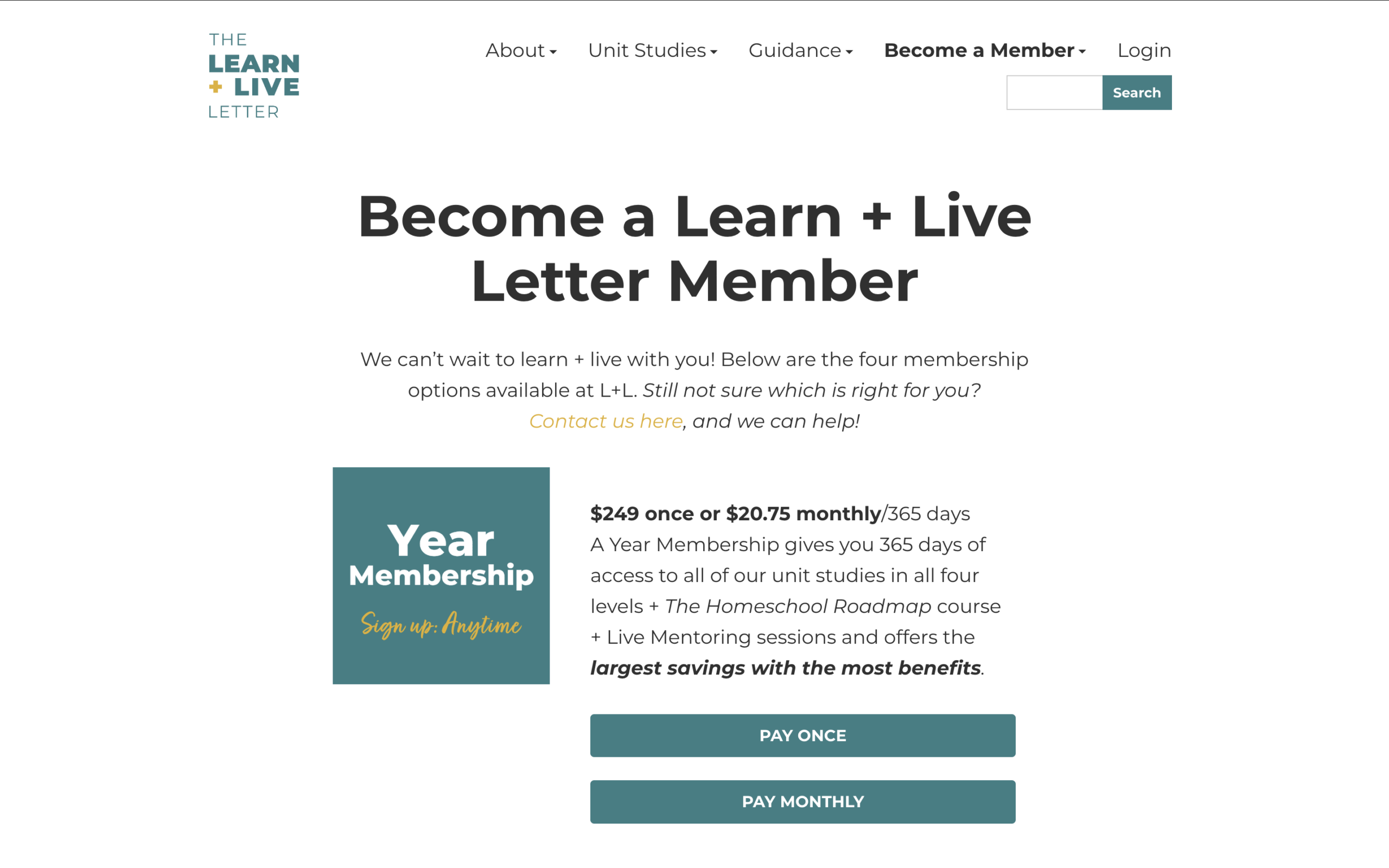
Here’s an example of what pricing can look like on a WordPress site from MemberSpace customer, The Learn + Live Letter.
4. Use Your Blog as the Funnel
Finally, let your blog bring people into your ecosystem.
At the end of relevant posts, add a natural next step such as:
- “Download the full template here.”
- “Members get access to the full resource library.”
- “Upgrade for the complete walkthrough.”
Your blog builds trust.
Your paid content provides the deeper solution.
Over time, this creates a simple system:
Helpful blog content → engaged reader → paying member.
Final Thoughts
Your website doesn’t need millions of readers to make money.
In fact, a smaller, engaged audience is often more valuable than a huge passive one.
Start by looking at the content you already have.
Pay attention to:
- Which posts get the most traffic
- Which topics readers respond to
- What questions people ask you
Those signals often reveal the best monetization opportunities.
Your WordPress website doesn’t just have to publish content.
With the right strategy, it can become a sustainable business built around your knowledge and expertise. Let us know if you have any questions, and good luck!