

Haiden Hibbert
Squarespace makes it simple to create a beautiful, professional website — and its built‑in store features let you sell digital products like PDFs, templates, or audio files.
But if you’ve ever tried to scale your digital product business on Squarespace, you’ve probably noticed some limitations. The built‑in tools work well for one‑time downloads, but they don’t give you much flexibility in how you sell, deliver, or manage your digital content.
That’s where MemberSpace comes in.
With MemberSpace, you can turn your Squarespace site into a powerful digital product business — one that sells, protects, and delivers your content seamlessly, while giving you more control over pricing, access, and customer experience. In this post, we’ll walk through the simple, five-step process on how to sell digital products with Squarespace and start earning passive income.
Sell digital products on Squarespace!
The easiest way to accept membership payments or one-time charges for digital products like online courses, communities, content libraries, and more — all from your own website!
Get started for free! 5 minutes to set up.
Step 1: Install MemberSpace (30 Seconds)
Getting started takes less than a minute.
- Go to MemberSpace and create your free account.
- Choose “Use my existing website” and select Squarespace as your platform.
- Copy the short code snippet provided and paste it into your Squarespace site — the installation takes about 30 seconds.
That’s it. MemberSpace connects directly to your Squarespace site, so you can start selling digital products and memberships right away — no plugins or coding required.
If you manage multiple brands or client sites, the Agency Plan lets you white‑label MemberSpace and manage everything under one account.
Step 2: Upload Your Digital Products
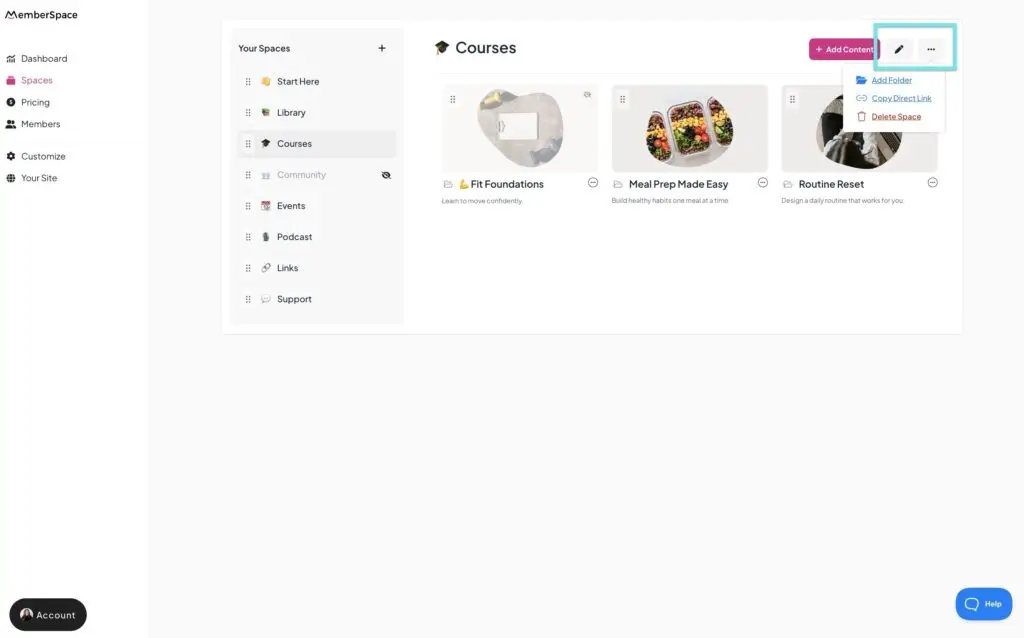
Once you’re connected, you can upload any type of digital product you want to sell on your Squarespace website directly to MemberSpace.
That includes:
- PDFs (ebooks, guides, templates)
- Videos (courses, tutorials, workshops)
- Audio files (trainings, recordings)
- Images or design assets
- Gated pages of your Squarespace website
- Posts
- Links
You can organize your content however you like — single products, bundles, or full libraries — and deliver everything securely to paying customers.
✨ Inspiration: If you’re still figuring out exactly what you want to sell, check out these 23 Digital Products You Can Sell to Monetize Your Website Today for some ideas.
Step 3: Set Up Pricing and Payments
MemberSpace integrates with Stripe for secure payments and flexible pricing. You can create:
- One‑time purchases — perfect for templates or guides
- Payment plans — for higher‑ticket courses or bundles
- Recurring subscriptions — for memberships or content libraries
- Free products – for lead magnets
You can also offer free trials or discount codes to attract new customers.
This flexibility makes it easy to start small and scale your Squarespace business over time.
That’s it! now you’re ready to share your digital products with your audience.

Step 4: Start promoting your products
To drive traffic and sales, MemberSpace will provide you with a unique product link, which will take customers directly to pay for your product. You’ll want to add this link to your sales page, other spots on your website, and anywhere else you plan on sharing about your digital product.
When you’re ready to start promoting, here are a few marketing ideas to get you started!
- Email marketing – Send a series of emails to your current subscriber list announcing your new product. Consider offering exclusive discounts!
- Social media posts – Come up with exciting posts describing your product for platforms like Facebook, Instagram, and LinkedIn (or wherever your target audience spends time!).
- Bundle your products – If you’re selling multiple digital products, consider selling them together as a content library for a monthly fee.
- Free sample/preview – Give away a free sample chapter, episode, tutorial, etc. to showcase the value of your product first.
- Webinars/workshops – Host an educational webinar focused on your area of expertise and provide the product as a call-to-action (optional: give a discount!).
Here’s some website inspiration from MemberSpace customers that sell digital products on their Squarespace sites!
Why Add MemberSpace to Squarespace
Squarespace’s built‑in digital product feature is great for simple downloads — but it’s designed for one‑time transactions. If you want to sell multiple digital products, offer bundles, or create recurring revenue, you’ll quickly run into limits.
MemberSpace gives you more flexibility and long‑term scalability for your digital business.
With MemberSpace, you can:
- Sell digital downloads, courses, and content libraries directly from your Squarespace site
- Deliver your products in a secure, branded customer dashboard instead of email links
- Offer subscriptions, payment plans, or one‑time purchases for each product
- Create tiered access levels for different product bundles or pricing tiers
- Use abandoned sign‑up reminders to recover lost sales automatically
- Enable one‑click Google sign‑up for faster checkout
- Accept credit cards, Apple Pay, Google Pay, or Link
- Offer pause or downgrade options instead of full cancellations to improve retention
Squarespace gives you the foundation.
MemberSpace gives you the flexibility to scale.
FAQ: How to Sell Digital Products on Squarespace
1. How do I sell digital products on Squarespace?
Squarespace lets you sell digital products through its built‑in Commerce tools. You can upload a file — like a PDF, video, or audio file — and customers receive a download link after purchase. However, if you want to sell multiple digital products, offer subscriptions, or deliver content in a secure, branded way, MemberSpace makes it much easier. It integrates directly with your Squarespace site and gives you more control over pricing, delivery, and customer experience.
2. What’s the difference between selling digital products on Squarespace and using MemberSpace?
When you sell digital products on Squarespace, each purchase delivers a one‑time download link by email. It’s simple but limited — there’s no way to bundle products, update content, or offer recurring access.
MemberSpace, on the other hand, lets you create a secure customer area where buyers can log in anytime to access all their digital products. You can also sell subscriptions, payment plans, and bundles — all from your Squarespace site.
3. What types of digital products can I sell on Squarespace?
You can sell almost any digital file on Squarespace — such as:
- PDFs (ebooks, guides, templates, or checklists)
- Videos (courses, tutorials, or workshops)
- Audio files (music, trainings, or recordings)
- Images, design assets, or digital art
With MemberSpace, you can organize and deliver all of these products securely in one place, instead of sending separate download links for each purchase.
4. Can I sell subscriptions or recurring digital products on Squarespace?
Squarespace’s built‑in digital product feature only supports one‑time purchases. If you want to sell subscriptions, payment plans, or ongoing access to your digital content — for example, a monthly template pack or course library — you’ll need a tool like MemberSpace. It integrates with Squarespace and lets you set up recurring payments through Stripe, giving you more ways to earn predictable revenue.
5. How do I price digital products on Squarespace?
When selling digital products on Squarespace, you can set a one‑time price for each item. With MemberSpace, you get more flexibility — offering one‑time purchases, payment plans, or recurring subscriptions. You can also use discount codes, free trials, and tiered pricing to attract new customers and increase conversions.
6. How are digital products delivered to customers on Squarespace?
Squarespace automatically emails customers a download link after purchase. That works fine for simple products, but it can be limiting if you sell multiple files or want to protect your content.
With MemberSpace, customers log in to a secure dashboard to access their purchases anytime. You can update or add new content without re‑sending links, making the experience smoother and more professional.
7. Is it safe to sell digital products on Squarespace?
Yes — Squarespace provides secure checkout and file hosting. However, once a customer downloads the file, you can’t control how it’s shared. MemberSpace adds an extra layer of protection by gating access behind a secure login, so only paying customers can view or download your digital products.
8. Can I use both Squarespace and MemberSpace together to sell digital products?
Absolutely. In fact, that’s the best setup for most digital creators. You can build and design your storefront in Squarespace, then use MemberSpace to handle payments, secure delivery, and customer access. The two tools work seamlessly together — giving you the best of both worlds: Squarespace’s design flexibility and MemberSpace’s selling power.
9. What are the benefits of using MemberSpace instead of just Squarespace for selling digital products?
If you’re serious about growing your digital product business, MemberSpace offers major advantages:
- Sell multiple products or bundles in one place
- Offer subscriptions, payment plans, and recurring access
- Deliver content securely in a branded customer area
- Recover lost sales with abandoned sign‑up reminders
- Accept a wider range of payment options (Apple Pay, Google Pay, and more)
- Customize the entire experience to match your brand
It’s the easiest way to scale your digital product business without switching platforms.
10. What’s the best way to get started selling digital products on Squarespace?
Install MemberSpace — it takes about 30 seconds. Once installed, you can upload your digital products, set up flexible pricing, and start selling securely from your existing site. It’s the simplest way to go from a basic Squarespace store to a full digital product business.
11. Can agencies or freelancers use MemberSpace for client sites?
Yes. MemberSpace’s Agency Plan lets you manage multiple Squarespace sites or brands under one account. It’s perfect for web designers and digital agencies that build Squarespace sites for creators or educators.
Final Thoughts
Selling digital products on Squarespace opens up huge passive income potential for your online business. So whether you sell recipes, photography assets, business advice or anything else – now is the time to monetize your expertise! Let us know if you have any questions! We’ve got a super helpful support team and newsletter that shares topics on how to grow your business.
Sell digital products on Squarespace!
The easiest way to accept membership payments or one-time charges for digital products like online courses, communities, content libraries, and more — all from your own website!
Get started for free! 5 minutes to set up.
