
If you don’t have a website, want to launch quickly, and want most of the technology handled for you, a hosted community platform is probably the easier choice. If you already have a website, care about your brand and audience, or want the flexibility to sell more than just community access, building on your own website is probably the better long-term choice.
Let’s do a side-by-side analysis
And before we go further, let’s acknowledge our bias. This article is published by MemberSpace. We make software that lets you add paid memberships and community directly to your own website, so naturally, we’re big believers in building a business you fully control.
MemberSpace is awesome, but it might not be everyone’s cup of tea. If you just want a spot for folks to connect without needing a full website, a dedicated community platform might be exactly what you need.
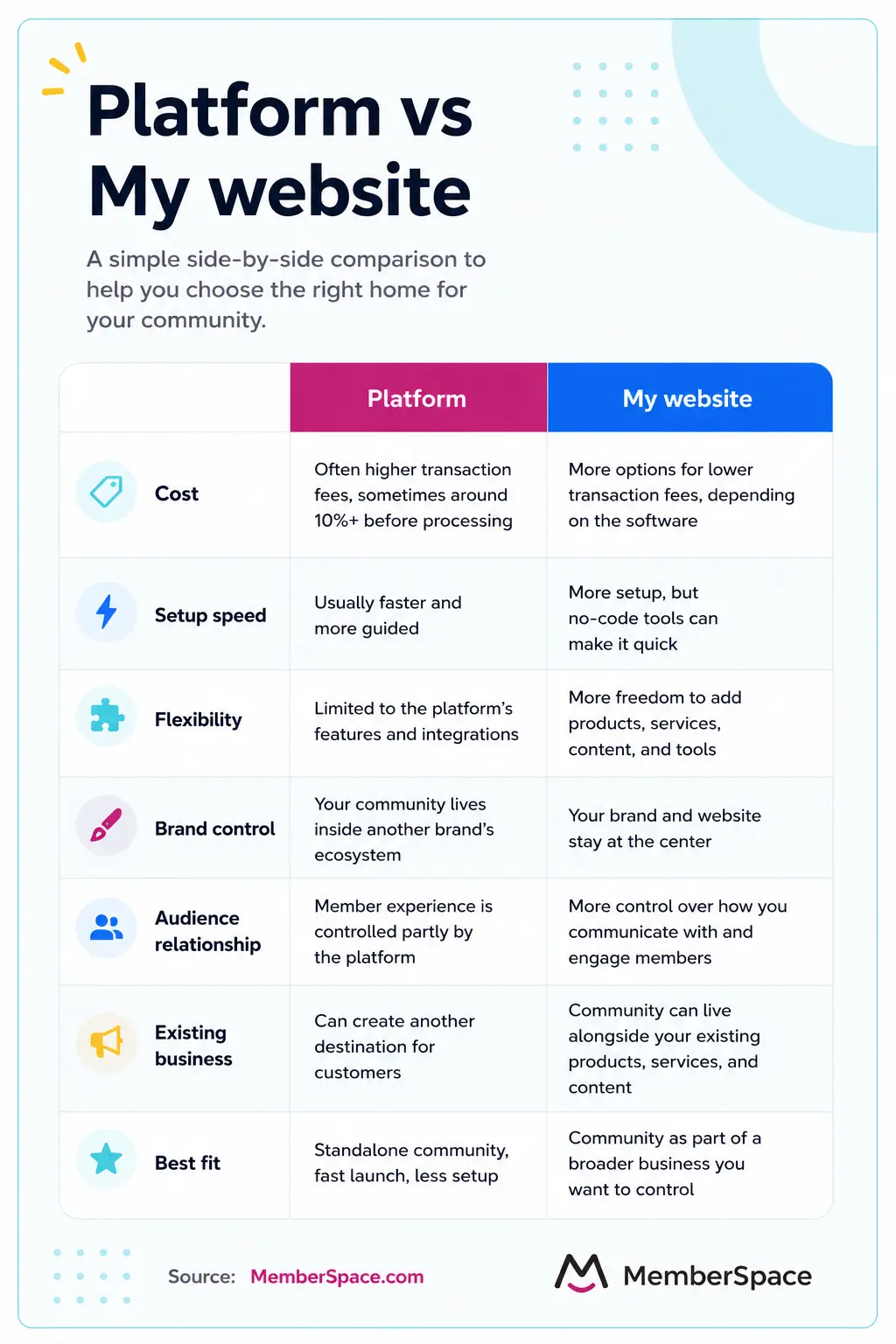
Platform vs Website
A hosted community platform gives your community a home inside someone else’s product. Patreon, Circle, and Mighty Networks are good examples. They provide the infrastructure, member accounts, payments, community features, and much of the member experience.
The advantage is convenience. The tradeoff is that your business operates within that platform’s rules, features, pricing, design, and limitations.
Building on your own website gives you more control over the experience. Your community can live alongside your existing content, products, marketing, and brand, giving you more freedom to shape the business as it grows.
So the basic tradeoff is convenience vs. control and flexibility.
If you’re simply looking for the fastest way to launch, a platform can make a lot of sense. But if you’re thinking beyond launch day and want your community to become part of a larger business, your own website often gives you more room to grow.
1. Transaction fees
Price matters, but don’t just look at what something costs today. Think about what it could cost if your community succeeds.
Platform
One of the biggest costs to watch with a platform is the percentage of your revenue it takes. Fees around 10% aren’t unusual, and that’s often before payment processing and other applicable fees.
For example, Patreon charges new creators a 10% platform fee plus payment processing. Substack takes 10% of paid subscription transactions plus Stripe fees. Discord charges a 10% platform fee on Server Subscriptions made through desktop or browser, plus a 6% payment processing fee. Gumroad charges 10% + $0.50 on direct sales, with card processing additional.
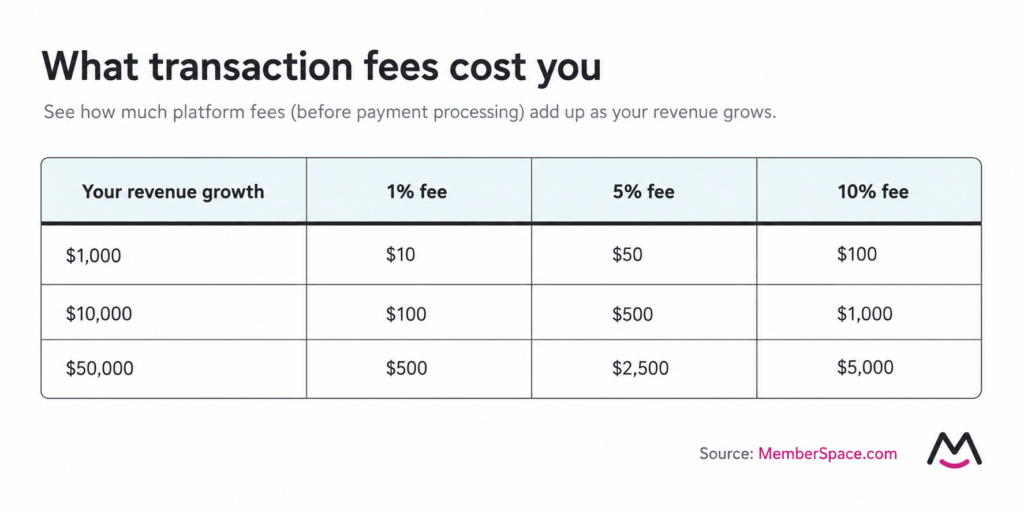
Those percentages can become significant as your community grows. A 10% platform fee means giving up $100 at $1,000 in monthly revenue, $1,000 at $10,000, and $5,000 at $50,000, before any additional processing fees.
Compare what a platform will cost at the revenue you hope to reach, not just what it costs to get started.
My own website
Building on your website will usually give you more options for lower transaction fees, although pricing varies by membership software. Popular website membership tools, including MemberSpace, Memberful, and MemberPress, generally range from 0% to around 5%, depending on the plan. With MemberSpace, transaction fees decrease as your business grows.
A percentage fee isn’t inherently bad. The question is whether you’ll still be comfortable with the pricing model if your community becomes a significant business.
2. Renting vs. owning your audience
Renting versus owning your audience is a useful way to think about this decision, although the reality is a little more nuanced. When you build on a platform, you’re building your community inside a product another company controls. When you build on your own website, you have more control over the destination, brand, and experience your audience interacts with.
Platform
When you build your community on a platform, you’re also building your brand and audience inside someone else’s brand. Your members interact within an experience the platform controls, where they may encounter other creators, communities, recommendations, or distractions.
You also operate within that platform’s rules. Changes to features, pricing, how you communicate with members, or how you access member data can affect how you run your community.
My own website
On your own website, your brand is the destination. You control the surrounding experience, how you communicate with members, what you promote, and how your community connects to the rest of your business.
You also have more direct control over your member relationships and aren’t building your business inside another company’s ecosystem.
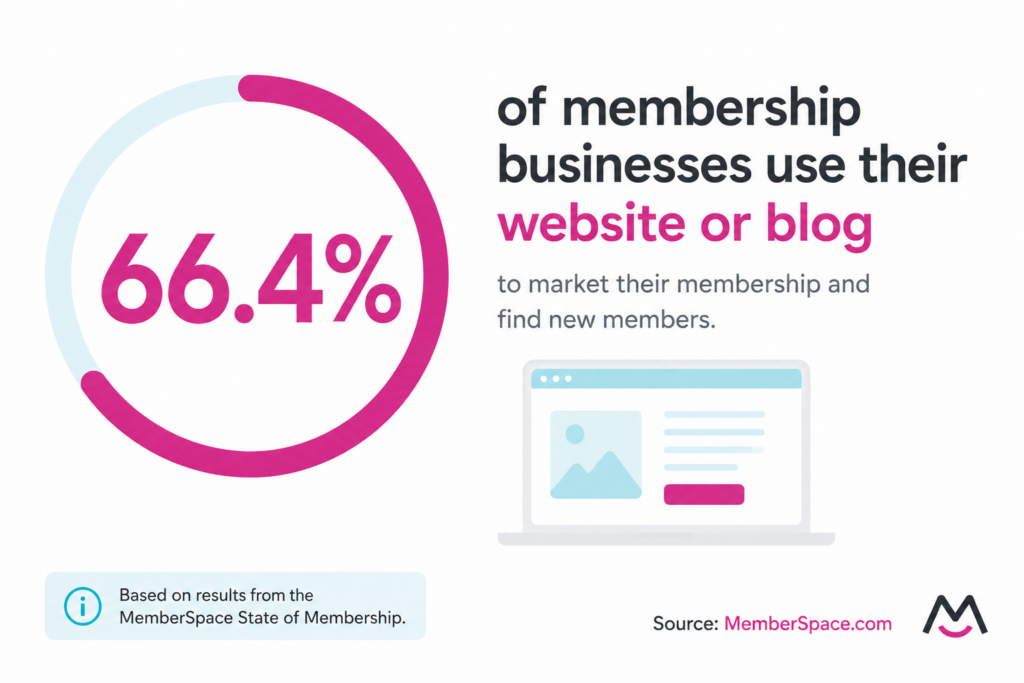
That can be especially valuable if your website is already helping you find customers. In our State of Membership research, 66.4% of membership businesses said they used their website or blog to market their membership and find new members.
The real question isn’t whether you literally “own” your audience. It’s how much control you want over the relationship and where it happens.
3. Do you already have a website?
This can dramatically change the decision.
Platform
If you don’t have a website and don’t particularly want one, a hosted platform has an obvious advantage. You can create an account, set up your community, invite people, and start selling without building a separate website first.
My own website
If you already have a website, the calculation changes. You already have a home for your brand, content, and potentially your audience, so keeping your community there can make the overall experience more connected.
Your website may already include basic membership functionality, or you can add dedicated membership software if you eventually need more advanced features.
And building on your website doesn’t necessarily mean hiring a developer. In our State of Membership research, 74.6% of membership owners said they built their membership site themselves.
Having a website doesn’t automatically mean you should build your community there, but it gives you a much stronger reason to consider it.
4. Flexibility
You might be starting with a paid community today. But what will you want to sell two years from now?
Platform
A dedicated platform can be a great fit when community is the primary product. Many give you discussions, events, member profiles, chat, and other community features right out of the box.
The tradeoff is that what you can add in the future depends on what that platform supports.
My own website
Your website can give you more flexibility if you expect the business to expand beyond community. You might eventually add courses, premium content, downloads, events, coaching, or entirely new products.
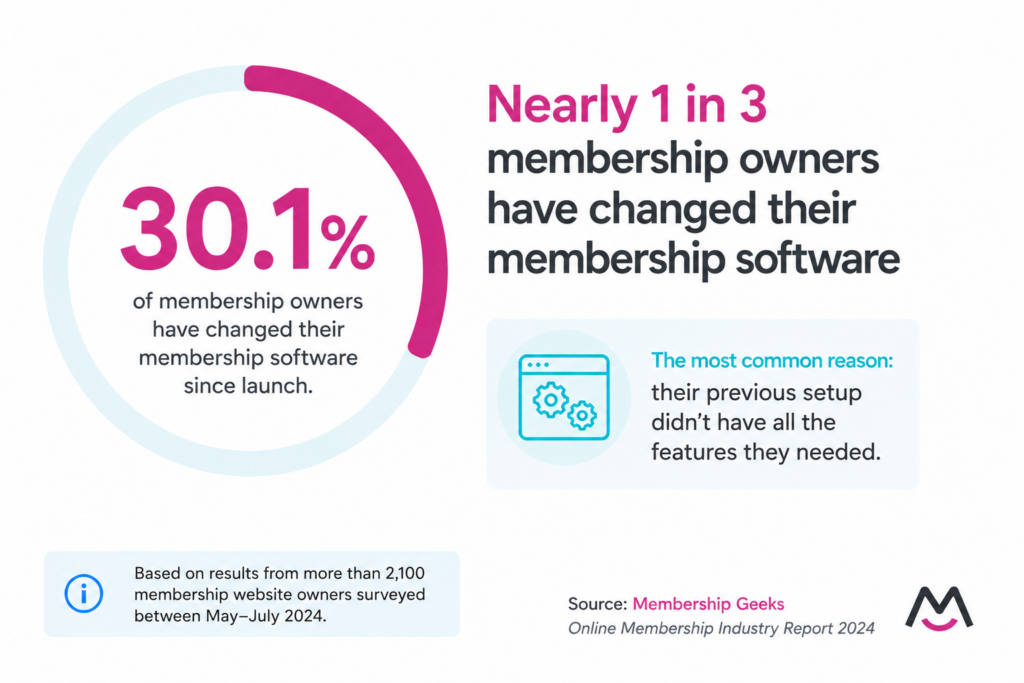
Membership Geeks also found in their Online Membership Industry Report 2024 that 30.1% of membership owners had changed their membership software since launch, most commonly because their previous setup didn’t have all the features they needed.
Think about what you might want to sell tomorrow, not just the community you’re launching today.
5. Is the community your business, or part of your business?
This might be the most important question.
Platform
A dedicated platform can give your community its own home, but that may create another destination for your customers. They might visit your website for your services, another tool for a course, and a community platform to interact with other members.
That separation isn’t necessarily a problem, especially if you want the community to have its own distinct experience. But it does mean asking customers to move between different platforms as they engage with your business.
My own website
Keeping your community on your website can make more sense when it’s one part of an existing business. Someone can discover your content, learn about your services, purchase a product, and participate in your community without your brand being spread across multiple destinations.
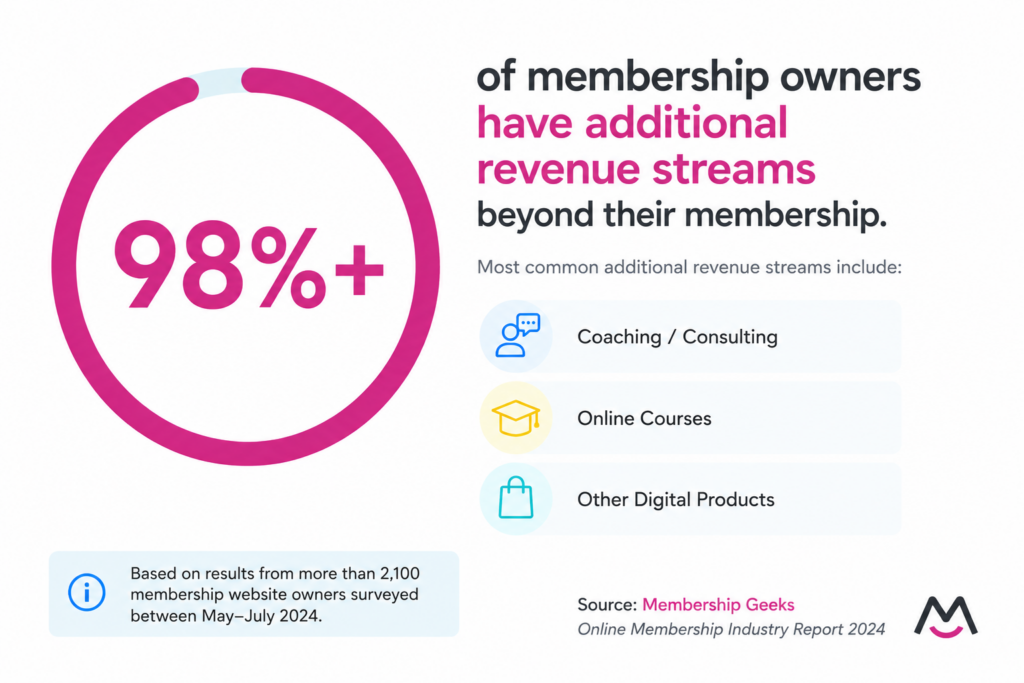
Membership Geeks found in their Online Membership Industry Report 2024 that more than 98% of membership owners had additional revenue streams, with coaching and consulting, online courses, and other digital products among the most common.
The question isn’t whether you can sell other things on a community platform. It’s whether you want your community to be its own destination or part of the business experience you’ve already built.
6. Are you in a rush?
Sometimes speed matters more than everything else.
Platform
Hosted platforms generally have the advantage here. Much of the experience has already been designed for you, so there are fewer decisions to make and fewer pieces to connect.
If you’re trying to validate an idea this weekend, don’t spend three months building the perfect setup for an idea you haven’t proven people will pay for.
My own website
Building on your own website can require more setup, but it doesn’t necessarily mean custom development. No-code membership tools like MemberSpace can add memberships and community to an existing website without having to build the functionality yourself.
If you already have a website, that can make the website route relatively quick while still giving you more control over the experience.
If speed is your number-one priority, choose the simplest option that gets you selling.
7. How much control do you actually want?
More control isn’t automatically better.
Platform
One benefit of a platform is its constraints. Instead of deciding how every part of your community should work, you’re given an experience that’s already been designed.
For someone who wants to focus almost entirely on the community itself, that can be a feature rather than a limitation.
My own website
Your website gives you more freedom over your branding, navigation, content, offers, customer journey, and how your membership connects to the rest of your business.
That flexibility matters to many membership business owners. Our State of Membership research found that important considerations when choosing membership software included member experience and navigation, content security, content organization, design customization and branding, and member billing options.
If you’d rather have most of the experience decided for you, a platform may be the better fit. If you’re hands-on and want more room to shape the business as it evolves, your website gives you that freedom.
So, where should you build your paid community?
If you don’t have a website, don’t want one, want to launch quickly, and primarily need a standalone place for people to interact, a dedicated community platform is probably the easier choice.
If you already have a website, it’s worth exploring what you can build there before moving your community somewhere else. Your website’s built-in membership features may be enough, or you can add more advanced membership software if your needs grow.
Ultimately, the decision comes down to what you value more: the convenience of a dedicated platform or the control and flexibility of building on your own website.
Don’t choose based only on what’s easiest today.
Choose based on the business you’re trying to build.
Frequently asked questions
What happens to my members if I switch community platforms?
Moving from one community platform to another can require migrating member data, rebuilding content and community spaces, and asking members to adjust to a new experience. If your community lives on your own website with MemberSpace, changing website builders is simpler because your MemberSpace account, members, and membership setup can move with you.
Can I use my own domain for a paid community?
Sometimes. Some platforms support custom domains or branded URLs, while others keep your community within their domain or require a higher-tier plan for custom domains. Building the community directly on your website keeps it connected to your existing domain.
Can my community and membership live on the same website?
Yes. For example, MemberSpace lets you manage your membership and create private community spaces directly on your existing website, so members don’t need to leave your site to participate.
Can I change website builders without moving my entire membership?
It depends on how your membership is set up. If it’s tied directly to your website builder’s native membership system, changing builders may require more work. With MemberSpace, you can install MemberSpace on another supported website and bring your existing membership setup with you.
Are community platforms better for mobile users?
Sometimes. Dedicated community platforms often put significant emphasis on mobile experiences and may offer native mobile apps and push notifications. A website-based community can also work well on mobile, but the experience depends on your website design and membership software.
Which option gives me more control over branding and the member experience?
Generally, your own website. A community platform lets you customize your community within the options it provides, while your own website gives you more control over the surrounding design, navigation, content, and customer journey.
