How to sell Canva templates

How to Sell Canva Templates – 5 Steps to Build a Scalable Template Business

If you already create content, work with clients, run a membership, or sell digital products online, Canva templates can become a really natural extension of your business.

We’ve seen business owners use Canva templates to:

  • create new revenue streams
  • support memberships and resource libraries
  • package their expertise into digital products
  • make their services more scalable
  • and give customers ready-to-use business resources

And the nice thing is you don’t need to become a full-time designer to make this work. A lot of successful template sellers are coaches, consultants, educators, marketers, real estate professionals, service providers, and membership owners who simply understand what their audience needs help with.

In this guide, we'll walk through:

Sell your Canva templates!

The easiest way to accept membership payments or one-time charges for digital products like online courses, communities, content libraries, and more — all from your own website!

Get started for free! 5 minutes to set up.

Ways to Sell Canva Templates

There are a few different ways business owners typically sell Canva templates depending on how they want to structure their offers.

Some sellers focus on:

  • individual templates for things like webinar slides, lead magnets, onboarding systems, or social media content
  • curated bundles or collections built around a specific strategy or business need
  • memberships and resource libraries with ongoing access to templates and business resources
  • client resources that support coaching, consulting, branding, or done-for-you services

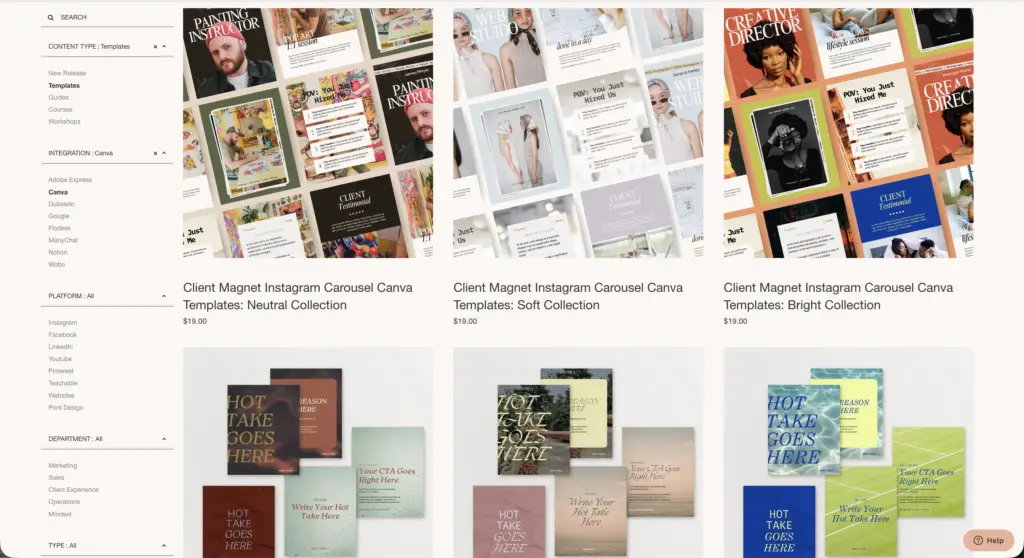
For example, The Creative Template Shop sells curated Canva template collections and business toolkits, available for one-time purchases. 

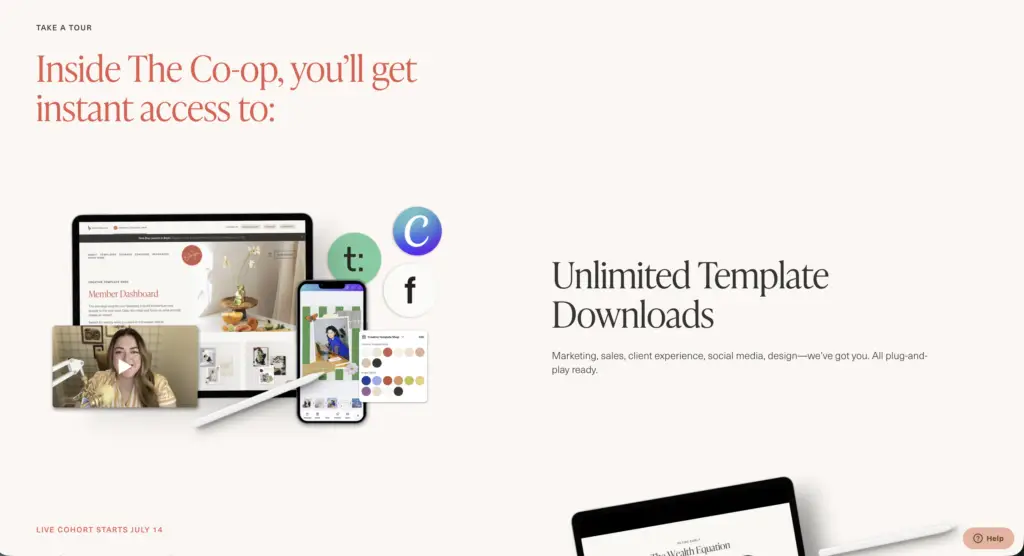
However, all of her templates are also available as a part of her membership subscription, The Co-op (we’ll chat more about this later on in the post). 

the co op template membership

Where to Sell Canva Templates

There are several different places you can sell Canva templates online, but each option comes with different tradeoffs depending on how much control and flexibility you want.

Etsy

Etsy is one of the most popular places to sell Canva templates because people are already searching there for digital products.

It can be a good place to get initial visibility, but it’s also extremely competitive. You also have limited control over branding, customer relationships, and the overall buying experience.

Gumroad & Creative Market

Platforms like Gumroad and Creative Market make it easy to upload and sell digital downloads without needing a full website setup.

These platforms work well for simple product catalogs, but you’re still building your business on someone else’s platform instead of fully owning your audience and customer experience.

Selling Canva Templates on Your Own Website

A lot of business owners eventually move away from marketplaces because they want more control over how they package and sell their products.

Selling Canva templates on your own website makes it much easier to:

  • build your brand
  • collect customer emails
  • create memberships
  • sell digital product bundles
  • offer upsells
  • build client portals
  • create recurring subscription revenue
  • combine templates with coaching, services, or communities

Plus, you’re not competing next to thousands of nearly identical listings.

This is especially helpful if you want to turn templates into part of a larger digital product ecosystem instead of relying only on one-time marketplace sales.

The easiest way to do this is by using MemberSpace to protect your template links, accept payments, and automatically give customers access after signup.

Here’s how to set it up.

How to Sell Canva Templates on Your Own Website – Step-by-Step

Step 1: Set up your website

To start selling Canva templates, you’ll need to set up your own website and install MemberSpace. This is the software you’ll use to sell exclusive access to your templates. It only takes a few minutes to install and works on any CMS.

If you don’t have a website, we’ll set up a simple, one-page site for you during onboarding. 

Your site should focus on clearly showing:

  • what your templates are
  • who they’re for
  • and what’s included
  • a preview of them so people can get an idea of your aesthetic 

This could be a collection of templates, a bundle, or access to a full library.

Once your site is ready and MemberSpace is installed, you’ll be able to start adding your templates and setting up how you want to sell them!

Example: Ladies of Real Estate is a membership for realtors that sells access to a library of Canva templates and other marketing resources.

Sell Canva templates on your website!

The easiest way to accept membership payments or one-time charges for digital products like online courses, communities, content libraries, and more — all from your own website!

Get started for free! 5 minutes to set up.

Step 2: Create your Canva templates

Next, it’s time to create the templates you want to sell.

Most businesses either:

  • design templates completely from scratch
  • or create custom versions of their own existing marketing assets, systems, or client resources

It’s important to make sure you’re creating original templates and not simply reselling someone else’s Canva template design.

Once your template is ready, click the “Share” button inside Canva and choose “Template link.” This creates a shareable link your customers can use to open and customize their own copy of the template.

That template link is what you’ll add into MemberSpace in the next step.

canva template link

Step 3: Add your template links to MemberSpace

This is where you actually add the templates you’re going to sell.

MemberSpace is what lets you turn your Canva template links into something people can pay to access. Instead of sending files or links manually, you’re setting up a private area where your templates live, and only paying customers can get in.

To start, you’ll create a Space, which is just a collection of your templates.

From there, the process is simple:

  • create a new Space
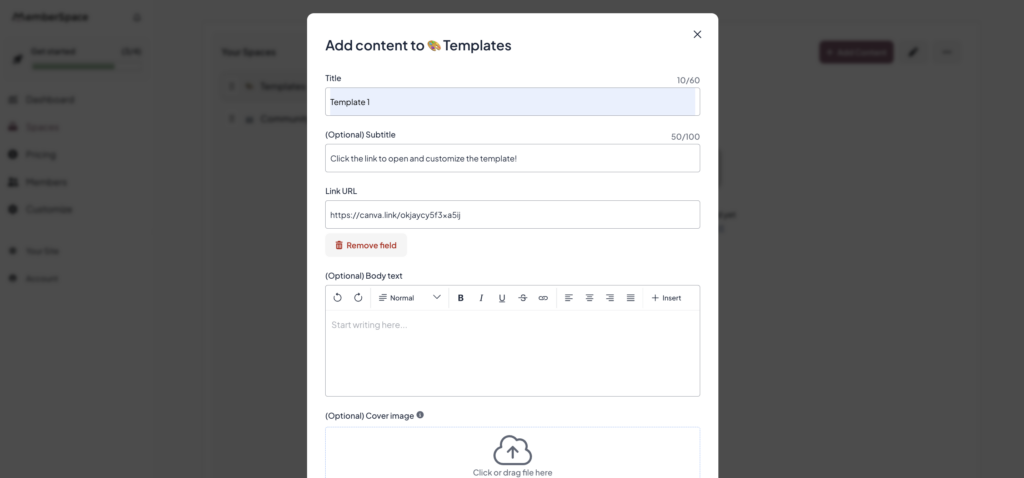
  • click “Add Content”
  • select “Add link”
  • paste in your Canva template link
add canva template links to memberspace
 
After adding your template links, your Space will look something like this example: 
 
selling canva templates with memberspace


Each link is a template your customers will be able to access after they sign up.

As you add more templates, you can organize them however you want. A lot of business owners group them into:

  • categories
  • folders
  • bundles
  • membership libraries
  • client resources

You can also upload cover images so customers can preview templates before opening them, which makes the experience feel much more polished.

Once this is set up, your templates are ready — the next step is deciding how you want to charge for access.


Step 4: Set up your pricing and payments

Now that your templates are added, the next step is deciding how you want to charge for access.
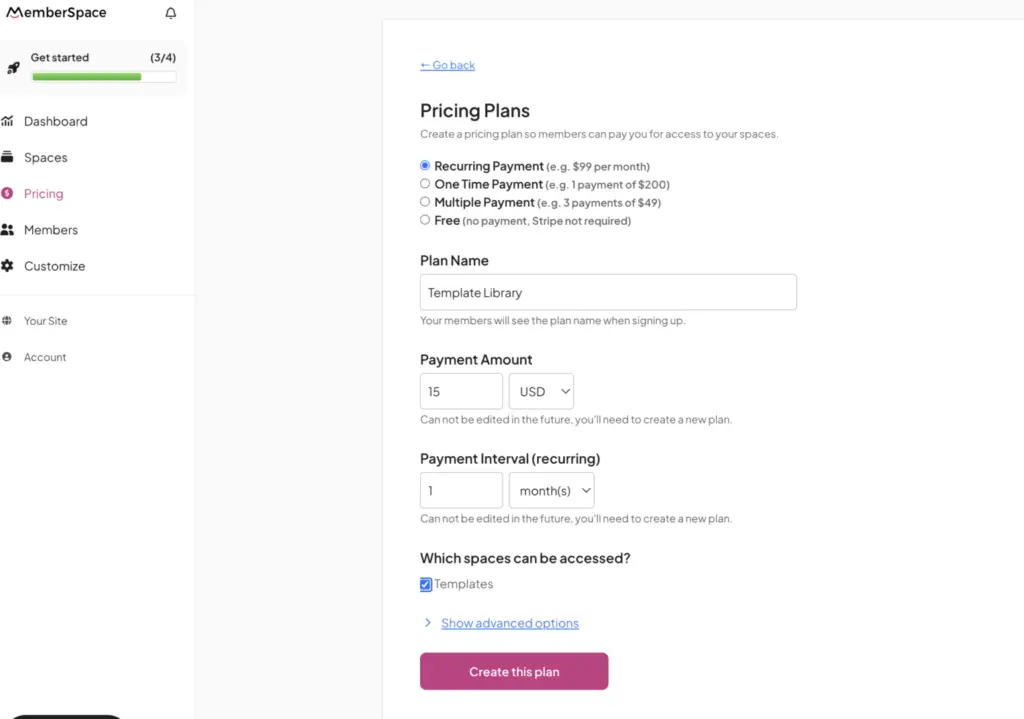
pricing canva templates

MemberSpace connects with Stripe to handle all of your payments, so once that’s set up, you can choose how you want to sell your templates.

You’ve got a few flexible options here, depending on how you want to structure your shop.

You can charge for:

  • one-time purchases if you’re selling individual templates
  • subscriptions if you want to offer access to a full template library
  • payment plans if you’re selling larger bundles at a higher price point
  • or even free access if you want to offer a sample template to grow your email list

A lot of business owners combine multiple pricing models together.

For example, you might:

  • offer a free template to grow your email list
  • sell bundles as one-time purchases
  • and offer a recurring membership for full access to your resource library

You can also add:

  • discount codes
  • free trials
  • limited-time offers
  • multiple pricing tiers


Step 5: Launch your Canva template shop

At this point, everything is set up. Now you just need to add signup links to your website so people can buy your templates. 

For each pricing plan you created, MemberSpace gives you a signup link. This is what you’ll use to trigger the checkout experience.

All you need to do is add those links to buttons on your site, like:

  • your homepage
  • your sales page
  • any landing pages for bundles or collections

When someone clicks one of those buttons, a signup, plan selection, and checkout form will pop up.

From there, they can create an account, enter their payment details, and get access right away.

Once they sign up, MemberSpace automatically gives them access to whichever templates or collections are included in that plan.

Real Examples of Businesses Selling Canva Templates

Here are a few examples of how business owners use Canva templates as part of larger offers and digital product ecosystems.

Ladies of Real Estate

Ladies of Real Estate sells Canva templates as part of a membership designed specifically for real estate professionals.

Members get ongoing access to:

  • social media templates
  • marketing resources
  • educational content
  • business tools

This membership-style approach works especially well because members continue receiving new resources over time instead of making a one-time purchase once.

The Creative Template Shop

creative template shop

The Creative Template Shop sells Canva templates as one-off products, but also through a membership called The Co-Op.

Members get access to:

  • unlimited template downloads
  • courses and trainings
  • workshops
  • implementation support
  • business resources
  • community access

This is a great example of how many successful template businesses eventually grow beyond one-time downloads and into larger membership-based businesses.

Branded by Britt
branded by britt canva templates

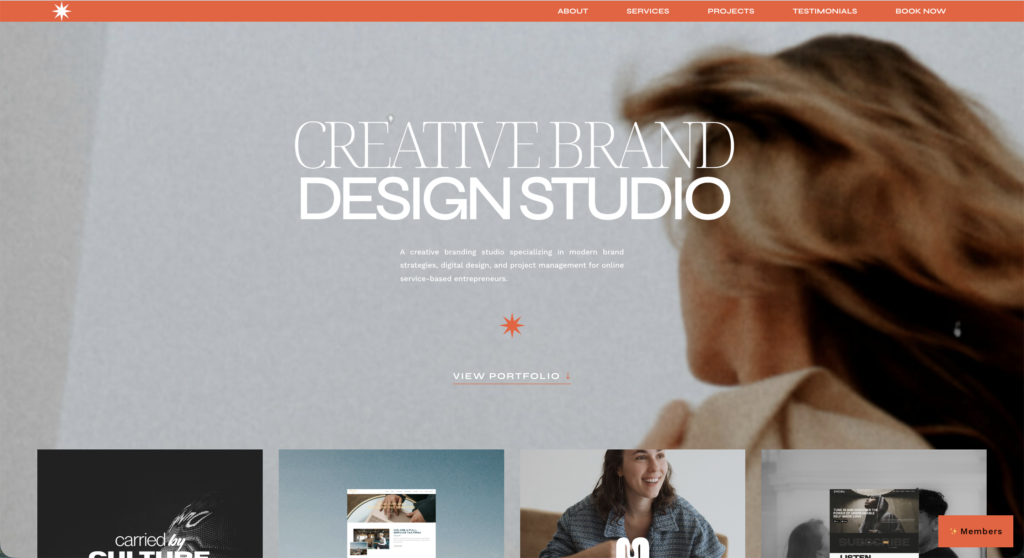
Branded by Britt uses Canva templates as part of her creative branding and design studio.

Her business offers:

  • branding services
  • website design
  • marketing support
  • customizable Canva templates

The templates help clients maintain consistent, polished branding after their project is complete without needing a designer for every update.

This is a great example of how Canva templates can support and scale a service-based business.
Tips for Growing a Canva Template Business

Once your Canva template shop is live, the next step is growing it into a sustainable business.

Here are a few strategies many successful template creators use:

  • niche down into a specific audience or industry
  • create bundles instead of only individual templates
  • offer memberships or recurring subscriptions
  • use free templates as lead magnets
  • build an email list
  • continuously release new collections
  • pair templates with coaching, education, or services
  • create systems of templates that work together

The more your templates solve a specific problem for a specific audience, the easier they’ll be to market and sell.

How to Price Canva Templates

How much you charge for Canva templates usually depends on:

  • how specialized the templates are
  • how much time they save customers
  • how they’re packaged
  • and whether they’re sold individually or as part of a larger offer

For example, a simple Instagram template pack will usually be priced very differently than a niche business toolkit, membership library, or client resource system.

Here are some common pricing structures we see business owners use:

Offer TypeTypical Price Range
Individual Canva templates$9–$29
Small template bundles$29–$99
Large business toolkits$99–$299+
Monthly template memberships$15–$97/month
Premium memberships with coaching/community$100–$300+/month

A lot of business owners also combine pricing models together — offering free templates to grow their email list, selling standalone bundles, and creating memberships with ongoing access to new resources.

And in most cases, pricing is less about the number of templates included and more about the outcome they help customers achieve. A niche marketing toolkit or branded content system that saves customers time and helps them grow their business can usually support much higher pricing than generic templates.

A Quick Note on Licensing

Before you start selling Canva templates, it’s important to be clear about how customers are allowed to use them.

Most template creators include a simple terms section on their website explaining that customers can customize the templates for their own business or client work, but cannot resell, redistribute, or share the original template links.

You don’t need anything overly complicated here — just make the expectations clear so there’s no confusion later.


FAQ

Can you really make money selling Canva templates?

Yes — many creators make money selling Canva templates as standalone products, bundles, memberships, or even as part of larger coaching and service businesses. Some people treat it as side income, while others build full recurring revenue businesses around template libraries and memberships.

Why do people buy Canva templates instead of making their own?

Most people buying Canva templates want to save time and avoid designing everything from scratch. Templates help businesses create professional-looking, consistent content quickly without needing advanced design skills.

What types of Canva templates sell best?

Some of the most popular Canva templates include social media templates, planners, presentations, media kits, lead magnets, and niche-specific marketing templates. Templates designed for specific industries or business types tend to perform especially well.

Where is the best place to sell Canva templates?

A lot of creators start on marketplaces like Etsy because they already have built-in traffic. But many eventually move to selling on their own website so they can build a stronger brand, collect emails, offer memberships, and have more control over pricing and customer relationships.

Can you sell Canva templates on your own website?

Yes — many creators use their own website to sell individual templates, bundles, memberships, and full resource libraries. With MemberSpace, customers can instantly pay for and access your Canva templates directly from your website.

Can you sell Canva templates without Canva Pro?

Yes, but Canva Pro gives you access to more premium design elements and features, which can help you create more polished templates. Many template creators use Canva Pro because it expands the types of templates they can build and sell.

Do Canva template memberships work?

Yes — memberships have become one of the most popular ways to sell Canva templates because they create recurring revenue instead of relying only on one-time sales. Many creators now offer ongoing access to template libraries, monthly downloads, trainings, and other resources through subscription-style memberships.

Is Etsy the best place to sell Canva templates?

Etsy can be a great place to start because people are already searching for templates there. But it’s also highly competitive, which is why many creators eventually expand to their own website where they have more control over branding, pricing, and customer experience.

How much should you charge for Canva templates?

Pricing depends on the type of templates you’re selling and how they’re packaged. Individual templates are usually priced lower, while bundles and memberships can support much higher pricing because they provide more ongoing value.

Can Canva templates become passive income?

Canva templates can create semi-passive income because you can sell the same product repeatedly. But the most successful template businesses still spend time creating new resources, growing their audience, and marketing their products consistently.

What’s the difference between selling templates individually vs through a membership?

Selling templates individually creates one-time revenue, while memberships generate recurring revenue through ongoing access to template libraries and new resources. Many creators eventually combine both models to maximize sales and long-term customer value.

Can you bundle Canva templates with other digital products?

Absolutely. Many creators combine Canva templates with courses, coaching, resource libraries, swipe files, communities, and other digital products to create more valuable offers and increase revenue.

Final Thoughts

Hosting and selling your own Canva templates can give you more control and income potential compared to uploading them to a marketplace.

With tools like MemberSpace and Canva, anyone can start their own template shop regardless of your tech experience. It does take consistent effort to promote your templates, grow an audience, and bring in sales over time. But the payoff of passive template income is well worth it!


Sell Canva templates!

The easiest way to accept membership payments or one-time charges for digital products like templates, online courses,  content libraries, and more — all from your own website!

Get started for free! 5 minutes to set up.