
Creating a paid Discord server is one of the fastest ways to monetize an online community.
Whether you’re building a niche group, coaching program, or creator community, charging for access turns your Discord into a recurring revenue stream—not just a place to chat.
While Discord does offer built-in server subscriptions, there’s a big downside: they take a cut of your revenue and limit how you control your pricing and members.
A better approach is to sell access through your own website using a membership platform like MemberSpace. This way, you keep more of what you earn and have full control over your community.
In this guide, you'll find:
Launch a paid Discord server!
The easiest way to accept membership payments or one-time charges for digital products like online courses, communities, content libraries, and more — all from your own website!
Get started for free! 5 minutes to set up.
How to Create a Paid Discord Server – Step-by-Step
The easiest way to run a paid Discord server is to sell access through your website and use a membership platform to manage payments and member access.
Here’s how to set it up:
Step 1: Create Your Discord Server
First, you need to set up your Discord server, which will serve as your online community where members can chat via text, voice, or video, and share files or media in different channels. Kind of like Slack or Whatsapp.
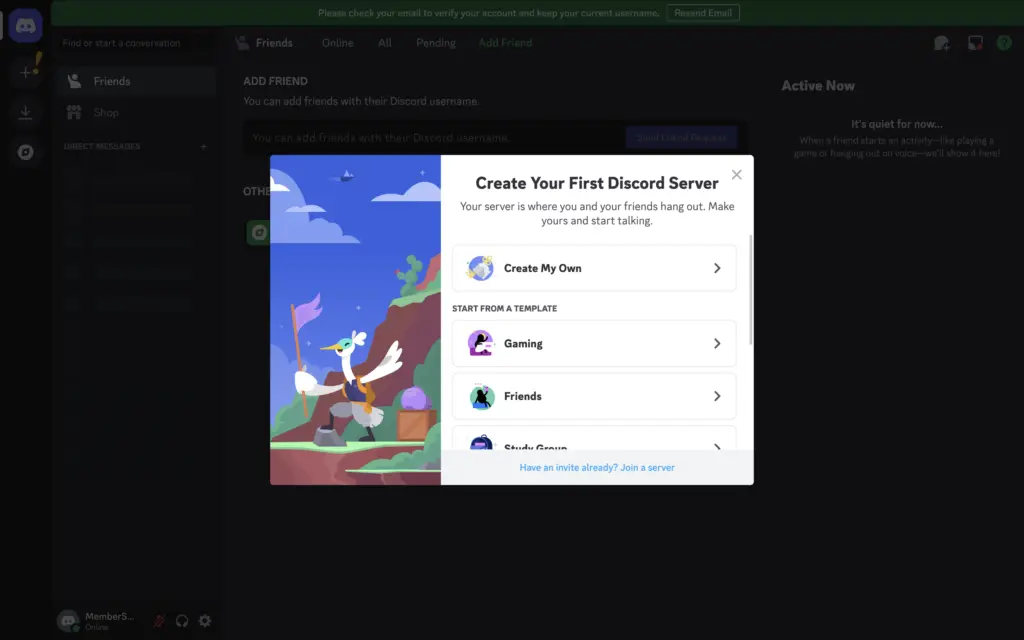
After you set up your server, there are a few things you’ll need to do:
- Set up categories and channels – This is how you’ll organize your discussions into different spaces. For example:
- A welcome channel to greet new members
- A rules channel to set community guidelines
- Topic-specific channels based on your niche (fitness, gaming, business, etc.).
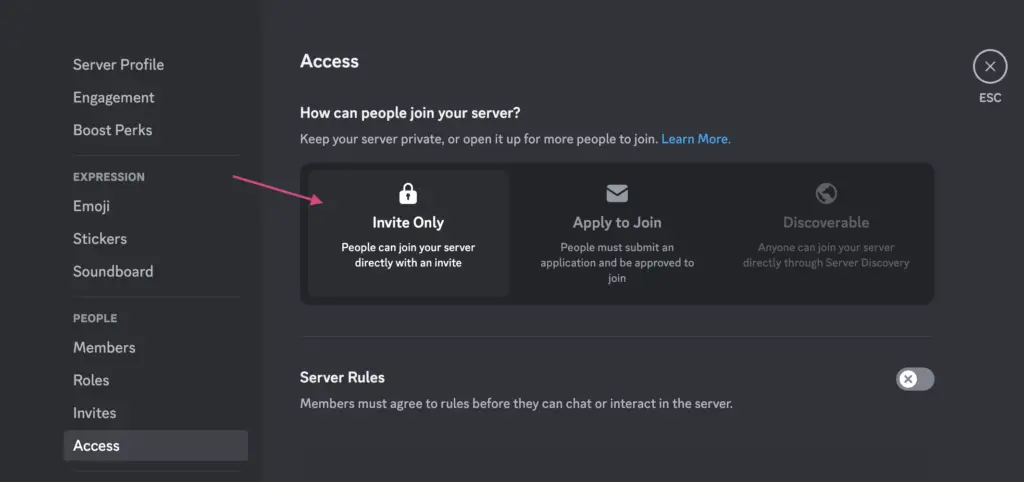
- Set your server to “Invite Only” – This ensures only paying members can access your community.
- Create an invite link and set it to never expire, so you don’t have to create new links for every new member that signs up.
Once your server is set up, it’s time to connect it to your website and start charging for access!
Step 2: Set up a MemberSpace Account
To accept payments for your paid Discord server, create a MemberSpace account for free and install it on your website.
If you don’t already have a website, MemberSpace can even generate a simple one-page website for you.
MemberSpace works with virtually any website platform and only takes a few minutes to install using a simple snippet of code.
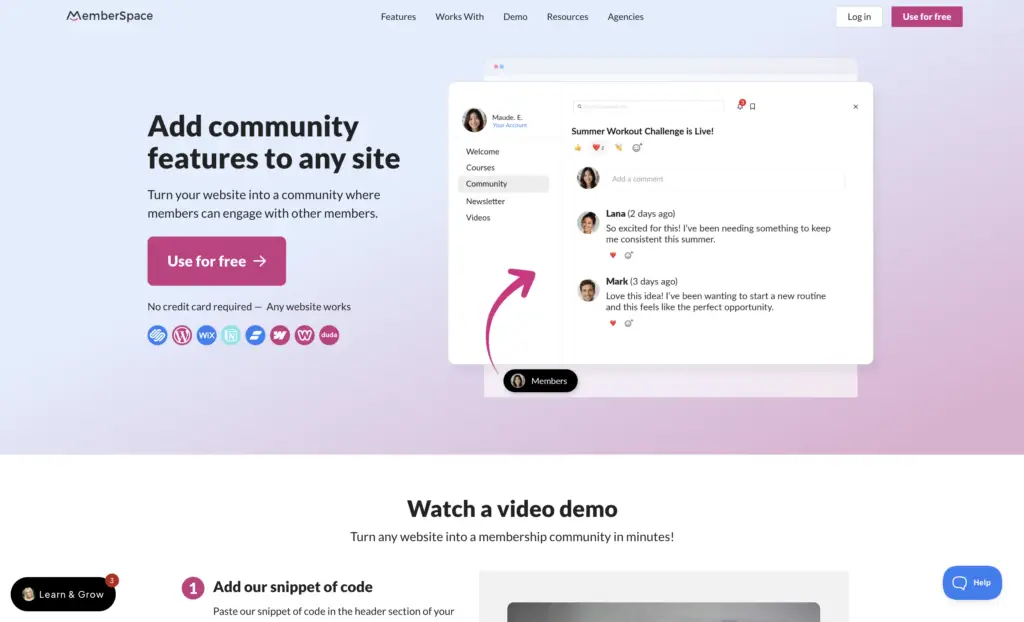
Many community platforms require you to host your members on their platform, but MemberSpace MemberSpace allows you to sell access directly from your own website while still using Discord as the place where your members meet up.
This gives you more flexibility to:
- control your branding
- create membership tiers
- manage members
- sell additional digital products
- grow your business beyond Discord over time
Many community owners also use MemberSpace to monetize their communities with:
- courses
- coaching
- newsletters
- resource libraries
- workshops
- premium content
Step 3: Protect Your Discord Community Link
Now it’s time to connect your Discord invite link to your membership.
Inside MemberSpace:
- Create a new Space
- Click “Add Content”
- Choose the “Link” option
- Paste your Discord invite link

That’s it. Once members sign up, they’ll be able to securely access your Discord community from inside their account!

Step 4: Set a Price for Access
Now it’s time to decide how you want to charge for your Discord community.
With MemberSpace, you can offer:
- recurring subscriptions
- one-time payments
- free memberships
- free trials
- discounts and promo codes
- multiple membership tiers
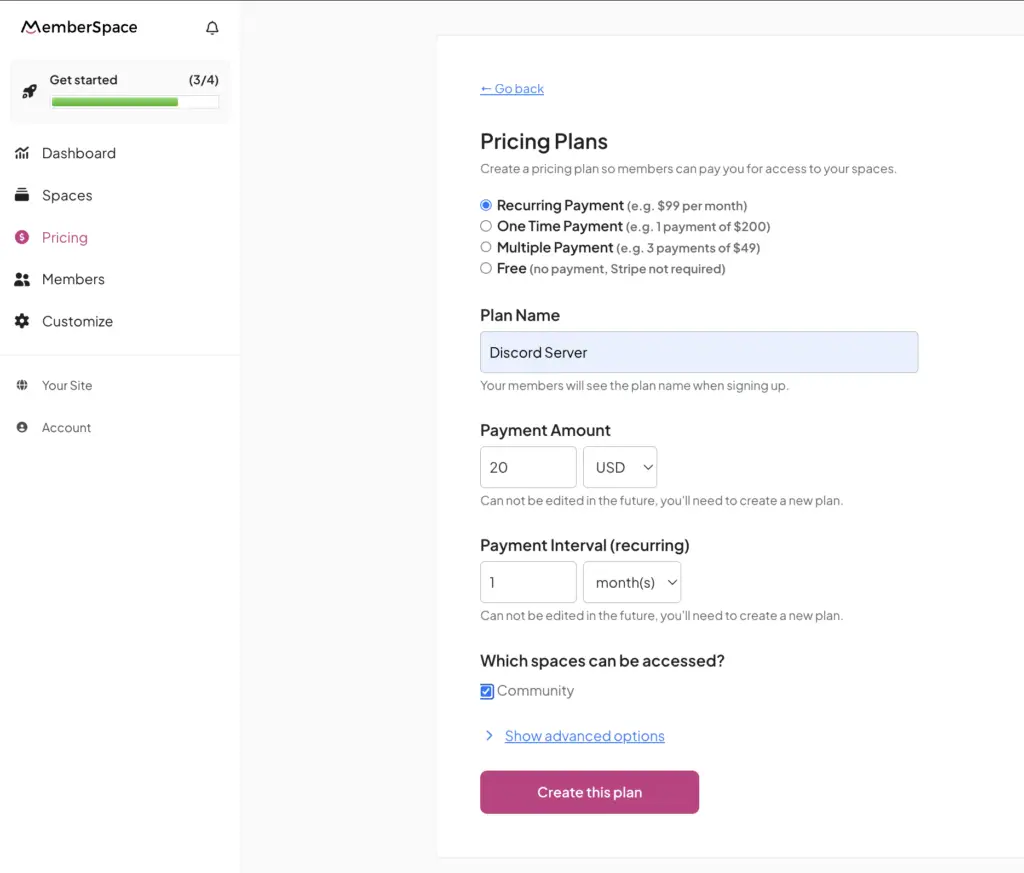
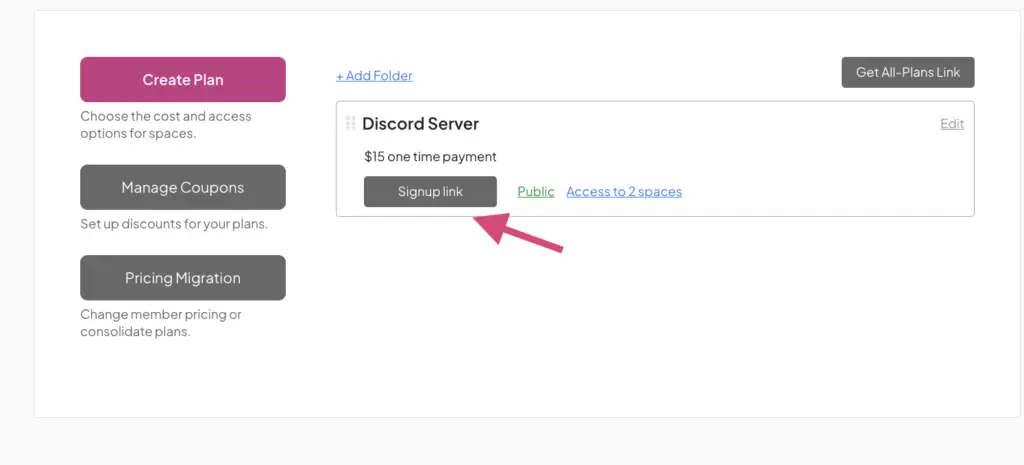
Once your pricing is set, grab your signup link and add it to your website.
Place it:
- On CTA buttons like “Join the Community”
- On your homepage or landing page
- In emails or social media bios
When someone signs up and pays, they’ll immediately get access to your Discord invite link.
Most paid Discord communities charge anywhere from $5 to $50+ per month depending on the value they provide.
Here’s a general breakdown:
| Community Type | Typical Monthly Price |
|---|---|
| Creator or fandom communities | $5–15/month |
| Fitness & accountability groups | $10–30/month |
| Coaching or mastermind communities | $50–200+/month |
| Trading or investing groups | $20–100+/month |
Pricing usually depends on:
- community engagement
- accountability
- live events
- exclusive content
- member access
- additional resources or programs
Offering Tiered Memberships
Many successful Discord communities create multiple membership tiers instead of offering just one plan.
For example:
- Free tier → basic community access
- Premium tier → exclusive channels, resources, or events
- VIP tier → coaching, direct access, or bonus content
Free tiers can be especially effective because they allow people to experience your community before upgrading to a paid plan later.
As your community grows, tiered memberships also make it easier to increase revenue without constantly needing new members.
Once your pricing is set, simply add your signup link to:
- your homepage
- CTA buttons
- landing pages
- emails
- social media bios
Step 5: Automate New Member Invites
As soon as members sign up and pay, they’ll be able to access your Discord invite link from inside their account.
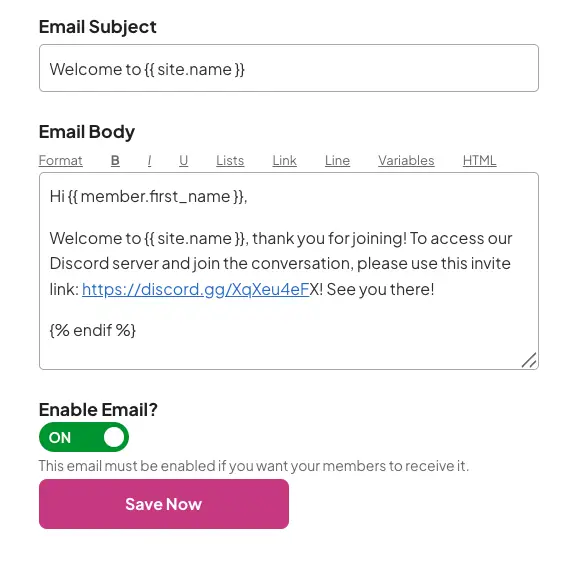
But to create a smoother onboarding experience, you can also automatically send new members a welcome email with their Discord access link.
Inside MemberSpace:
- Go to Customize → Notification Emails
- Select “Add Welcome Email per Plan”
- Add your Discord invite link
Community tip: As your community grows, keeping members active becomes one of the biggest factors in reducing churn and increasing retention. Here are additional strategies to increase member engagement over time.
Discord Subscriptions vs MemberSpace
There are a few different ways to monetize a Discord community.
Some creators use Discord’s built-in subscription feature, while others use external membership platforms that allow them to sell access through their own website.
While Discord subscriptions are simple to set up, many community owners eventually switch to a more flexible platform like MemberSpace so they can have greater control over pricing, branding, member management, and additional products.
| Feature | Discord Subscriptions | MemberSpace |
|---|---|---|
| Use your own website | No | Yes |
| Full branding control | Limited | Yes |
| Flexible pricing options | Basic | Advanced |
| Free trials | Limited | Yes |
| One-time payments | No | Yes |
| Recurring subscriptions | Yes | Yes |
| Multiple membership tiers | Limited | Yes |
| Free membership tiers | No | Yes |
| Sell courses, downloads, newsletters, coaching, etc. | No | Yes |
| Apple Pay & Google Pay | No | Yes |
| Transaction fees | Higher revenue share | Lower transaction fees |
| Full member management | Discord only | Yes |
Discord subscriptions can work for simple communities that only need basic recurring payments inside Discord.
But many community owners eventually want more flexibility — especially if they plan to offer:
- courses
- coaching
- newsletters
- downloads
- workshops
- resource libraries
- multiple membership tiers
- free and paid plans
Using MemberSpace allows you to build your business around your own website while still using Discord as the community hub.
Why Many Businesses Prefer Owning Their Community Platform
One challenge with relying entirely on platform-native subscriptions is that your business becomes tied to that platform’s ecosystem.
Many membership businesses prefer using their own website because it gives them more control over:
- branding
- customer relationships
- email marketing
- upsells
- pricing
- additional products
This also makes it easier to grow beyond Discord later without needing to migrate your audience.
As more businesses shift toward owned communities and recurring memberships, we’re seeing more creators focus on building direct relationships with their audience instead of relying entirely on third-party platforms. In fact, many of the fastest-growing businesses today are built around community.
Ways to Monetize a Discord Community
There are several ways creators and businesses can make money from a Discord community.
Charge for Community Access
The most common approach is simple: members pay monthly or annually to access your private Discord server.
This works especially well for:
- creator communities
- fitness groups
- coaching programs
- mastermind groups
- gaming communities
- accountability groups
Offer Tiered Memberships
Many communities increase revenue by offering multiple membership levels with different perks and access.
For example:
- free communities
- premium channels
- VIP coaching access
- bonus resources
- members-only events
Bundle Additional Content
Many successful Discord communities combine community access with:
- courses
- templates
- workshops
- newsletters
- content libraries
- live calls
This makes the membership more valuable and helps justify higher pricing.
Host Events & Challenges
Live events help communities stay active and increase retention over time.
Examples include:
- Q&As
- accountability challenges
- virtual meetups
- workshops
- live training sessions
One example of this model in action is Micro Squad, a fitness membership community that combines private Discord access with themed workouts, accountability, virtual events, and exclusive member experiences.
Launch a paid Discord community!
The easiest way to accept membership payments or one-time charges for digital products like online courses, communities, content libraries, and more — all from your own website!
Get started for free! 5 minutes to set up.
Example of a Paid Discord Community (The Micro Squad)
One example of a successful paid Discord community is The Micro Squad, a fitness membership community created by Sam.
Instead of using Discord as just a chat room, the community combines:
- themed workouts
- accountability
- virtual events
- fandom culture
- fitness programs
- member interaction
Members get access to private Discord channels where they can stay motivated, connect with other members, and participate in discussions beyond fitness alone.
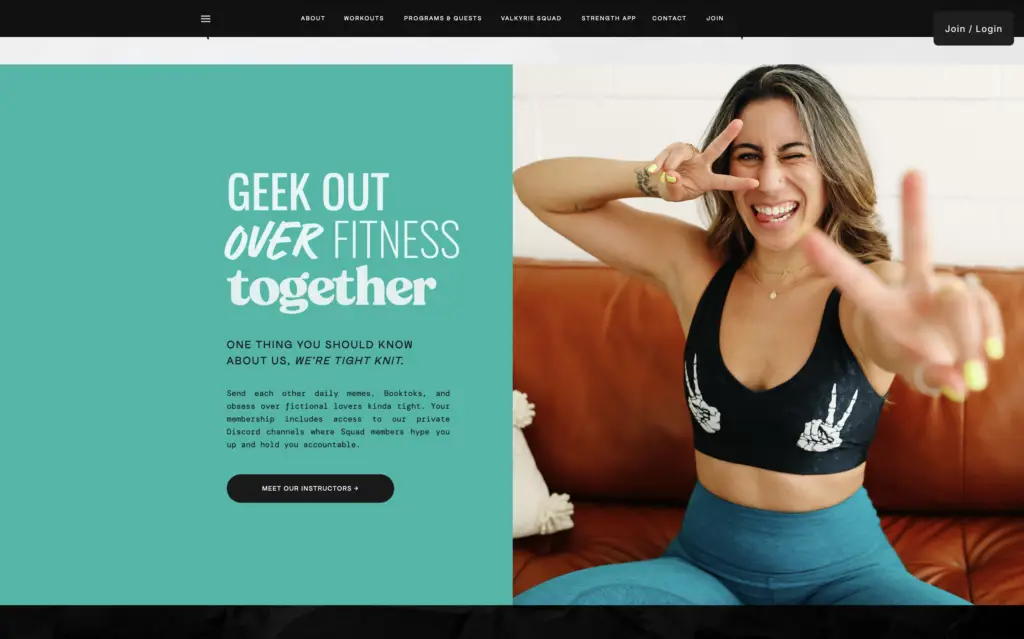
As Sam describes it:
“One thing you should know about us, we’re tight knit. Send each other daily memes, BookToks, and obsess over fictional lovers kinda tight. Your membership includes access to our private Discord channels where Squad members hype you up and hold you accountable.”
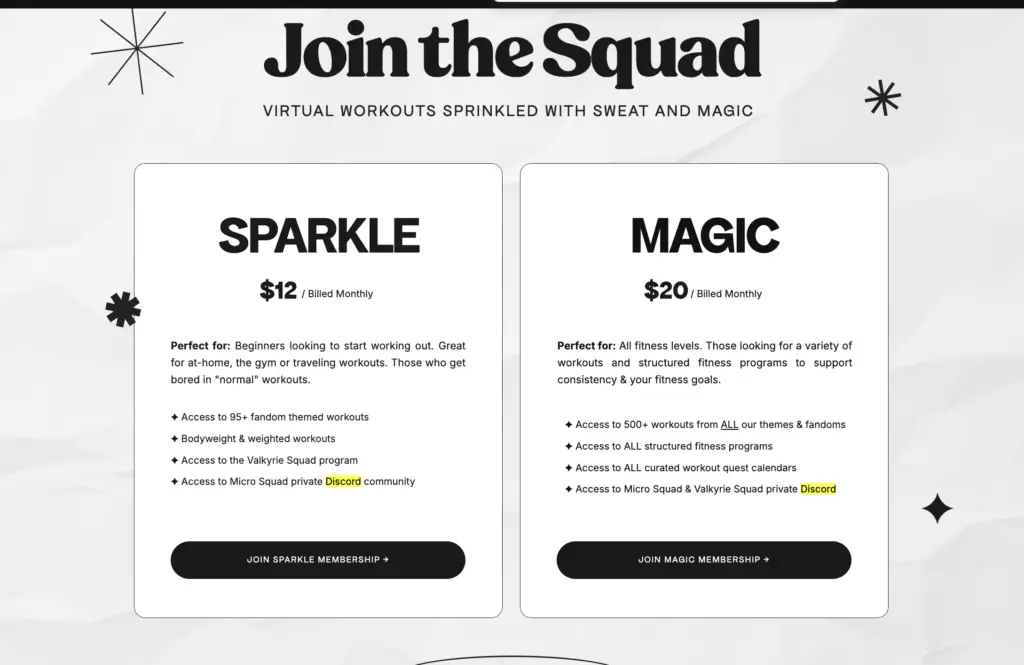
The community offers multiple membership tiers, including:
- Sparkle → $12/month
- Magic → $20/month
Higher-tier members get access to:
- additional workouts
- structured programs
- curated workout calendars
- expanded Discord access
- exclusive resources
How Micro Squad Uses Its Paid Discord Community to Keep Members Engaged
One reason many paid Discord communities struggle is because they focus too much on content and not enough on connection.
Micro Squad takes a different approach.
Instead of using Discord as just a chat server, the community is designed around accountability, interaction, and shared interests that keep members engaged long-term.
Members use the Discord community to:
- share workout progress
- encourage each other
- join virtual workouts
- participate in challenges
- discuss books, memes, and fandoms
- build real friendships
The community also hosts members-only meetups, announcements, swag drops, and special events directly through Discord, giving members ongoing reasons to stay active.
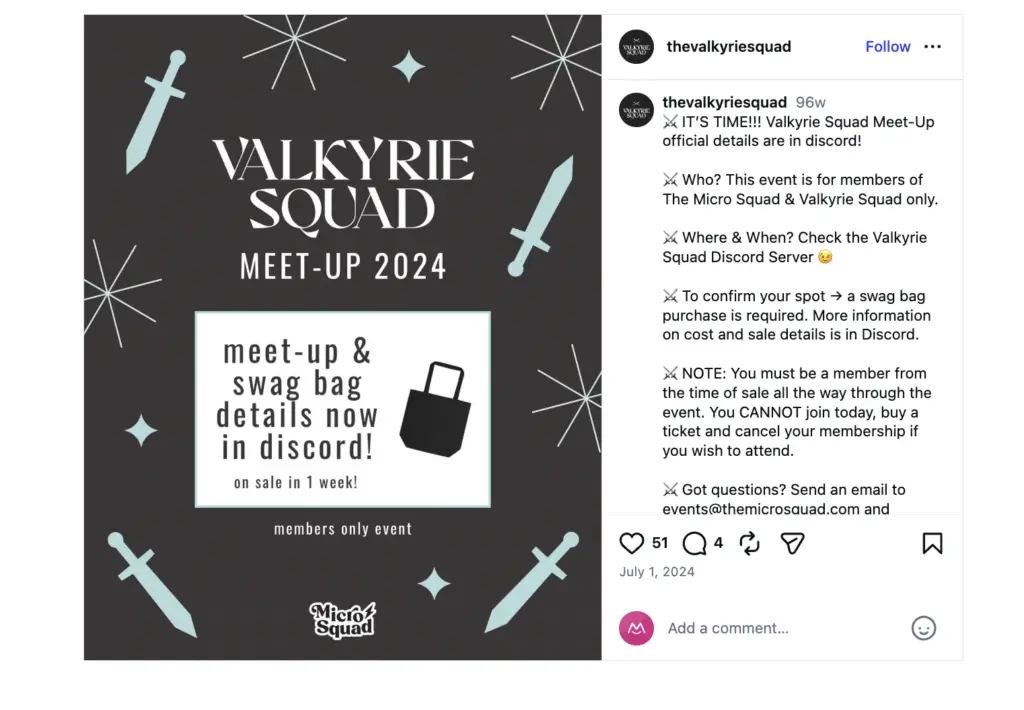
One member shared:
“The Discord community is amazing. The other Valkyries are so accepting and caring.”
They also mentioned things like virtual workouts, gift exchanges, art nights, and accountability support during difficult mental health days.
That’s what makes successful paid Discord communities different — they create belonging and ongoing interaction, not just another place to chat.
Tips for Managing Your Paid Discord Server
Once your paid Discord server is up and running, here are a few ways to keep it organized and running smoothly:
Monitor who joins your server
Since Discord invite links can technically be shared, it’s a good idea to check your member list every so often and remove anyone who hasn’t paid. This helps keep your community exclusive to paying members.Define member roles and permissions
Decide what each type of member can access, who they can tag, and what they can manage. Discord offers moderation tools and permission settings to help manage private communities.Offer multiple pricing tiers
With MemberSpace, you can set up different membership tiers, so after you launch, consider adding a premium plan with extra perks like:- Access to exclusive virtual events
- Private Q&A sessions
- VIP-only content or resources
Add a rules channel
Set clear community guidelines from the start by creating a rules channel. This helps keep things organized, respectful, and enjoyable for everyone.Customize your server with apps, integrations, and bots
Discord has tons of built-in features to help you manage and grow your community. Some ideas:- Use a moderation bot (like MEE6 or Dyno) to automate rule enforcement
- Add a polling bot to get feedback from members.
- Integrate YouTube and other platforms to connect your Discord with your other content.
FAQ
Can you charge for a Discord server?
Yes, you can charge for access to a Discord server by selling memberships through your website and giving paying members access to your invite link.
How much should I charge for a Discord server?
Most paid Discord communities charge between $5 and $50 per month, depending on the value provided.
Does Discord take a percentage of subscriptions?
Yes, Discord takes a percentage if you use their native subscription feature – 10 percent – which is why many creators use external tools instead.
What’s the best way to monetize a Discord server?
The most effective approach is to combine paid access with additional value like content, coaching, or exclusive resources.
Do I need a website to run a paid Discord server?
Yes, you’ll need a website (or a simple landing page) to collect payments and manage member access.
Final Thoughts
Setting up a paid Discord server is a great way to build a thriving, members-only community. And with MemberSpace, you can charge for access, automate invites, and even offer other exclusive content (like courses, newsletters, or bonus resources) alongside your paid Discord server!
Create your paid Discord server!
The easiest way to accept membership payments or one-time charges for digital products like online courses, communities, content libraries, and more — all from your own website!
Get started for free! 5 minutes to set up.
