

Why Squarespace SEO Matters for Membership Businesses
Memberships thrive on consistency. Consistent value. Consistent engagement. Consistent new signups.
SEO supports that last piece in a way social platforms simply don’t. When you rank for topics your ideal members are actively searching for, you create a steady stream of new people discovering your work because it’s useful, not because you posted at the right time of day.
And the best part is that it compounds. A blog post you write today can still bring in members six months from now. Sometimes even years later. That kind of long-term return is rare in online business.
If you’re using Squarespace with MemberSpace, the setup is pretty clean. Your public blog content brings people in through search. Your protected content turns the right readers into paying members.
Is Squarespace Good for SEO?
Short answer: yes.
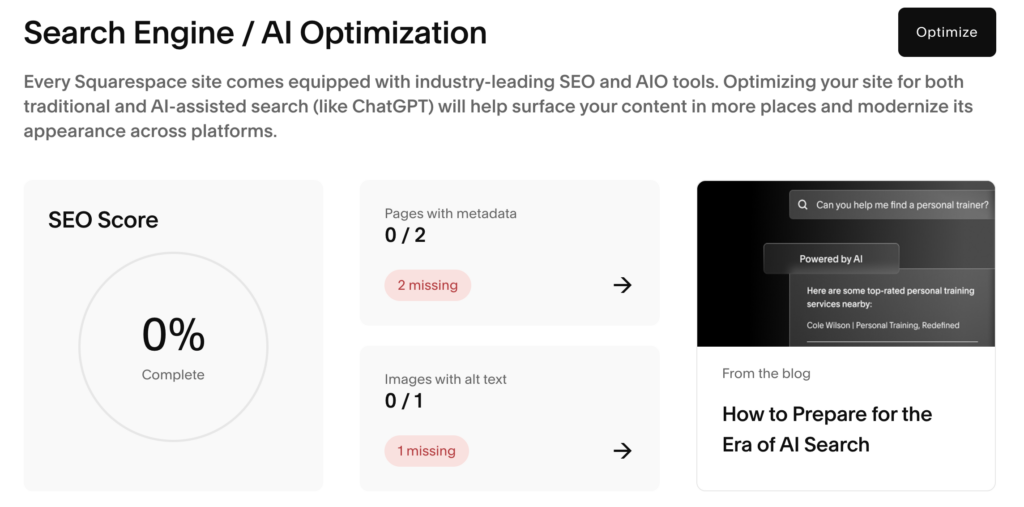
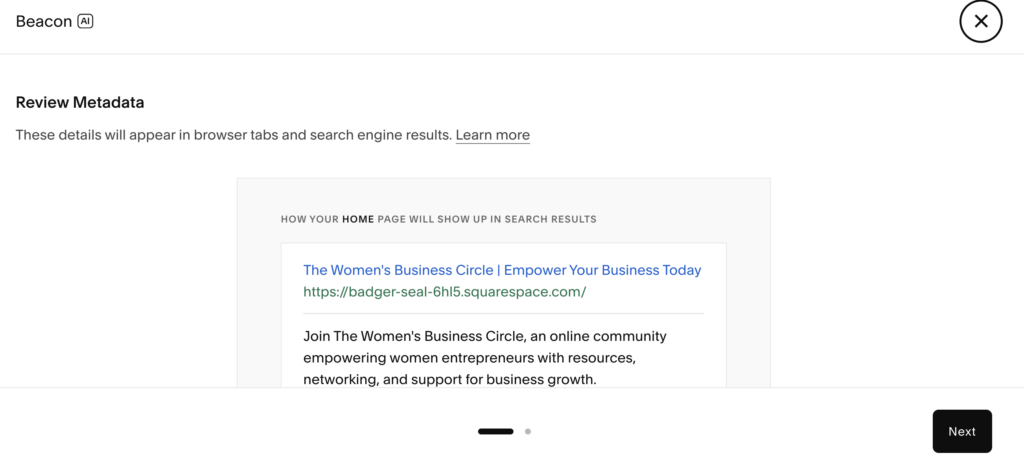
Squarespace gives you everything most membership and digital product businesses actually need. You get clean URLs, built-in SSL, mobile-friendly templates, editable page titles and descriptions, automatic sitemaps, and solid blogging tools. Squarespace also has SEO/AI Optimization tools built in, which is a nice touch!
Is it endlessly customizable? No. But most creators don’t need endless customization. They need clarity around what they want to rank for and consistency in publishing helpful content.
If your Squarespace SEO strategy is focused and your niche is specific, ranking is absolutely possible.
Squarespace SEO Foundations
Before worrying about advanced tactics, make sure the basics are solid.
First, write clear page titles and descriptions. Every page should explain exactly what it is. If your homepage title just says “Welcome,” you’re missing an opportunity. A title like “Beginner Strength Training Membership | Build Consistency at Home” tells both Google and real people what you do.
Next, clean up your URLs. Squarespace lets you edit them, and you should. Keep them short and readable. Something like yoursite.com/beginner-watercolor-guide is much stronger than a long string of random words and numbers.
You’ll also want to connect your site to Google Search Console and submit your sitemap. Squarespace creates one automatically, so you’re really just helping Google crawl your content properly. It sounds technical, but it’s a one-time setup that supports everything else.
Finally, check your mobile experience. A large percentage of membership signups happen on phones. Make sure your buttons are easy to tap, text is readable, and images aren’t slowing things down. SEO isn’t just keywords. It’s overall experience.
How to Find the Right Keywords for Your Membership
This is where people tend to overcomplicate things. You don’t need expensive software to get started.
Open Google and type in your main topic. Look at the autocomplete suggestions, the “People also ask” box, and the related searches at the bottom of the page. Those are real queries from real people.

If you run a budgeting membership, you might see searches like “how to start a budget for beginners,” “simple monthly budget template,” or “how to stop overspending.” Each of those is a potential blog post.
The key is making sure every post connects naturally to your paid offer. If your membership includes monthly budgeting templates, that’s an easy bridge. You’re not forcing a sale. You’re offering the next logical step.
The Blog Strategy That Turns Traffic Into Members
Let’s keep this simple and practical.
First, solve one specific problem per post. Broad content rarely ranks well. Specific content does. “How to Get Fit” is too general. “How to Start Strength Training at Home (Beginner Guide)” is much clearer and more likely to match a search.
Specific topics attract specific people. And specific people convert better.
Second, add a clear path to your membership. Don’t assume readers will connect the dots on their own. Inside your post, mention your membership naturally. You might say, “Inside the membership, we go deeper into this,” or “Members get access to the full template library.” It doesn’t need to feel pushy. It just needs to be visible.
Third, protect your premium content. This is where MemberSpace works well with Squarespace. You can share foundational knowledge publicly while keeping advanced tutorials, downloadable templates, or a resource library inside your member area. Your blog builds trust. Your membership delivers depth.
On-Page Squarespace SEO Checklist
When you publish a post, run through a simple checklist.
Make sure you have one clear H1 headline. Include your main keyword naturally in the first paragraph and in at least one subheading. Use a short, readable URL. Add internal links to related posts and at least one helpful external link. Fill in image alt text. Write a custom meta description. And most importantly, include a clear next step that connects to your membership.
We created an SEO checklist you can download, too.
SEO for Squarespace Membership & Subscription Sites
If you run a membership or subscription site on Squarespace, SEO requires a slightly different approach.
Unlike paid ads that interrupt someone mid-scroll, SEO captures high‑intent traffic. When someone searches on Google, they’re actively looking for a solution. That intent is powerful — and it’s why organic search visitors often convert at much higher rates than traffic from ads or social media.
But membership sites face a structural challenge.
Most of your best content is gated.
That means:
- Search engines can’t fully access it
- Individual lessons or resources don’t rank
- Potential members never discover what’s inside
If your entire value proposition lives behind a login wall, Google has very little to index.
The Smarter Approach: Public Landing Pages for Private Content
Instead of trying to make gated pages rank, focus on creating strong public-facing landing pages for each product, course, or membership tier.
Think of these pages as:
- SEO entry points
- Conversion-focused previews
- Bridges between search traffic and your paid content
Each landing page should clearly explain:
- Who the product is for
- What transformation or outcome it delivers
- What’s included
- Why it’s different
This allows you to rank for specific, high-intent keywords — while keeping your premium content protected.
We recently shared a deeper breakdown of this strategy in our newsletter, including specific tips for MemberSpace users and how to handle indexing for gated pages.
If you run a subscription-based site, it’s worth reading here.
A Practical SEO Tip Most People Skip
One of the biggest mistakes we see is spending months trying to rank for a keyword without validating whether it actually converts.
A smarter strategy?
Test demand first.
Running a small Google Ads campaign for your target keyword can quickly show you:
- Whether people click
- Whether they sign up
- Whether they buy
Once you know a keyword drives real conversions, you can confidently invest in ranking for it organically. When you eventually rank, that traffic compounds over time.
Advanced Squarespace SEO Tips (When You’re Ready)
Once you’ve published a solid base of content, you can build more structure around it.
Creating a pillar post is a strong next step. This is a comprehensive guide around your core topic, like “The Complete Beginner’s Guide to Freelance Writing.” Then you write smaller posts that explore subtopics and link back to that main guide. This helps search engines understand your site and keeps readers exploring longer.
Adding FAQ sections can also help you show up for additional search terms. Think about the questions members ask you repeatedly. Answer them clearly and directly at the end of relevant posts.
And don’t forget to update older content. Improve headlines, clarify explanations, add internal links, and strengthen the connection to your membership. Sometimes small updates lead to noticeable traffic increases.
How Long Does Squarespace SEO Take?
Usually a few months, AT LEAST.
Three to six months is common before you see steady traction, especially if you’re publishing consistently. In smaller niches, it can happen faster. In more competitive spaces, it may take longer.
SEO feels slow at first because the results aren’t immediate. But once your content starts ranking, it builds on itself. That’s the part most people never reach because they quit too early.
Squarespace SEO Mistakes That Cost You Membership Sales
A few patterns show up often.
Some creators write content no one is actually searching for. Others forget to mention their membership entirely. Some give away every advanced resource publicly and leave no reason to join. And many publish a handful of posts, see little movement, and stop.
SEO rewards consistency. Membership businesses reward consistency. There’s a clear overlap there.
Frequently Asked Questions About Squarespace SEO
Is Squarespace good for SEO compared to WordPress?
For most membership and digital product sellers, yes. WordPress offers more technical flexibility, but Squarespace is fully capable of ranking when you use its built-in features properly. For many creators, the simplicity is actually an advantage.
How do I improve SEO on Squarespace?
Start with clear page titles, focused keywords, consistent blog content, and internal linking. Submit your sitemap, improve mobile experience, and make sure each post has a clear purpose. Build from there.
Can I build a membership site on Squarespace?
Yes. Many creators use MemberSpace to protect content, manage recurring payments, and create flexible membership areas without rebuilding their entire site. It keeps your public content open for search while allowing you to monetize premium material.
How long does Squarespace SEO take to work?
Most sites see meaningful progress within three to six months. Consistency matters more than volume. One strong post per week is better than ten rushed ones.
What’s the best SEO strategy for selling digital products?
Create content around real problems your audience is already searching for. Offer helpful guidance, capture emails when possible, introduce your membership or product naturally, and keep premium value protected. The structure is simple. The execution just takes consistency.
Final Thoughts: Traffic Is Only Step One
Squarespace SEO helps people find you. That’s important.
But growth happens when you give those people a clear next step. Your public content builds trust. Your membership delivers depth. Your system ties it together.
If you’re already on Squarespace, you don’t need a new platform. You need a focused content strategy and a way to turn readers into members.
Start with one keyword. Write one genuinely helpful post. Connect it clearly to your membership. Then repeat. Let us know if you have any questions, and good luck!
And if you want to learn more about how to optimize your Squarespace site for AI, check out our YouTube video below!