
Squarespace subscription products

Squarespace Subscription Products: How to Build Real Recurring Revenue

For a long time, online businesses were built around launches.

You create something, promote it heavily for a few weeks, close the cart, and then start planning the next push. When it works, it works well. But the cycle can be draining. Revenue comes in waves, and there’s constant pressure to produce something new.

That’s one reason so many creators and membership ownersare moving toward subscription products. Instead of chasing income spikes, they’re building predictable recurring revenue. Instead of focusing on one-time transactions, they’re building ongoing relationships. In this post, we’ll walk through how to set up and manage subscription products on Squarespace!

Sell Subscription Products on Squarespace!

The easiest way to accept membership payments or one-time charges for digital products like online courses, communities, content libraries, and more — all from your own website!

Get started for free! 5 minutes to set up.

The Shift Toward Subscription-Based Digital Products

We’re living in a time where content is everywhere. AI tools make it easier than ever to publish blog posts, create courses, and generate digital products at scale. The result isn’t necessarily better education or deeper experiences. In many cases, it’s just more noise.

And people feel that.

They’re not looking for another generic download or surface-level course. They’re looking for:

  • Thoughtful, curated guidance
  • Depth instead of volume
  • Ongoing support
  • Real community

Subscription products allow you to meet that need in a way one-time sales rarely can.

When someone subscribes, they aren’t just buying access. They’re choosing continuity. They’re choosing to stay connected to your work. That gives you the opportunity to consistently deliver value, refine your content over time, and make a lasting impact.

Instead of constantly asking, “What can I sell next?” you start asking, “How can I continue supporting the people who are already here?”

If you’re using Squarespace, building subscription-based digital products is absolutely possible. The important question is whether your setup supports long-term growth — not just short-term simplicity.

Types of Subscription Products You Can Sell on Squarespace

When we talk about Squarespace subscription products, we’re focusing specifically on digital or virtual offers.

These are some of the most common (and effective) models business owners are building:

Content Libraries

A collection of exclusive resources such as:

  • Training videos
  • Templates
  • Swipe files
  • Recorded workshops
  • Downloadable guides

Members maintain access as long as they’re subscribed, and you can continue expanding the library over time.

Online Course Memberships

Instead of selling a course once, you turn it into an ongoing experience.

This might include evergreen lessons plus:

  • Monthly bonus trainings
  • Live Q&A calls
  • Updated modules
  • Community access

It transforms a static product into something dynamic.

Paid Communities

Community-driven subscriptions often include:

  • Private discussion spaces
  • Live calls
  • Peer networking
  • Accountability sessions

In many cases, members stay for connection more than content.

Premium Newsletters

A recurring subscription that delivers deeper strategy, curated insights, or behind-the-scenes breakdowns each month. Think Substack, but on your Squarespace website

Dripped Learning Programs

Instead of giving members access to everything at once, lessons are released gradually.

Dripping content:

  • Reduces overwhelm
  • Improves completion rates
  • Encourages longer retention

And it creates a more structured experience.

Squarespace allows you to build many of these models. But how you structure them depends heavily on the tools you use behind the scenes.

How Squarespace Handles Subscription Products

Squarespace offers built-in membership tools through its Member Sites feature.

With it, you can:

  • Gate pages behind a login
  • Charge recurring payments
  • Create basic membership tiers
  • Manage members inside your dashboard

For business owners who want a simple subscription setup with straightforward billing, this can be a solid starting point. However, at MemberSpace, we’ve seen many Squarespace users begin this way. Early on, the native tools often feel convenient and easy to manage.

But as their subscription products grow, limitations start to surface.

For example:

  • Setting up multiple pricing tiers is very challenging
  • Squarespace does not support free trials.
  • Billing flexibility is limited.
  • You can’t add signup fees.
  • Content dripping isn’t built in.
  • Advanced retention tools aren’t included.

Managing multiple tiers can also become complicated. If you want different access levels across plans, you may end up duplicating content. As your subscription library expands, that backend setup can become messy and harder to maintain.

To learn more about setting up Squarespace subscription products with MemberSpace, check out our tutorial below!


Building Subscription Products with Squarespace + MemberSpace

Many creators choose to keep their Squarespace website but layer in MemberSpace for more control. 

MemberSpace plugs directly into your existing site. There’s no need to rebuild your pages or migrate your content. It works alongside your design while giving you significantly more flexibility behind the scenes.

One of the biggest advantages is pricing control.

With MemberSpace, you can:

  • Offer free trials
  • Create monthly and annual plans
  • Add signup fees
  • Set custom billing dates
  • Change pricing for individual members
  • Sell across multiple tiers easily

That flexibility makes it easier to test offers and optimize conversions over time.

Tier management also becomes much cleaner. Instead of duplicating content for different plans, you can dynamically grant access based on membership level. This allows you to build upgrade paths — for example, moving members from a basic tier to a premium plan with additional perks.
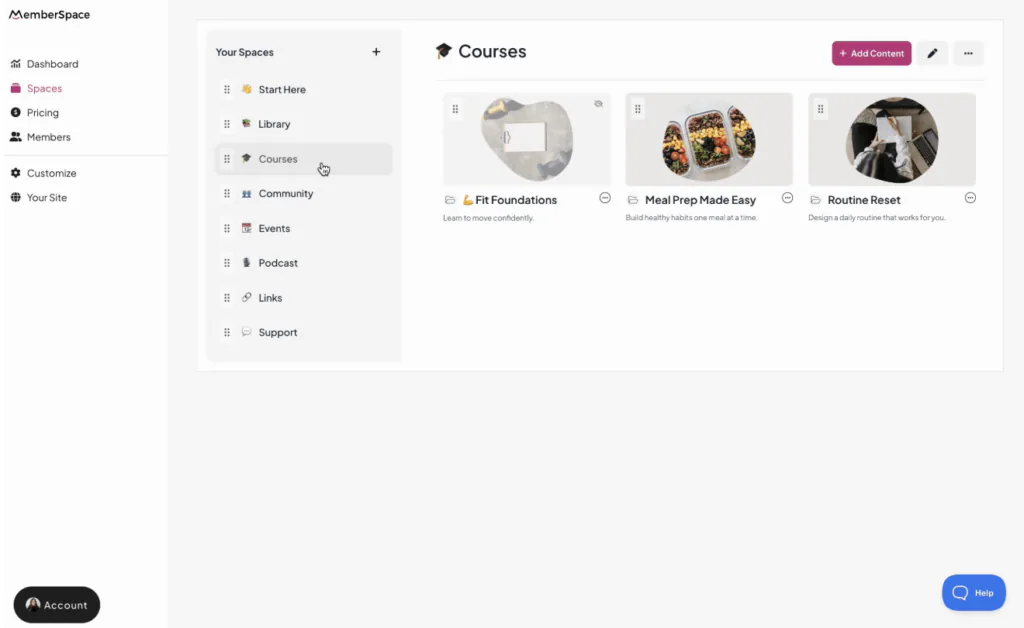
squarespace subscription products with memberspace
MemberSpace allows you to sell any kind of subscription products on your Squarespace website.

Content dripping is another major difference. If you’re delivering structured learning or onboarding sequences, you can release lessons over time automatically. This improves the learning experience and helps prevent members from consuming everything in one week and canceling.

Retention is where sustainable subscription businesses are built.

MemberSpace includes tools like:

  • Failed payment notifications
  • Cancellation alternatives
  • Abandoned signup reminders
  • Plan expirations
  • Automatic upsells
  • Ability to add conversation to your content with comments and reactions

These features help reduce churn and protect recurring revenue. In a subscription model, keeping members engaged is just as important as acquiring them.

MemberSpace also integrates with platforms like Zapier and popular email marketing tools, making automation easier as your business grows.

If recurring revenue is your strategy, your infrastructure needs to support that strategy.

FAQ About Squarespace Subscription Products

Can you sell subscription products on Squarespace?

Yes. Squarespace allows you to sell recurring access through its Member Sites feature. For more advanced pricing structures and membership flexibility, many creators use MemberSpace alongside Squarespace.

What are examples of Squarespace subscription products?

Examples include content libraries, online course memberships, paid communities, premium newsletters, and structured programs that release content over time.

Does Squarespace support free trials?

No. Squarespace’s native Member Sites feature does not support free trials. If free trials are part of your strategy, you’ll need a tool like MemberSpace.

What’s the difference between Squarespace Member Areas and MemberSpace?

Squarespace Member Areas offers basic gated content and recurring billing. MemberSpace adds flexibility, including:

  • Free trials
  • Flexible billing options
  • Dripped content
  • Cleaner multi-tier management
  • Built-in retention tools
  • Integrations with other platforms

Can I switch to MemberSpace without rebuilding my site?

Yes. MemberSpace works with your existing Squarespace website, so you don’t need to redesign or migrate your content.

Final Thoughts

Subscription products aren’t just about charging monthly.

They’re about building something ongoing — a space your audience trusts, a system they rely on, and a relationship that deepens over time.

Squarespace gives you a starting point. For some businesses, that simplicity is enough.

But if your goal is to build real recurring revenue — with flexible pricing, structured content delivery, and tools that help reduce churn — your setup matters.

Because in a subscription business, what happens after someone signs up is what determines whether you truly scale.

Sell subscription products on Squarespace!

The easiest way to accept membership payments or one-time charges for digital products like online courses, communities, content libraries, and more — all from your own website!

Get started for free! 5 minutes to set up.