

10 Squarespace Subscription Business Ideas
If you’re not sure what to sell yet, start here. These are some of the most popular (and profitable) subscription models you can run on Squarespace.
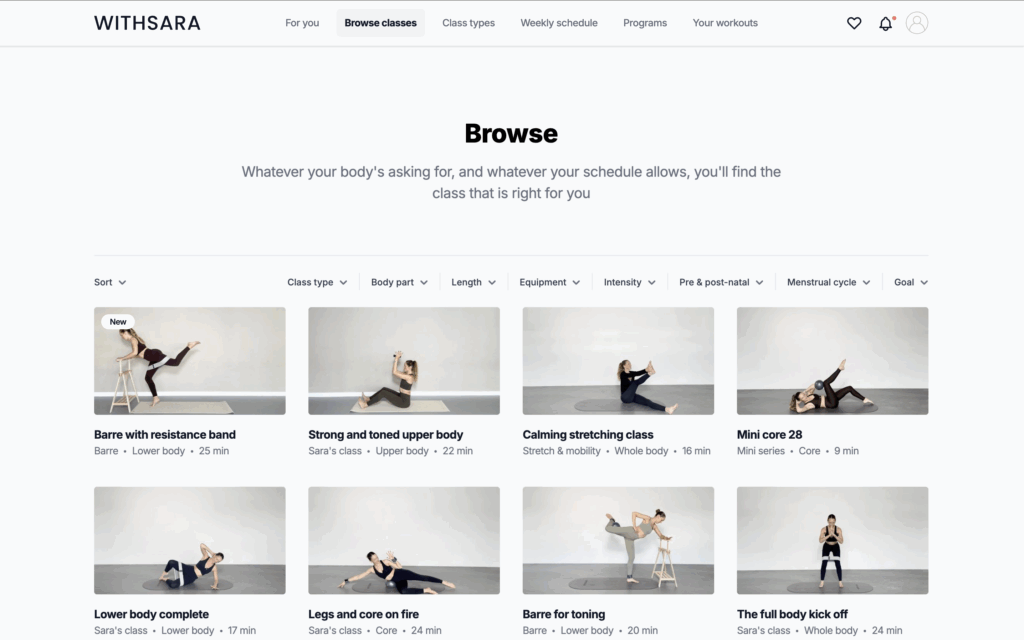
1. Content Library Membership
This is one of the most common (and scalable) subscription models.
You create a centralized hub of valuable content—like tutorials, templates, recordings, or guides—that members can access anytime. The key here is volume and organization. The more helpful content you add over time, the more valuable your membership becomes.
This works especially well if you’re consistently creating content already and want to package it into a paid resource.
2. Online Course Subscription
Instead of selling a course as a one-time purchase, you turn it into an ongoing experience.
Members don’t just get access to one course—they get continuous learning. That might include new lessons, updated modules, or an expanding library of courses over time.
This model works well if you plan to keep teaching and adding content regularly, rather than creating something once and moving on.
3. Paid Community
If your audience values connection just as much as content, a paid community can be a strong subscription model.
You’re not just selling information—you’re creating a space where members can interact, ask questions, and learn from each other. That could be through a private forum, Slack group, Discord server, or even gated pages on your site.
In many cases, the community itself becomes the main reason people stay subscribed.
4. Coaching Membership
Coaching memberships are a great option if you want to move away from one-off coaching sessions and create more predictable income.
Instead of selling individual calls, you offer ongoing access—like monthly group calls, office hours, or structured support. You can also include resources, templates, or training alongside the coaching.
It’s a more scalable way to deliver personalized value without trading time for money one client at a time.
5. Premium Newsletter
A paid newsletter is one of the simplest ways to start a subscription business.
You’re delivering exclusive insights, ideas, or curated content directly to your subscribers on a regular basis. This works especially well if you already enjoy writing or sharing opinions and insights.
It’s low overhead, easy to maintain, and a great entry point if you’re just getting started.
6. Template or Resource Membership
If you create assets—like templates, swipe files, or frameworks—you can turn them into a recurring subscription.
Instead of selling individual downloads, members get ongoing access to your entire library, plus any new resources you release. This encourages people to stay subscribed over time rather than making a one-time purchase.
This model works especially well for designers, marketers, and creators who are constantly producing new materials.
7. Fitness or Wellness Membership
Fitness and wellness subscriptions are a natural fit for recurring revenue.
You can offer workout programs, guided routines, meal plans, or wellness resources that members follow over time. Some creators also combine on-demand content with live sessions or challenges to keep members engaged.
The ongoing nature of fitness goals makes this one of the stickiest subscription models.
8. Niche Education Hub
Instead of broad content, you focus on a very specific topic or audience.
This could be anything from real estate investing to UX design to freelance writing. The more targeted your niche, the more valuable your content feels to the right people.
Over time, this can evolve into a go-to resource in your industry, especially if you consistently add new insights and training.
9. Creator Membership
If you already have an audience, this is a great way to monetize it.
You can offer exclusive content like behind-the-scenes updates, bonus material, early access to new work, or deeper dives into your process. It gives your biggest fans a way to support you while getting extra value.
This model works well for YouTubers, writers, podcasters, and other content creators.
10. Tool or Asset Subscription
This model is all about ongoing utility.
Instead of content, you’re giving members access to something they use regularly—like datasets, tools, dashboards, or curated resources. The value comes from consistency and convenience.
If your product solves an ongoing problem, this type of subscription can be very sticky and high-retention.
How to Set Up a Squarespace Subscription Business
The best way to run a subscription business on Squarespace is by using a setup that gives you flexibility as you grow—not just something that works on day one.
Member Sites vs MemberSpace
If you’re building a subscription business on Squarespace, it’s tempting to use their built-in Member Sites feature since it’s already part of the platform.
And to be fair—it works fine for simple setups. But most subscription businesses don’t stay simple for long.
As soon as you start thinking about things like offering multiple tiers, improving conversions, or increasing revenue per member, the limitations start to show.
For example:
- You can’t easily sell the same content across multiple tiers without duplicating pages
- There’s no built-in way to offer free trials, which can significantly impact conversions
- Pricing changes typically only apply to new members—not your existing subscribers
- Billing options are limited, making it harder to experiment with different pricing strategies
- There are no built-in tools to recover abandoned signups or reduce churn
These aren’t just small feature gaps—they directly affect how much you can grow your subscription business.
That’s why many business owners use MemberSpace alongside Squarespace instead.
It gives you the flexibility to structure your subscriptions the way you want—whether that’s tiered access, free trials, flexible pricing, or a smoother signup experience—all without needing to rebuild your site.
Once you have the right setup in place, here’s how to build your subscription business step-by-step.
Step 1: Install MemberSpace on Your Squarespace Site
Start by creating a MemberSpace account and selecting “Use my existing website.”
Then choose Squarespace, enter your site URL, copy your MemberSpace code snippet, and paste it into the header section of your site.
Once installed, MemberSpace is connected to your site and ready to manage subscriptions and member access.

Step 2: Add Your Subscription Products
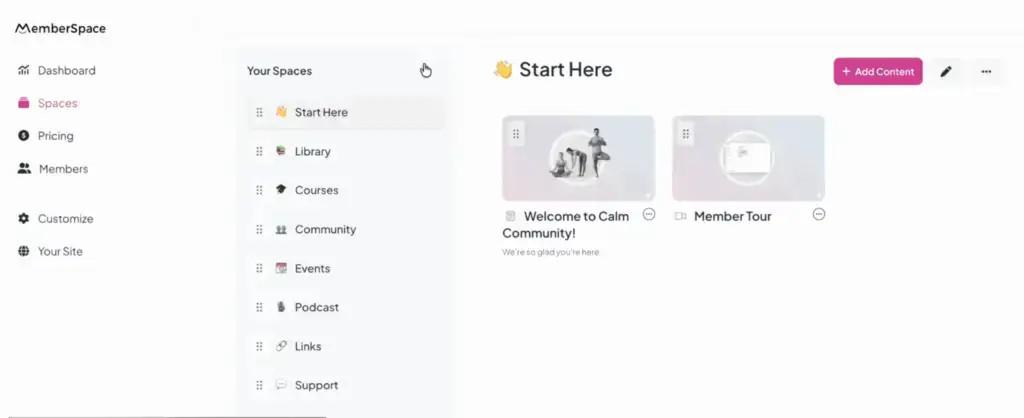
Next, create your first Space inside MemberSpace.
A Space is where your members-only content lives. This could include course lessons, resource libraries, private pages, or community content.
You can create multiple Spaces depending on what you’re offering, keeping everything organized and flexible.
Step 3: Set Up Your Subscription Pricing
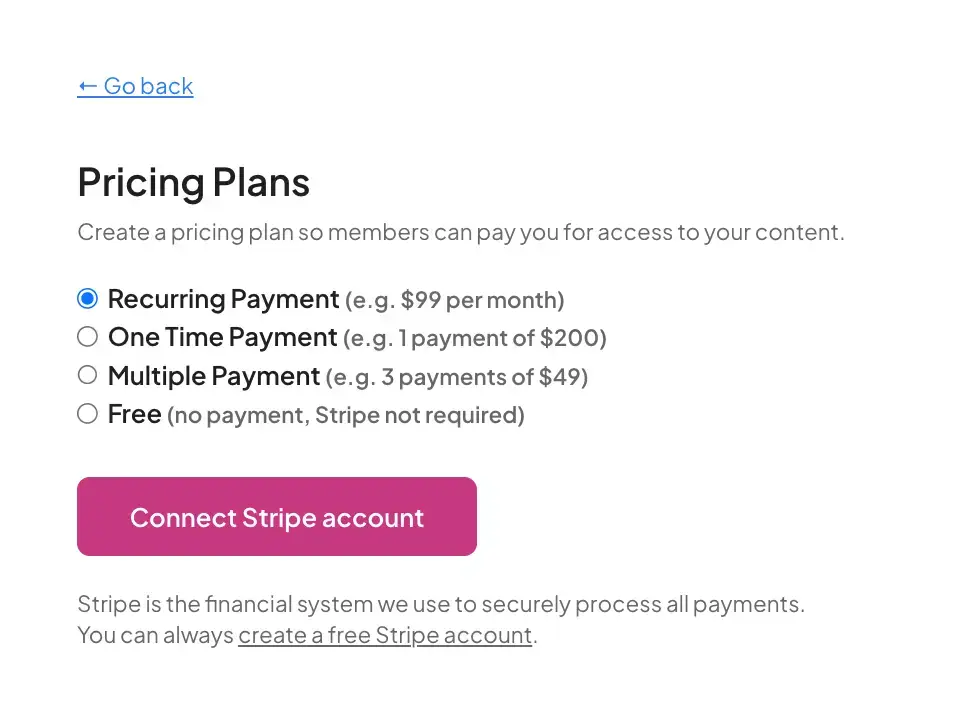
Now create your pricing plans.
Go to Pricing → Add a Plan and set up your tiers (free, standard, premium).
Each plan can unlock different Spaces, allowing you to bundle content, offer upgrades, and increase revenue per member.
You can also add monthly or yearly billing, free trials, and discounts. This is where your subscription business model really comes together.
Step 4: Match Your Branding
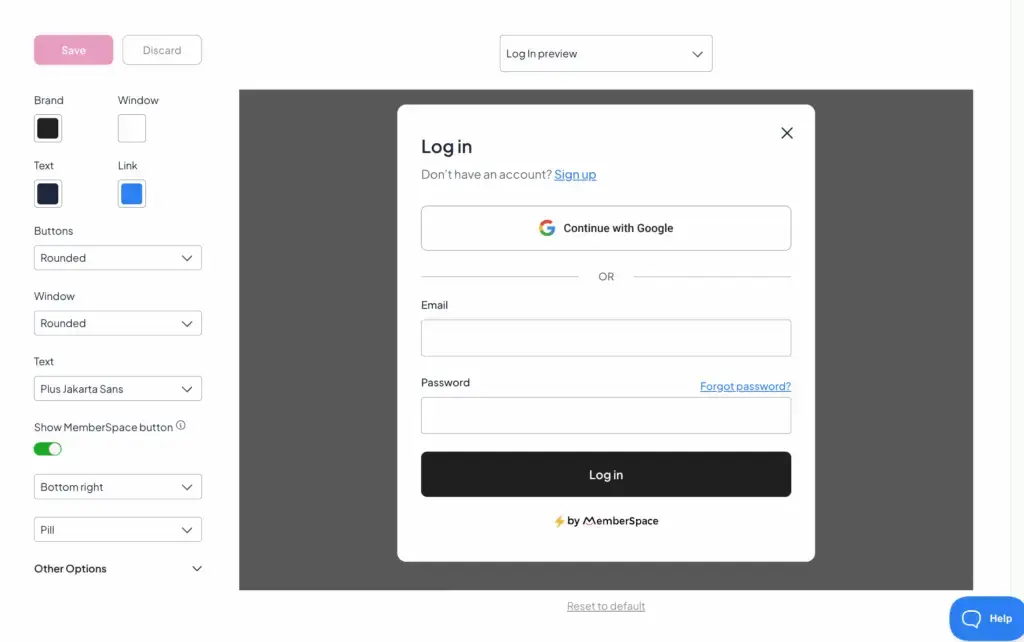
Customize your signup forms, login experience, and buttons so everything matches your website.
This creates a seamless experience and builds trust with potential members.
Step 5: Add Your Signup Links to CTA Buttons
Finally, connect your signup links to your website.
Add CTA buttons like “Join Now,” “Start Your Free Trial,” or “Get Access.”
Place them on your homepage, sales pages, navigation, and content previews.
This is what turns visitors into paying subscribers.
Final Thoughts
Squarespace is a great place to build your website. But your subscription setup is what determines how far your business can grow.
Choosing the right structure—and the right tools—early on makes everything easier as you scale.
FAQ
Can you run a subscription business on Squarespace?
Yes, you can run a subscription business on Squarespace by combining your site with a membership tool that manages subscriptions and access.
What can I sell as a subscription on Squarespace?
You can sell content libraries, courses, communities, coaching programs, newsletters, and digital resources.
Does Squarespace support free trials?
No, Squarespace’s native tools don’t offer built-in free trials.
Can I create multiple membership tiers on Squarespace?
Yes, but it’s much easier to manage tiers using a dedicated membership platform.
Can I change pricing for existing members on Squarespace?
Not easily. Most native setups only apply pricing changes to new members.
Do I need to rebuild my site to use MemberSpace?
No, MemberSpace works directly with your existing Squarespace site.
